
Install
- Make
- Aston Martin
- Model
- V8 Vantage Factory Workshop Manual
- Year
- 2005–2010
- Section
- Steering Column Switches › Install
11 SteeringInstall
- Remove the electrical connector (1) from the rotary
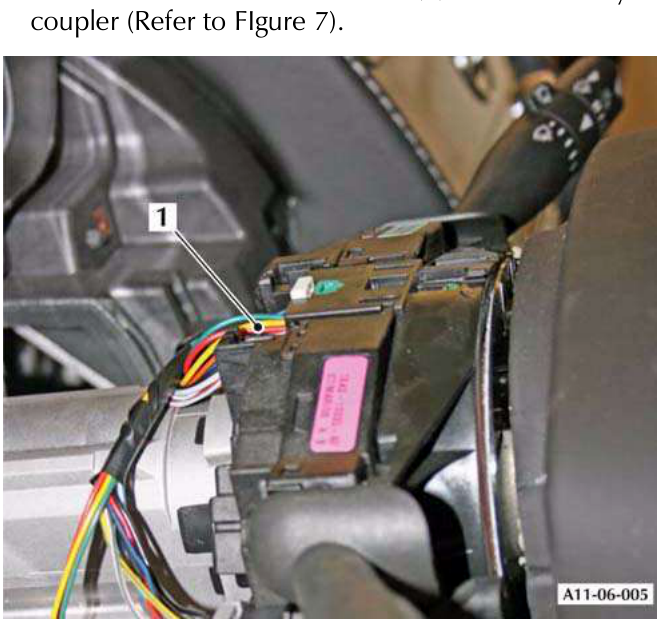
Figure 7
- Release the two clips that attach the rotary coupler to
the steering column and remove the rotary coupler.
Install
- Put tape on the rotary coupler to hold it in its central position.
- Push the rotary coupler onto the steering column until the two clips engage.
- Install the electrical connector (1) for the rotary coupler.
- Install the column switches into the rotary coupler.
- Connect the electrical connectors for the column switches.
- Put the load-spread plate in position on the steering column.
- Install the screw that attaches the load-spread plate.
- If a rotary coupler is to be installed that is not new, remove the tape used to hold it in its central position.
- For a new rotary coupler, remove the locking key.
- Install the top and bottom steering column shrouds (Refer to 'Top and Bottom Shrouds for the Steering Column - Remove and Install', page 11-4-4).
- Put the electrical cables from the rotary coupler through the steering wheel.
Align the steering wheel and the rack to the centre position during assembly. If you do not, the rotary coupling can be damaged. Also, it can be difficult to align the steering wheel in the straight-ahead position.
- 12. Align and install the steering wheel assembly.
- 13. Install and torque the M10 screw that attaches the steering wheel (Refer to 'Specifications', page 11-6-1).
- 14. Connect the electrical connector for the steering wheel harness.
- 15. Connect the two electrical cables to the airbag module.
- 16. Put the airbag module in position.
- Turn the steering wheel to get access to install one of the two airbag module M6 attachment screws.
- 18. Install the first M6 attachment screw.
- 19. Turn the steering wheel to get access to install the second airbag module M6 attachment screw.
- 20. Install the second M6 attachment screw.
- 21. Connect the vehicle battery.
Wiper Switch for the Steering Column - Remove and Install
| Repair Operation Time (ROT) | |
|---|---|
| Item | Code |
| Wiper Switch for the Steering Column - Remove and Install | 11.06.EL |
Remove
- Remove the top shroud from the steering column (Refer to 'Top Shroud for the Steering Column - Remove and Install', page 11-4-1).
- Release the clips that attach the wiper switch to its mounting.
- Release the wiper switch from its mounting.
- Disconnect the electrical connector for the wiper switch.
- Remove the wiper switch.
Install
- Connect the electrical connector to the wiper switch.
- Install the wiper switch in the mounting.
- Make sure that the clips that attach the switch are correctly engaged.
- Install the top shroud to the steering column (Refer to 'Top Shroud for the Steering Column - Remove and Install', page 11-4-1).
Parts & tools for this job For 2005 Aston Martin V8 Vantage
- TOOLTie rod end toolSearch: tie rod end puller
- TOOLBall joint separatorSearch: ball joint separator
- FLUIDPower steering fluidSearch: Aston Martin power steering fluid
Links open Amazon search results in a new tab. As an Amazon Associate I earn from qualifying purchases.