
Battery System: Specifications
- Make
- Aston Martin
- Model
- V8 Vantage Factory Workshop Manual
- Year
- 2005–2010
- Section
- Battery System › Specifications
14 Power supplySpecifications
Specifications
| Torque Figures | ||
|---|---|---|
| Description | Nm. | lb. / ft. |
| Battery clamp | 9 | 7 |
| Battery Terminals | 9 | 7 |
Maintenance
Battery Disconnect Switch-Renew
| Repair Operation Time (ROT) | |
|---|---|
| Item | Code |
| Switch Battery Disconnect-Renew | 14.01.CJ |
Removal
- Power RH seat fully forward.
- Remove rear compartment cover.
Warning
To prevent damage to electrical components, always disconnect the vehicle battery when working on the vehicle's electrical system. The earth lead (- ve) must be disconnected first and reconnected last.
- Disconnect vehicle battery.
- Remove panel assembly - quarter trim middle - RH (see Workshop Manual procedure 01.05.CL Panel Assembly - Quarter Trim Middle Section - RH - Renew).
- Release rear carpet studs (x2), move carpet aside.
- Remove screws (x2), battery compartment cover to support rail.
- Remove nuts (x2), RH rear heel board to body. Remove heel board.
- Remove nuts/washers (x2), securing battery cables to battery disconnect switch (see Fig. 1).
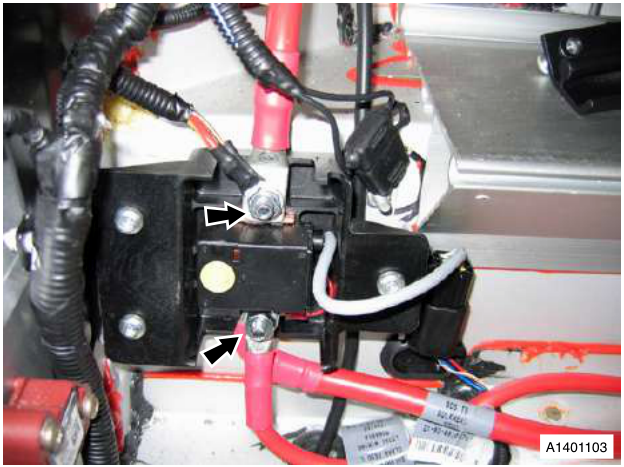
Fig. 1
- Release battery cables (x4) from battery disconnect switch. Note fitted position of spacer washer between RH battery cables.
- Remove Torx screws (x3), securing battery disconnect switch to mounting bracket.
- Release multiplug from bracket, disconnect multiplug, remove battery disconnect switch.
- Remove battery cable bolts from battery disconnect switch.
Installation
- Install battery cable bolts in disconnect switch.
- Position battery disconnect switch, connect multiplug, install multiplug on bracket.
- Install and torque tighten Torx screws (x3).
- Install battery cables (x4), install washers (x2), install and torque tighten nuts (x2).
- Install RH rear heel board, install and tighten screws (x2) and nuts (x2).
- Position rear carpet, install on studs (x2).
Warning
Always connect the earth (- ve) terminal last.
- Connect vehicle battery.
- Install panel assembly - quarter trim middle - RH (see Workshop Manual procedure 01.05.CL Panel Assembly - Quarter Trim Middle Section - RH - Renew).
- Install rear compartment cover.
- Power RH seat to original position.
Battery Conditioner-Renew
| Repair Operation Time (ROT) | |
|---|---|
| Item | Code |
| Battery Conditioner-Renew | 14.01.DL |
Removal
Warning
To prevent damage to electrical components, always disconnect the vehicle battery when working on the vehicle's electrical system. The earth lead (- ve) must be disconnected first and reconnected last.
- Disconnect vehicle battery.
- Remove carpet - RH side luggage compartment (see Workshop Manual procedure 01.05.FB Carpet Assembly - Luggage Compartment - Side - RH - Renew).
- Remove tyre sealant bottle.
- Remove mobility kit from storage rack.
- Remove bolt, loosen nuts (x2), power socket bracket.
- Slide luggage compartment fusebox rearwards, release from mounting bracket.
- Release terminal cover, remove nut securing main battery lead to fusebox.
- Release harness clips (x2) from power socket bracket.
Parts & tools for this job For 2005 Aston Martin V8 Vantage
- TOOLBattery testerSearch: car battery tester
- TOOLDigital multimeterSearch: automotive digital multimeter
- TOOLBattery terminal cleanerSearch: battery terminal cleaner
Links open Amazon search results in a new tab. As an Amazon Associate I earn from qualifying purchases.