
Maintenance
- Make
- Aston Martin
- Model
- V8 Vantage Factory Workshop Manual
- Year
- 2005–2010
- Section
- Audio System › Maintenance
15 Vehicle entertainmentMaintenance
Maintenance
Power Amplifier-Renew
| Repair Operation Time (ROT) | |
|---|---|
| Item | Code |
| Power Amplifier-Renew | 15.01.AB |
Removal
- Battery isolation switch ‘OFF’.
- Remove RH luggage compartment carpet (see Workshop Manual procedure 01.05.FB Carpet Assembly - Luggage Compartment - Side - RH - Renew).
- Remove RH rear upper pillar panel assembly (see Workshop Manual procedure 01.05.BF Panel Assembly - Rear Pillar - Upper - RH - Renew).
- Remove bolt (x1) and nuts (x2) from power socket bracket to body (see Fig. 1).
- Release power socket bracket and position aside.
- Remove Torx screws (x6) from amplifier bracket to body (see Fig. 2).
- Release clip securing lamp harness to amplifier bracket.
- Disconnect harness to luggage compartment lamp and remove lamp assembly.
- Release power amplifier bracket from body and disconnect harness multiplugs (x3).
- Remove amplifier and bracket assembly.
- Disconnect multiplugs (x3) from amplifier to audio harness.
- Remove nuts and bolts (x4) that secure power amplifier to mounting plate and remove amplifier (see Fig. 3).
- Collect spacers between amplifier and mounting plate (see Fig. 4).
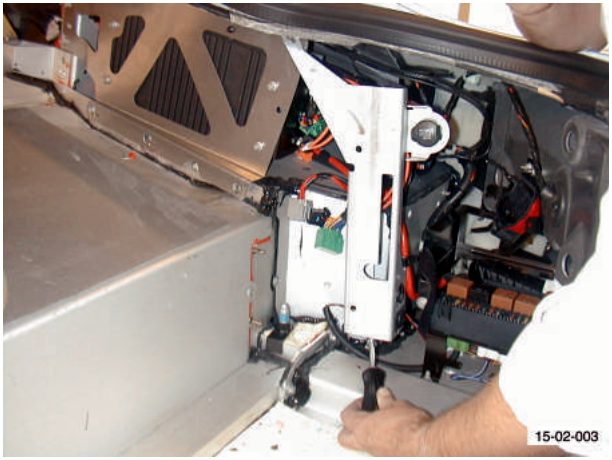
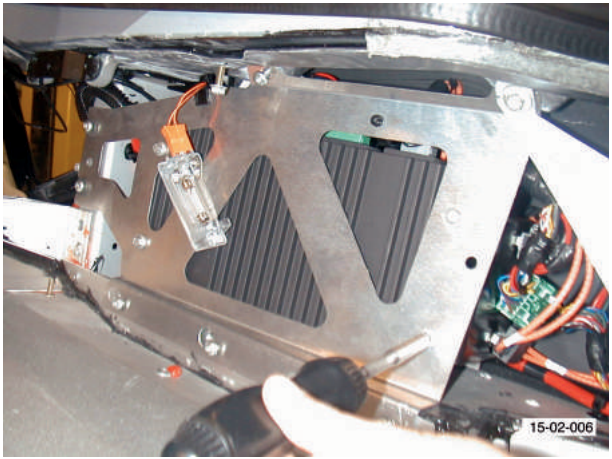
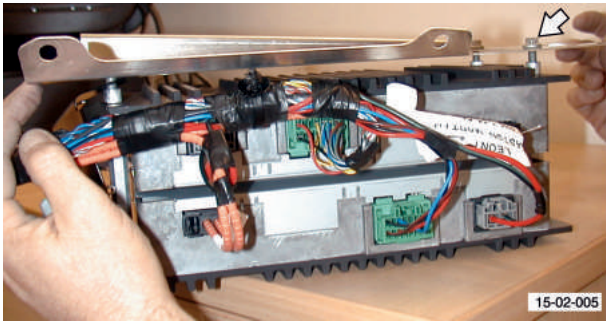
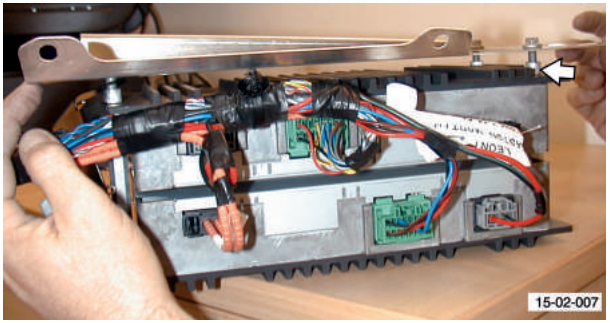
Installation
- Position amplifier and spacers to mounting plate.
- Install nuts and bolt amplifier to mounting plate.
- Connect multiplugs (x3) from amplifier to audio harness.
- Position amplifier and bracket assembly to body and connect multiplugs (x3).
- Secure luggage compartment lamp harness and connect and install lamp assembly.
- Install Torx screws (x6) from amplifier bracket to body.
- Position power socket bracket to body and install bolt (x1) and nuts (x2).
- Install RH rear upper pillar panel assembly (see Workshop Manual procedure 01.05.BF Panel Assembly - Rear Pillar - Upper - RH - Renew).
- Install RH luggage compartment carpet (see Workshop Manual procedures 01.05.FB Carpet Assembly - Luggage Compartment - Side - RH - Renew).
- Battery isolation switch ‘ON’.
Parts & tools for this job For 2005 Aston Martin V8 Vantage
- PARTOil filterSearch: Aston Martin V8 Vantage 2005 oil filter
- TOOLOil filter wrenchSearch: oil filter wrench
- FLUIDEngine oilSearch: Aston Martin V8 Vantage engine oil
Links open Amazon search results in a new tab. As an Amazon Associate I earn from qualifying purchases.