audi Workshop Repair Guides

Audi Workshop Service and Repair Manuals

Removing and installing clutch pedal > < Exploded view - pedal cluster
Removing and installing over-centre spring
Special tools and workshop equipment required
   
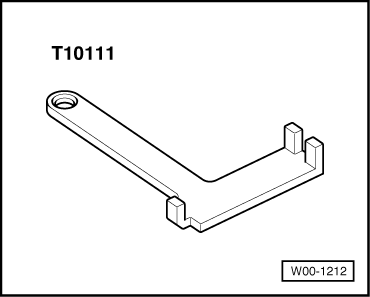
t  Assembly clip -T10111-
Removing
–  Remove driver's storage compartment (bottom left) → Rep. Gr.68.
  W00-1212
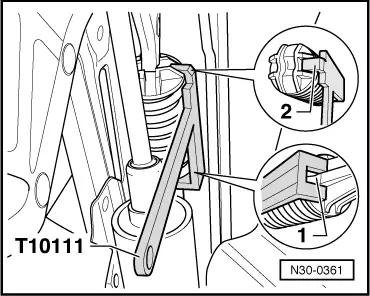
–  Fit assembly clip -T10111- from the right onto over-centre spring.
–  Ensure that assembly clip -T10111- is correctly seated on over-centre spring:
1 - The assembly clip -T10111- must be positioned on the rear part of the over-centre spring so that the claws fit exactly over the rib -1-.
2 - Lightly depress clutch pedal towards bulkhead. Engage the lug -2- of the assembly clip -T10111- into the cut-out on the over-centre spring.
–  Now depress the clutch pedal towards the bulkhead until the over-centre spring can be removed downwards from its retainers on the mounting bracket and clutch pedal.
–  Return clutch pedal to normal position.
  N30-0361
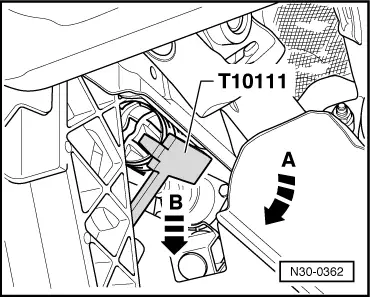
–  Turn over-centre spring together with assembly clip -T10111- in direction of -arrow A- and take out downwards in direction of -arrow B-.
Installing
–  Pull clutch pedal into the passenger compartment.
  N30-0362
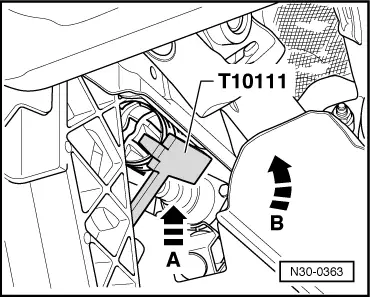
–  Insert over-centre spring together with assembly clip -T10111- upwards (in direction of -arrow A-) into mounting bracket and then turn in direction of -arrow B-.
  N30-0363
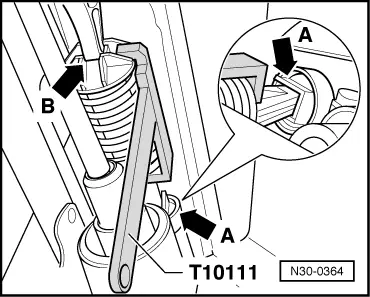
–  Insert over-centre spring into rear mounting first -arrow A-.
–  Press clutch pedal towards bulkhead until over-centre spring seats on mounting lug -arrow B- on clutch pedal.
–  Return clutch pedal to normal position and remove assembly clip.
–  Install driver's storage compartment (bottom left) → Rep. Gr.68.
  N30-0364

Removing and installing clutch pedal > < Exploded view - pedal cluster