
Removing and installing bumper aerials - Saloon, Cabriolet
- Make
- Audi
- Model
- A3 Mk3
- Year
- 2012–2020
- Section
- Aerial systems › Removing and installing bumper aerials - Saloon, Cabriolet
Electrical: CommunicationRemoving and installing bumper aerials - Saloon, Cabriolet
Removing and installing bumper aerials - Saloon, Cabriolet
LTE aerial 1 R297 is located on left side and LTE aerial 2 R306 on right side beneath rear bumper cover on body.
The removal and installation procedures described refer to LTE aerial 1 R297; the procedures are basically the same for LTE aerial 2 R306.
Switch off ignition and all electrical equipment and remove ignition key.
Remove rear bumper cover General body repairs, exteriorRep. gr.63Bumper (rear); Removing and installing bumper cover.
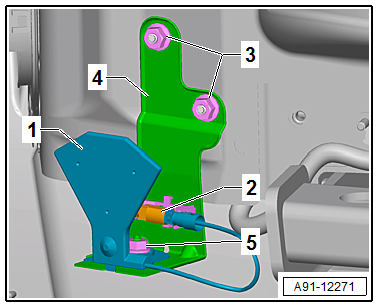
Release and unplug connector (2) for LTE aerial 1 R297(1).
Note
- Depending on the version of the LTE aerial 1 R297 fitted, the connector (2) may be located directly at the aerial (1).
Unscrew nut (5) for LTE aerial 1 R297(1).
Detach LTE aerial 1 R297(1) from bracket (4).
Remove nuts (3) for bracket (4).
Detach bracket (4) from body.
Install in reverse sequence of removal.
- Chapter“Overview of fitting locations - aerial systems, Saloon”
- Chapter“Overview of fitting locations - aerial systems, Cabriolet”
Parts & tools for this job For 2012 Audi A3
- TOOLTrim removal tool kitSearch: trim removal tool kit
- PARTTouch-up paintSearch: Audi touch up paint
- PARTPanel clip assortmentSearch: Audi panel clips assortment
As an Amazon Associate we earn from qualifying purchases.