
Removing and installing traffic data aerial
- Make
- Audi
- Model
- A3 Mk3
- Year
- 2012–2020
- Section
- Aerial systems › Removing and installing traffic data aerial
‹ Prev Removing and installing satellite tuner aerial - CabrioletNext › Removing and installing dedicated short-range communication aerial
Electrical: CommunicationRemoving and installing traffic data aerial
Removing and installing traffic data aerial
Traffic data aerial R173 is located on windscreen (top left).
Switch off ignition and all electrical equipment and remove ignition key.
The electrical connectors for the traffic data aerial R173 are located behind the front interior light W1.
Remove front interior light W1Electrical systemRep. gr.96Lights; Overview of fitting locations - lights in roof trim.
Release and unplug connector (3).
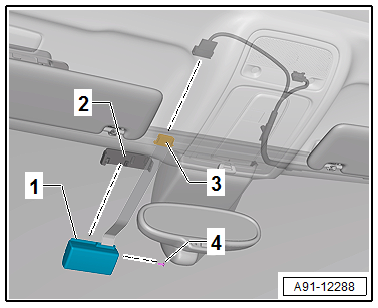
Traffic data aerial R173(1) is secured in bracket (2) by a locking element (4). Bracket (2) is bonded to windscreen.
Use small screwdriver to pull out locking element (4).
Pull traffic data aerial R173(1) out of bracket (2) and remove.
Install in reverse sequence of removal.
‹ Prev Removing and installing satellite tuner aerial - CabrioletNext › Removing and installing dedicated short-range communication aerial
Parts & tools for this job For 2012 Audi A3
- TOOLDigital multimeterSearch: automotive digital multimeter
- PARTAssorted fuse kitSearch: car fuse assortment kit
- TOOLWire crimper and connector kitSearch: wire crimper connector kit
As an Amazon Associate we earn from qualifying purchases.