audi Workshop Repair Guides

Audi Workshop Service and Repair Manuals

Removing and installing loudspeaker trim (side) > < Removing and installing cover for MMI screen - up to model year 2011
Removing and installing cover for MMI screen - from model year 2012 onwards
Special tools and workshop equipment required
   
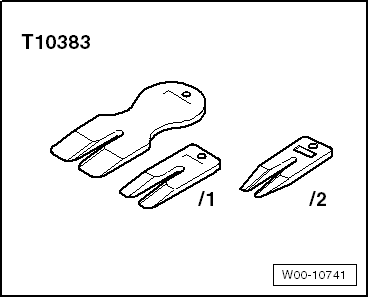
t  Wedges -T10383-
  W00-10741
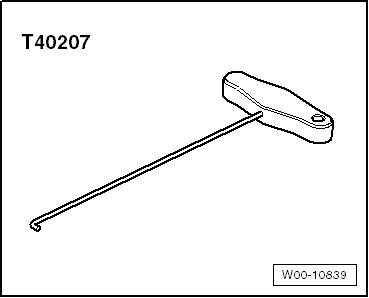
t  Hook -T40207-
  W00-10839
Removing
–  Move steering wheel down and to rear as far as possible, using full range of steering column adjuster.
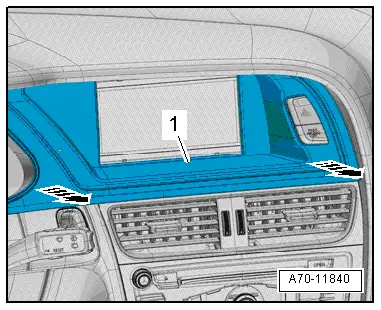
–  Unclip cover -1- for MMI screen from dash panel at bottom -arrows- using wedge -T10383-.
  A70-11840
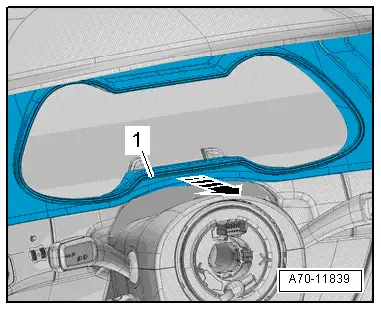
–  Carefully unclip cover -1- for MMI screen from instrument cluster at bottom -arrow- using wedge -T10383-.
  A70-11839
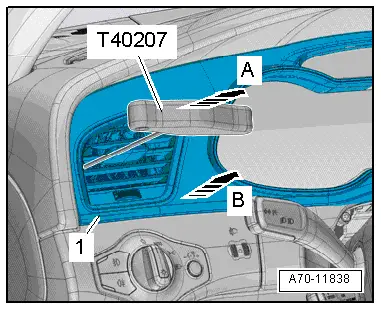
–  Unclip cover -1- for MMI screen from dash panel at bottom -arrow B- using wedge -T10383-.
  Note
A hole is provided on both sides of the vent for engaging the hook -T40207-.
–  Carefully insert hook -T40207- between louvres and engage at side of vent.
–  Carefully disengage vent at sides -arrow A-.
  A70-11838
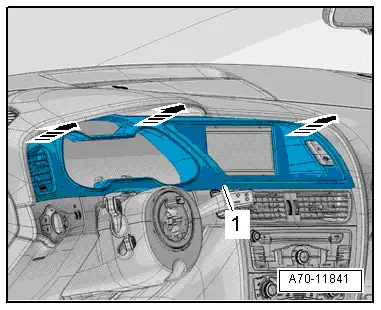
–  Carefully unclip cover -1- for MMI screen from dash panel at top -arrows-.
–  Unplug electrical connector at dash panel vent.
–  Unplug electrical connector for warning lamp for airbag deactivated on front passenger side -K145- / hazard warning lights button -E229- and detach cover for MMI screen.
Installing
Installation is carried out in the reverse order; note the following:
  Note
Check retaining clips for damage or deformation and renew if necessary.
–  Press on cover for MMI screen until it engages audibly.
  A70-11841

Removing and installing loudspeaker trim (side) > < Removing and installing cover for MMI screen - up to model year 2011