audi Workshop Repair Guides

Audi Workshop Service and Repair Manuals

Removing and installing retaining frame for instrument cluster > < Removing and installing mounting frame for radio/navigation system
Removing and installing trim for entry and start authorisation switchE415
Removing and installing trim for entry and start authorisation switch -E415-
Special tools and workshop equipment required
   
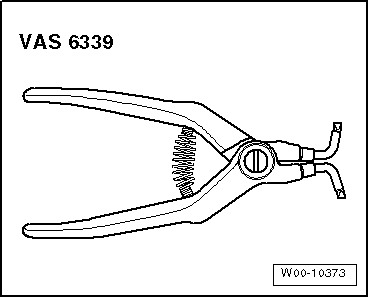
t  Ignition lock removal pliers -VAS 6339-
  W00-10373
Removing
–  Remove cover for MMI screen:
t  → Chapter „Removing and installing cover for MMI screen - up to model year 2011“.
t  → Chapter „Removing and installing cover for MMI screen - from model year 2012 onwards“.
–  Unclip trim cover for instrument cluster from dash panel → Chapter.
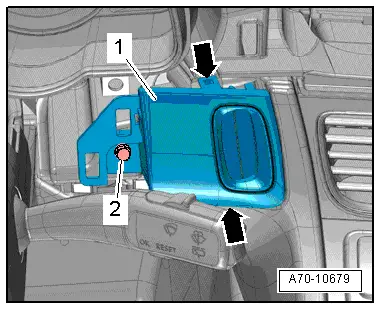
–  Unscrew bolt -2- for trim -1-.
  A70-10679
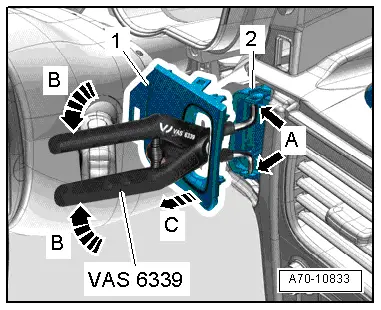
–  Insert ignition lock removal pliers -VAS 6339- through flaps in trim.
–  Apply tips of ignition lock removal pliers -VAS 6339- at two holes -arrows A- of entry and start authorisation switch -E415--2-.
–  Compress handles of ignition lock removal pliers -VAS 6339--arrows B-, causing tips of pliers to spread apart and release lugs on trim.
–  Hold handles of ignition lock removal pliers -VAS 6339- compressed with one hand and pull off trim -1- with other hand -arrow C-.
  Note
Use ignition lock removal pliers -VAS 6339- only to release; pull off trim by hand.
Installing
Install in reverse order of removal.
Tightening torque → Chapter
  A70-10833

Removing and installing retaining frame for instrument cluster > < Removing and installing mounting frame for radio/navigation system