audi Workshop Repair Guides

Audi Workshop Service and Repair Manuals

Removing and installing mounting frame for radio/navigation system > < Removing and installing loudspeaker trim (centre)
Removing and installing trim for light switch
   
Removing
–  Remove dash panel end trim (driver side) → Chapter.
–  Remove dash panel cover (driver side) → Chapter.
–  From model year 2012 onwards: Remove cover for MMI screen → Chapter.
–  Unclip trim cover for instrument cluster from dash panel → Chapter.
–  Remove light switch → Electrical system; Rep. gr.96.
–  Equipment version with headlight range control: Remove headlight range control regulator -E102- → Electrical system; Rep. gr.96.
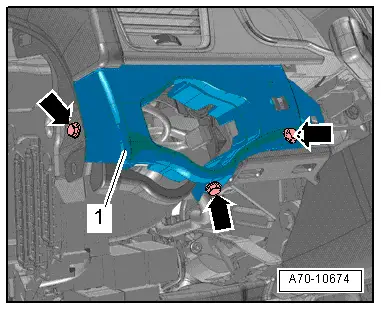
–  Remove bolts -arrows- and detach trim for light switch -1-.
Installing
Install in reverse order of removal.
Tightening torque → Chapter
  A70-10674

Removing and installing mounting frame for radio/navigation system > < Removing and installing loudspeaker trim (centre)