| –
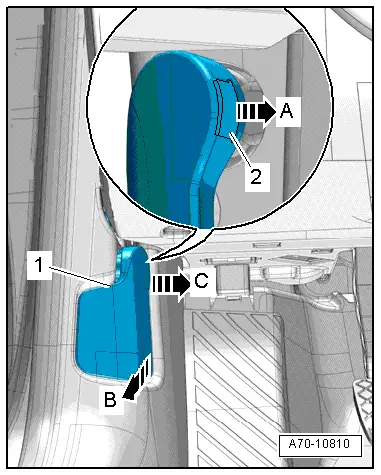
| Use a small screwdriver to pull securing clip -2- slightly out of operating lever -1--arrow A-. |
| –
| Pull operating lever to rear -arrow B- (this releases the bonnet) and hold in this position. |

Caution | If operating lever is pulled out at an angle, mounting could be damaged. |
|
| –
| At the same time, detach operating lever from its mounting towards centre of vehicle, taking care to keep it absolutely horizontal -arrow C-. |
| Installation is carried out in the reverse order; note the following: |
| –
| Fully insert clip into operating lever. |
| –
| Press operating lever onto mounting in mounting bracket and engage. |
|
|
|
