Audi Workshop Service and Repair Manuals
HOME
FEATURES
MENU
INDEX
ABOUT US
Detaching drive plate with overload safeguard/attaching >
< Unfastening and tightening air conditioner compressor drive shaft
A4 Mk3
Heating, ventilation, air conditioning system
Air conditioning / Air conditioner
Removing and installing air conditioner compressor
Removing and installing air conditioner compressor drive shaft
Removing and installing air conditioner compressor drive shaft
Removing and installing air conditioner compressor drive shaft
Removing drive shaft
–
Remove the air conditioner compressor
→ Chapter „Removing and installing air conditioner compressor (vehicles with 8-cyl. FSI engine) “
.
–
Detach the socket
-A-
.
–
Pull the drive shaft
-B-
out of the splines of the drive gear
-C-
.
Note
The socket
-A-
is currently secured in position at the flange of the drive gear
-C-
with a clamp to stop it slipping.
Installing drive shaft
Install in reverse order, paying attention to the following:
–
Check the drive shaft
-B-
. The splines must not exhibit signs of wear and must engage snugly in the splines of the drive gear
-C-
.
–
Prior to insertion, coat the splines of the drive shaft
-B-
e.g. with grease -G 000 100-
→ Electronic parts catalogue
.
–
Before fitting the air conditioner compressor, insert the drive shaft
-B-
and slide it home in the drive gear
-C-
.
–
After fitting the air conditioner compressor, check the installation position of the socket
-A-
.
Note
The socket
-A-
is secured in position at the power take-off flange with a clamp to stop it slipping
→ Engine, mechanics; Rep. gr.15
and
→ Electronic parts catalogue
.
Heating, ventilation, air conditioning system
Air conditioning / Air conditioner
Removing and installing air conditioner compressor
Removing and installing air conditioner compressor drive shaft
Detaching drive plate with overload safeguard/attaching >
< Unfastening and tightening air conditioner compressor drive shaft
 Note
Note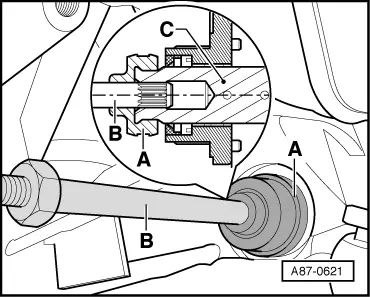 Note
Note
 Note
Note
Note
Note