
Removing and installing electromechanical parking brake button E538/auto-hold button E540 - manual gearbox
- Make
- Audi
- Model
- A4 Mk4
- Year
- 2015–2023
- Section
- Controls › Removing and installing electromechanical parking brake button E538/auto-hold button E540 - manual gearbox
‹ Prev Removing and installing electromechanical parking brake button E538/auto-hold button E540Next › Removing and installing electromechanical parking brake button E538/auto-hold button E540 - automatic gearbox
Electrical systemRemoving and installing electromechanical parking brake button E538/auto-hold button E540 - manual gearbox
Removing and installing electromechanical parking brake button E538/auto-hold button E540 - manual gearbox
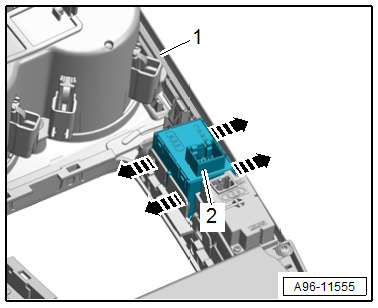
Remove insert for centre console General body repairs, interiorRep. gr.68Centre console; Removing and installing insert for centre console.
Carefully release catches (arrows) using a small screwdriver.
Press button (2) out of insert for centre console (1).
Install in reverse order.
‹ Prev Removing and installing electromechanical parking brake button E538/auto-hold button E540Next › Removing and installing electromechanical parking brake button E538/auto-hold button E540 - automatic gearbox
Parts & tools for this job For 2015 Audi A4
- PARTClutch kitSearch: Audi A4 2015 clutch kit
- TOOLClutch alignment toolSearch: clutch alignment tool
- FLUIDGear oilSearch: Audi A4 manual gearbox oil
As an Amazon Associate we earn from qualifying purchases.