
Removing and installing hazard warning lights button E229
- Make
- Audi
- Model
- A4 Mk4
- Year
- 2015–2023
- Section
- Controls › Removing and installing hazard warning lights button E229
‹ Prev Removing and installing switches in dash panel - dash panel insert operating buttons E493Next › Removing and installing valet parking button E536
Electrical systemRemoving and installing hazard warning lights button E229
Removing and installing hazard warning lights button E229
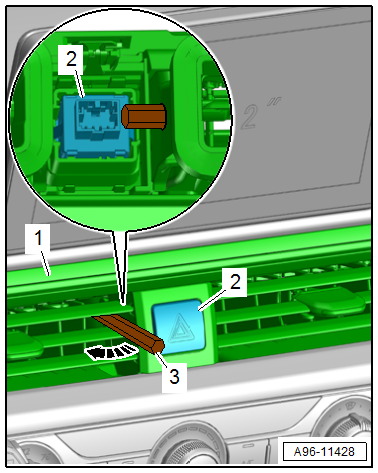
There is a hole in the wide air outlet on both sides of the hazard warning lights button.
Carefully guide 5 mm hexagon key (3) between louvres of wide air outlet (1) into hole and fit on hazard warning lights button (2) as shown.
Press hazard warning lights button out of mounting (arrow).
Unplug electrical connector.
Installation is carried out in the reverse order; note the following:
Press hazard warning lights button in until it engages audibly.
‹ Prev Removing and installing switches in dash panel - dash panel insert operating buttons E493Next › Removing and installing valet parking button E536
Parts & tools for this job For 2015 Audi A4
- TOOLDigital multimeterSearch: automotive digital multimeter
- PARTAssorted fuse kitSearch: car fuse assortment kit
- TOOLWire crimper and connector kitSearch: wire crimper connector kit
As an Amazon Associate we earn from qualifying purchases.