
Removing and installing amplifier R12 (basic)
- Make
- Audi
- Model
- A6 C6
- Year
- 2004–2011
- Section
- MMI Infotainment system › Removing and installing amplifier R12 (basic)
‹ Prev Removing and installing digital sound package control unit J525, BOSE 6000 basic (up to week 35/08)Next › Removing and installing digital sound package control unit J525, MMI (up to week 35/08)
Electrical: CommunicationRemoving and installing amplifier R12 (basic)
Removing and installing amplifier R12 (basic)
The amplifier R12 is located behind the luggage compartment side trim (left-side).
Switch off all electrical equipment.
Remove ignition key.
Open left-side luggage compartment storage area.
Remove luggage compartment side trim (left-side) General body repairs, interiorRep. Gr.70.
Unplug connector at amplifier R12(3).
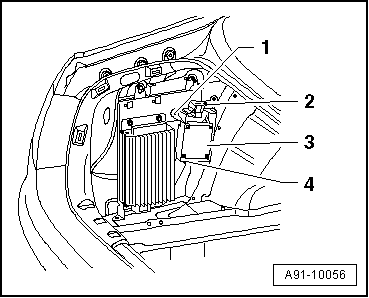
Unscrew bolts (1), (2) and (4) (2 Nm) and remove the amplifier R12(3).
Installation is performed in reverse sequence.
‹ Prev Removing and installing digital sound package control unit J525, BOSE 6000 basic (up to week 35/08)Next › Removing and installing digital sound package control unit J525, MMI (up to week 35/08)
Parts & tools for this job For 2004 Audi A6
- TOOLDigital multimeterSearch: automotive digital multimeter
- PARTAssorted fuse kitSearch: car fuse assortment kit
- TOOLWire crimper and connector kitSearch: wire crimper connector kit
As an Amazon Associate we earn from qualifying purchases.