
Removing and installing MiniDisc player R153
- Make
- Audi
- Model
- A6 C6
- Year
- 2004–2011
- Section
- MMI Infotainment system › Removing and installing MiniDisc player R153
Removing and installing MiniDisc player R153
Special tools and workshop equipment requiredRadio release tool T10057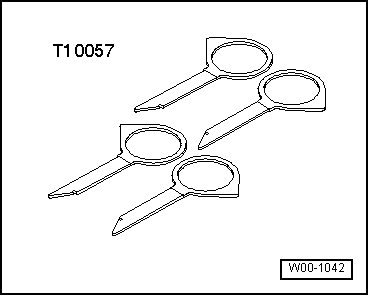
Switch off all electrical equipment.
Remove ignition key.
Warning The MOST Bus fibre optic cables for the MiniDisc player R153 have been made as short as possible.
Before removing the control unit, unplug the MOST Bus connector at the MiniDisc player R153.
A service flap for renewing the air conditioning system pollen filter is fitted to the underside of the glove box. The connectors at the MiniDisc player R153 can be unplugged after removing the service flap.
If there is no service flap fitted, the glove box must be removed General body repairs, interiorRep. Gr.68.
The service flap (A) is secured at the bottom of the glove box (B) by 4 retainers (C). Moderate force may be required to release the retainers.
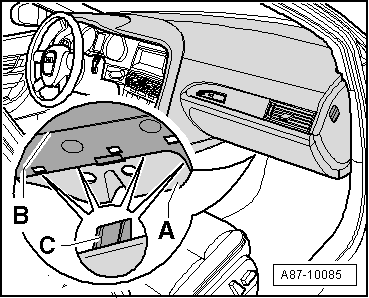
Release retainers (C) and detach service flap (A).
Unplug all connectors at MiniDisc player R153.
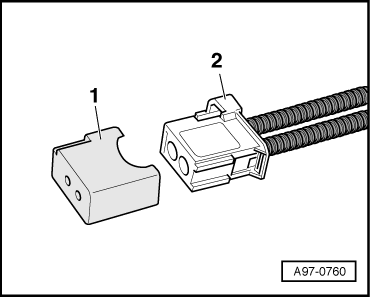
Fit protective cap for cable connector VAS 6223/9(1) onto MOST bus connector (2).
Insert two radio release tools T10057 into slots on MiniDisc player R153 until they engage. Pointed ends of grips must face outwards.
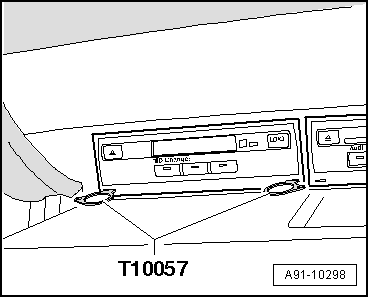
Pull MiniDisc player R153 out of mounting frame.
Pull out radio release tool T10057 by pressing retaining tabs on MiniDisc player R153.
Plug in connectors.
Slide MiniDisc player R153 into mounting frame until it engages.
Parts & tools for this job For 2004 Audi A6
- TOOLDigital multimeterSearch: automotive digital multimeter
- PARTAssorted fuse kitSearch: car fuse assortment kit
- TOOLWire crimper and connector kitSearch: wire crimper connector kit
As an Amazon Associate we earn from qualifying purchases.