
Removing and installing headlight fan 2 V463/ V464
- Make
- Audi
- Model
- A6 C7
- Year
- 2011–2018
- Section
- Headlights › Removing and installing headlight fan 2 V463/ V464
‹ Prev Removing and installing headlight fan V407/ V408 - vehicles from model year 2015 onwardsNext › Installing repair kit for headlight housing
Electrical systemRemoving and installing headlight fan 2 V463/ V464
Removing and installing headlight fan 2 V463/ V464
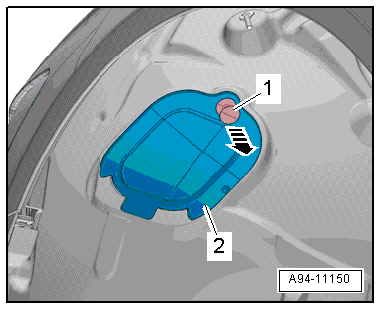
Loosen fastener (1) and disengage cap (2) from wheel housing liner (front section) (arrow).
Note
- Depending on the version, a bolt may be fitted instead of the fastener.
Release wheel housing liner (front) and press to side General body repairs, exteriorRep. gr.66Wheel housing liners; Removing and installing wheel housing liner (front).
Turn housing cover (1) anti-clockwise (arrow) and detach from headlight housing.
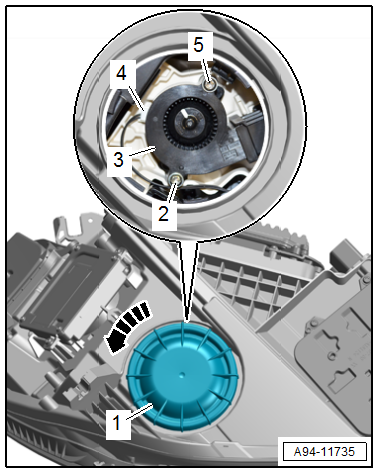
Remove bolts (2, 5).
Detach fan (3).
Press release tab to unplug electrical connector (4).
Install in reverse order.
- Chapter“Exploded view - headlights, LED headlight from model year 2015 onwards”
‹ Prev Removing and installing headlight fan V407/ V408 - vehicles from model year 2015 onwardsNext › Installing repair kit for headlight housing
Parts & tools for this job For 2011 Audi A6
- PARTReplacement bulbsSearch: Audi A6 2011 bulbs
- TOOLDigital multimeterSearch: automotive digital multimeter
As an Amazon Associate we earn from qualifying purchases.