
Removing and installing dash panel insert operating buttons E493
- Make
- Audi
- Model
- A8 D4
- Year
- 2010–2017
- Section
- Controls › Removing and installing dash panel insert operating buttons E493
‹ Prev Overview of fitting locations - controls in roof trim, version 2Next › Removing and installing light switch E1
Electrical systemRemoving and installing dash panel insert operating buttons E493
Removing and installing dash panel insert operating buttons E493
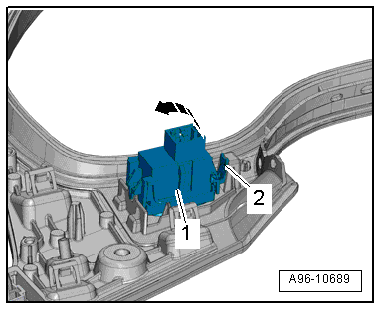
Remove instrument cluster cover General body repairs, interiorRep. gr.70Dash panel; Exploded view - dash panel.
Release retaining tab (2).
Take out operating buttons (1) to one side (arrow).
Install in reverse order.
‹ Prev Overview of fitting locations - controls in roof trim, version 2Next › Removing and installing light switch E1
Parts & tools for this job For 2010 Audi A8
- TOOLDigital multimeterSearch: automotive digital multimeter
- PARTAssorted fuse kitSearch: car fuse assortment kit
- TOOLWire crimper and connector kitSearch: wire crimper connector kit
As an Amazon Associate we earn from qualifying purchases.