
Removing and installing electromechanical parking brake button E538/auto-hold button E540
- Make
- Audi
- Model
- A8 D4
- Year
- 2010–2017
- Section
- Controls › Removing and installing electromechanical parking brake button E538/auto-hold button E540
‹ Prev Removing and installing door contact switch (rear) F10/ F11Next › Removing and installing entry and start authorisation button E408
Electrical systemRemoving and installing electromechanical parking brake button E538/auto-hold button E540
Removing and installing electromechanical parking brake button E538/auto-hold button E540
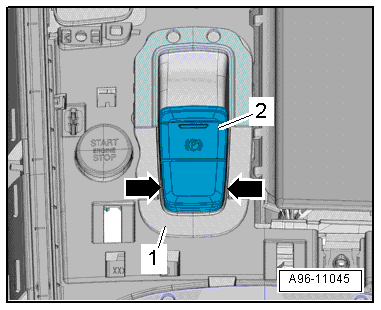
Remove centre console cover (front) General body repairs, interiorRep. gr.68Centre console; Removing and installing centre console cover.
Use a feeler gauge to release retaining clips at the locations marked with (arrows) and press electromechanical parking brake button E538/auto-hold button E540(item 2) out of centre console (1).
Note
- If the button cannot be removed as described, the centre console must be removed General body repairs, interiorRep. gr.68Centre console; Removing and installing centre console.
Install in reverse order.
‹ Prev Removing and installing door contact switch (rear) F10/ F11Next › Removing and installing entry and start authorisation button E408
Parts & tools for this job For 2010 Audi A8
- PARTBrake padsSearch: Audi A8 2010 brake pads
- TOOLBrake bleeder kitSearch: one man brake bleeder kit
- FLUIDBrake fluidSearch: brake fluid
As an Amazon Associate we earn from qualifying purchases.