
Removing and installing radio
- Make
- Audi
- Model
- TT Mk2
- Year
- 2006–2014
- Section
- Radio › Removing and installing radio
Removing and installing radio
Special tools and workshop equipment requiredRadio release tool T10057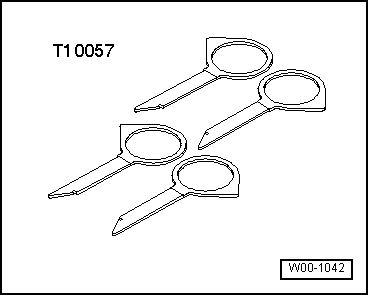
Note
- If control unit is to be renewed, select the “Replace control unit” function for appropriate control unit in Vehicle diagnostic tester.
Activate transport mode of “symphony” radio unit Chapter“Activating/deactivating transport mode of symphony radio unit”.
Switch off ignition and all electrical equipment and remove ignition key.
Insert radio release tools T10057 into slots on radio R until they engage. Pointed ends of grips must face outwards.
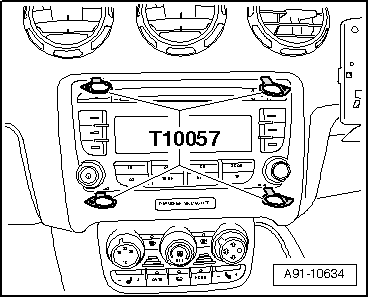
Grasp hold of grips on radio release tool T10057 and pull radio R out of dash panel.
Release and unplug electrical connectors at radio R.
Press release tabs on radio R and remove radio release tools T10057.
Remove warning lamp for airbag deactivated on front passenger side K145.
Install warning lamp for airbag deactivated on front passenger side K145.
Plug in all electrical connectors.
Slide radio R carefully into dash panel and engage it in mounting frame.
Deactivate transport mode of “symphony” radio unit.
Parts & tools for this job For 2006 Audi TT
- TOOLDigital multimeterSearch: automotive digital multimeter
- PARTAssorted fuse kitSearch: car fuse assortment kit
- TOOLWire crimper and connector kitSearch: wire crimper connector kit
As an Amazon Associate we earn from qualifying purchases.