
Removing and installing satellite radio R146
- Make
- Audi
- Model
- TT Mk2
- Year
- 2006–2014
- Section
- Radio › Removing and installing satellite radio R146
Electrical: CommunicationRemoving and installing satellite radio R146
Removing and installing satellite radio R146
The satellite radio R146 is clamped into an insert in the luggage compartment (left-side).
Note
- If control unit is to be renewed, select the “Replace control unit” function for appropriate control unit in Vehicle diagnostic tester.
Switch off ignition and all electrical equipment and remove ignition key.
Open luggage compartment.
Take out luggage compartment floor.
Pivot satellite radio R146(1) in direction of (arrow) out of insert in luggage compartment.
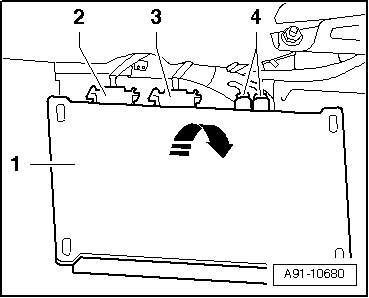
Unplug electrical connectors (2), (3) and (4) on satellite radio R146(1).
Installation is performed in reverse sequence.
Enable satellite radio R146Chapter.
Parts & tools for this job For 2006 Audi TT
- TOOLDigital multimeterSearch: automotive digital multimeter
- PARTAssorted fuse kitSearch: car fuse assortment kit
- TOOLWire crimper and connector kitSearch: wire crimper connector kit
As an Amazon Associate we earn from qualifying purchases.