
Catera V6-3.0L VIN R (1997)
9.
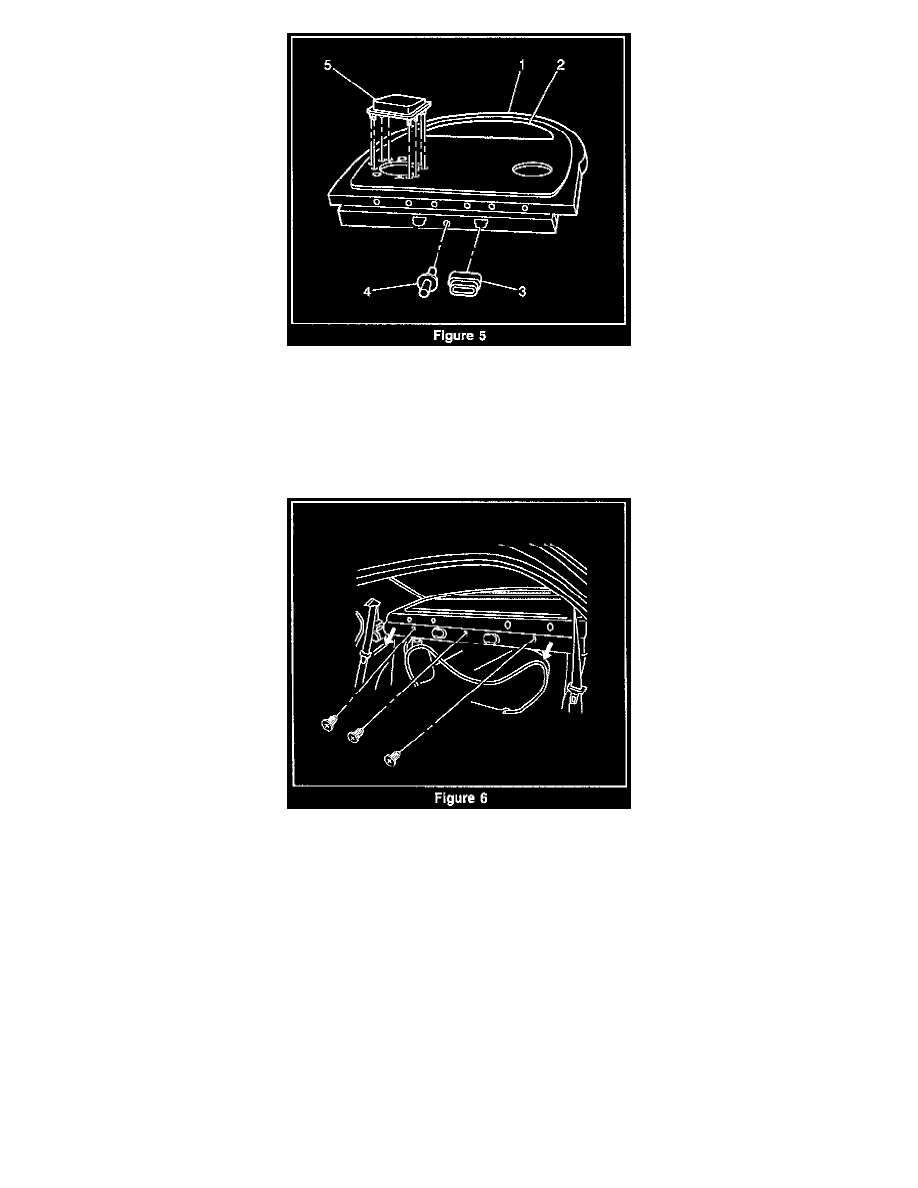
Remove the speaker grilles (5) (if equipped). Refer to Figure 5.
10.
Remove the folding rear seat-back anchor covers (3) from the rear seat-to-back window trim panel. Refer to Figure 5.
11.
Pull the edge trim down from the opening to the trunk.
12.
Remove the rear center arm rest anchor pin (4) from the rear seat-to-back window trim panel. Refer to Figure 5.
13.
Remove the 3 "Christmas Tree" pins from the rear seat-to-back window trim panel. Refer to Figure 6.
14.
Remove the rear air vent from the rear seat-to-back window trim panel.
15.
From inside the trunk, remove the rear sunshade nuts from the rear seat-to-back window panel (1998 vehicles only - if equipped).
16.
From inside the trunk, release the 3 rear seat-to-back window trim panel plastic pins.
17.
Disconnect the rear sunshade electrical connector (1998 vehicles only - if equipped).
18.
Remove the rear seat-to-back window trim panel.