
General: Audio system
- Make
- Citroën
- Model
- Xsara II Factory Workshop Manual
- Year
- 2000–2006
- Section
- Display systems › General: Audio system
General: Audio system
1. Foreword
The vehicle can be equipped with the following components:
- Audio system (with cassette player, CD player or carphone)
- Compact disc changer
- Audio system control at the steering wheel
| The audio systems can be divided into the 3 following types | |
|---|---|
| name | Description |
| RB2 | Radio receiver with mechanical cassette player |
| RD2 | Radio receiver with compact disc player |
| RT2 | Radio receiver with GSM telephone |
The audio systems have in common the following characteristics:
- Radio and music display transferred to the multifunction screen
- Audio system control at the steering wheel
- Compatibility with a CD changer
N.B.: The RT2 radio also has an integrated display for displaying the radiotelephone function.
ESSENTIAL: Do not fit an after-market CD changer. The only CD changer compatible with the radios is the 6 disc changer available from CITROEN Accessoirie.
2. General synopsis
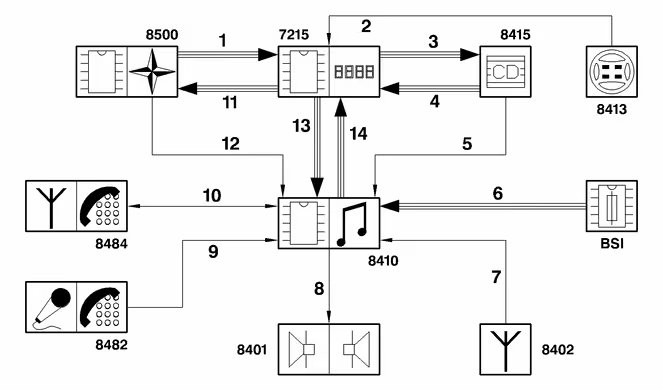
Key:
- Single arrow: Wire connection
- Triple arrow: Multiplexed connection
| Key | |
|---|---|
| BSI | Built-in systems interface |
| 7215 | multifunction screen |
| 8401 | speakers |
| 8402 | radio antenna |
| 8410 | Audio system |
| 8413 | Audio system control |
| 8415 | Compact disc changer |
| 8482 | Carphone microphone |
| 8484 | Carphone aerial |
| 8500 | Navigation ECU |
| Connections | ||
|---|---|---|
| No. of link | signal | Nature of signal |
| 1 | Navigation system status | Comfort VAN |
| 2 | Status of the user controls | All or nothing |
| 3 | CD changer status change request | Comfort VAN |
| 4 | Status of the CD changer control | Comfort VAN |
| 5 | Audio signal: Playing of CDs | Analogue |
| 6 | Vehicle speed information | Comfort VAN |
| VIN number | ||
| Level of brightness of the interior equipment | ||
| 7 | Radio reception signal | Analogue |
| 8 | Output signal from the radio (amplified) | Analogue |
| 9 | Signal from the microphone for the carphone | Analogue |
| 10 | GSM transmission / reception signal | Analogue |
| 11 | Navigation system control | Comfort VAN |
| 12 | Audio signal: Navigation system synthesised voice | Analogue |
| 13 | Controls for the radio | Comfort VAN |
| 14 | Audio system status | Comfort VAN |
| Audio system change of status request | ||
3. Description of the audio components
3.1. Audio system RB2
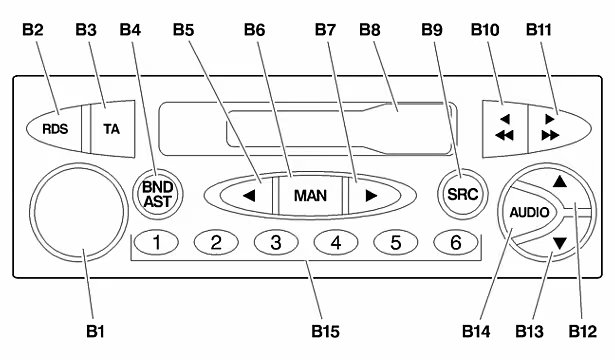
| Key | |
|---|---|
| B1 | On / off button. Volume adjustment button |
| B2 | Station search activation button (RDS) |
| B3 | Traffic information activation button |
| B4 | Memory and frequency band selector |
| Automatic memorisation button | |
| B5 | Frequency down search button |
| B6 | Automatic / manual frequency search mode button |
| B7 | Frequency up search button |
| B8 | Cassette housing |
| B9 | Source selection (radio, cassette or CD changer) |
| B10 | Cassette rapid rewind button |
| B11 | Cassette fast forward button |
| B12 | Increasing audio adjustment button |
| B13 | Decreasing audio adjustment button |
| B14 | Audio setting function recall button |
| B15 | Memorised stations button |
3.2. Audio system RD2
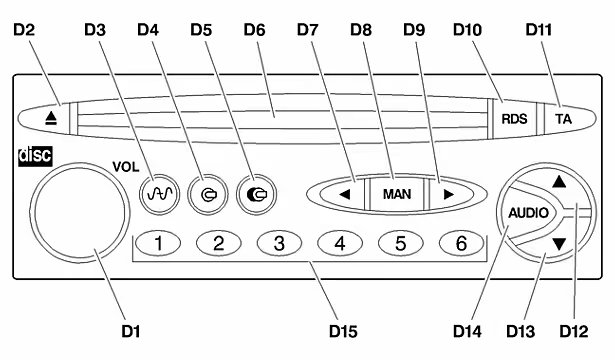
| Key | |
|---|---|
| D1 | On / off button. Volume adjustment button |
| D2 | CD ejection button |
| D3 | Memory and frequency band selector |
| Automatic memorisation button | |
| D4 | CD mode selection button |
| D5 | CD changer mode selection button |
| D6 | CD insertion |
| D7 | Frequency down search button |
| Down search button for one track of the same CD | |
| Rapid return button for track just played | |
| D8 | Automatic or manual mode frequency search activation button. Fast listen function activation button |
| D9 | Frequency up search button |
| Up search button for one track of the same CD | |
| Fast forward button for the track just played | |
| D10 | Station search activation button (RDS) |
| D11 | Traffic information activation button |
| D12 | Increasing audio adjustment button |
| D13 | Decreasing audio adjustment button |
| D14 | Audio setting function recall button |
| D15 | Memorised stations button |
3.3. Audio system RT2
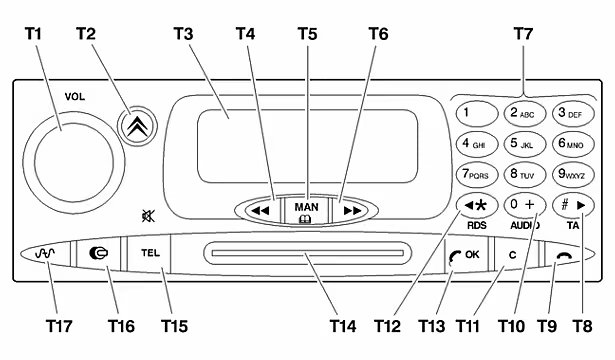
| Key | |
|---|---|
| T1 | On / off button. Volume adjustment button |
| T2 | Emergency call button |
| T3 | Liquid crystal display |
| T4 | Down search button |
| T5 | Carphone directory button |
| Search mode selection button | |
| T6 | Up search button |
| T7 | Numeric keypad |
| T8 | Up scroll key |
| "sharp" key | |
| Traffic information activation button | |
| T9 | Telephone call termination button |
| T10 | "Plus" button |
| "zero" key | |
| Audio setting function recall button | |
| T11 | Cancellation button |
| T12 | Down scroll key |
| "star" key | |
| Station search activation button (RDS) | |
| T13 | Telephone communication start button |
| T14 | SIM card slot |
| T15 | Carphone mode selection key |
| T16 | CD changer mode selection button |
| T17 | Radio mode selection key |
3.4. Compact disc changer
The CD changer is stowed in the boot, against the vehicle’s rear left hand wing.
The CD changer accommodates 6 CDs and has a multiplexed interface.
ESSENTIAL: Do not fit an after-market CD changer. The only CD changer compatible with the radios is the 6 disc changer available from CITROEN Accessoirie.
3.5. Audio system control
The audio system control is on the steering wheel. Acquisition of the user commands is by wire line (direct input on the multifunction screen).
Parts & tools for this job For 2000 Citroën Xsara
- PARTReplacement bulbsSearch: Citroën Xsara 2000 bulbs
- TOOLDigital multimeterSearch: automotive digital multimeter
As an Amazon Associate we earn from qualifying purchases.