
General: Navigation assistance
- Make
- Citroën
- Model
- Xsara II Factory Workshop Manual
- Year
- 2000–2006
- Section
- Display systems › General: Navigation assistance
General: Navigation assistance
1. Foreword
1.1. Geographical location by GPS system
N.B.: GPS is the abbreviation of the English term "Global Positioning System" (system of positioning on the planet).
The GPS system consists of satellites distributed around the Earth.
The satellites permanently transmit numerical signals at the speed of light, on 2 different frequencies.
The signals transmitted by the satellites are called "the ephemerides".
At all times, the ephemerides enable the GPS receiver to know the positions of all the satellites in the sky, as well as the time the message is transmitted.
The aerial is used to receive these signals from inside the vehicle. The receiver incorporated in the navigation ECU deduces from the signals the distances that separate it from the respective satellites.
Thus the navigation ECU calculates its own position and therefore that of the vehicle.
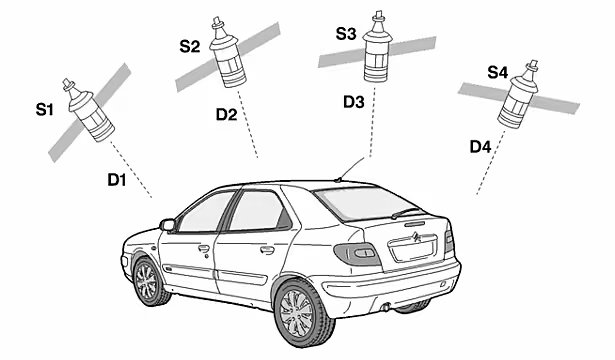
Key:
- S1: Satellite 1
- S2: Satellite 2
- S3: Satellite 3
- S4: Satellite 4
- D1: Distance between satellite 1 and the vehicle
- D2: Distance between satellite 2 and the vehicle
- D3: Distance between satellite 3 and the vehicle
- D4: Distance between satellite 4 and the vehicle
1.2. System of navigation assistance
The on-board navigation system guides the driver towards the destination which he has fixed in accordance with a chosen itinerary.
The on-board navigation system consists of the following components:
- A navigation ECU incorporating a CD-ROM of cartographic data
- The vehicle’s multifunction screen (type C)
- A multiplexed radio
- A GPS aerial
- A control keypad located on the central console
- A last message recall control, located at the end of the lighting switch
2. General synopsis
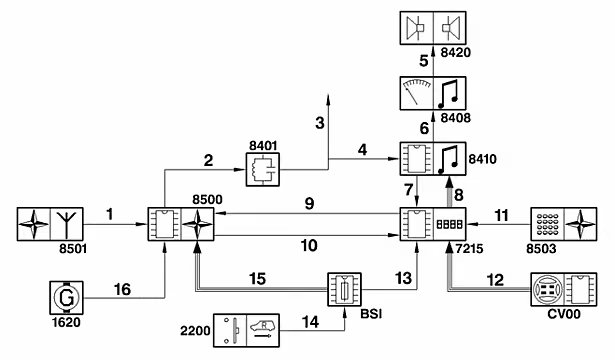
| Components | |
|---|---|
| BSI | Built-in systems interface |
| 1620 | Vehicle speed sensor |
| 2200 | Reverse lamp switch |
| 7215 | multifunction screen |
| 8401 | Impedance adaptor |
| 8408 | External hi-fi amplifier (optional) |
| 8410 | Audio system |
| 8420 | speakers |
| 8500 | Navigation ECU |
| 8501 | GPS aerial |
| 8503 | Navigation control keypad |
| CV00 | Switch module at the steering wheel |
| Connections | ||
|---|---|---|
| No. of link | signal | Nature of signal |
| 1 | Ephemerides | High frequency |
| 2 | Synthesised voice audio output | Audio (line level) |
| 3 | Synthesised voice audio output for an external amplifier | Audio (line level) |
| 4 | Synthesised voice audio output for the original radio | Audio (line level) |
| 5 | Power audio output | Audio (amplified) |
| 6 | Audio output for the original amplifier | Audio (line level) |
| 7 | Audio system status | Comfort VAN |
| 8 | Controls for the radio (audio source and adjustment switch) | Comfort VAN |
| 9 | Navigation ECU command | Comfort VAN |
| 10 | Status of the navigation ECU. Cartographic information | Comfort VAN |
| 11 | User commands via the navigation control keypad | All or nothing |
| 12 | User commands by the audio system control. Recall of the last voice information | Body VAN 1 |
| 13 | Reverse gear information | Comfort VAN |
| 14 | Reverse gear information | filament |
| 15 | Reverse gear information | Comfort VAN |
| 16 | Vehicle speed information | Frequency based |
3. Description of the system’s components
3.1. Navigation ECU
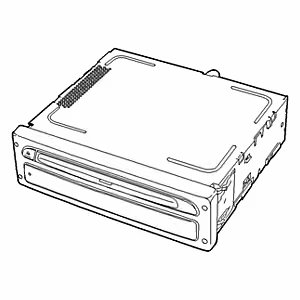
The navigation ECU calculates the optimum itinerary and works out the route, permanently comparing the road taken by the vehicle with the retained instructions.
The navigation ECU is installed in the upper part of the glovebox.
The navigation ECU divides the itinerary into several road segments and deals with them one at a time.
A CD-ROM reader, incorporated in the ECU, reads a CD-ROM of which the cartography is produced and regularly updated by the company Navigation Technologies.
3.2. Multifunction screen
The multifunction screen is type C.
During guidance, the multifunction screen displays different types of information depending on the manoeuvres to be taken:
- Distance until the next operation
- Next manoeuvre. If 2 manoeuvres are imminent, the distance separating them is displayed
- Next road to be taken
- Hr
- Exterior temperature
- Road taken
- Distance to final destination
3.3. Audio system
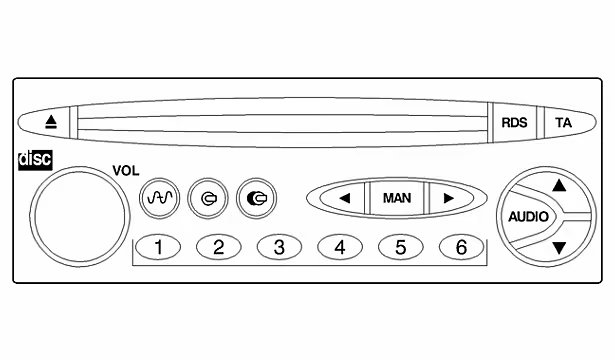
The radio amplifies the guidance voice messages emitted by the navigation system at line level.
The switching on the auxiliary input is controlled by the multifunction screen.
3.4. GPS aerial
A GPS (Global Positioning System) aerial is integrated in the radio aerial. The aerial captures the signals coming from the positioning satellites and the navigation ECU’s gyroscope device pinpoints the vehicle’s position.
3.5. Navigation control keypad
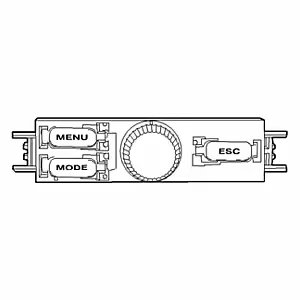
The control keypad can be stowed on the central console and permits selection of the information contained in the various menu displays.
CAUTION: Control of the satellite guidance system is by means of the control keypad.
3.6. Recall command
A press on the key located at the end of the lighting switch repeats the last voice synthesiser message.
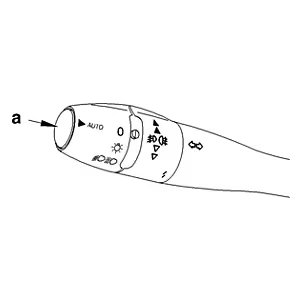
| "a" | Guide | In ACC+ activation/deactivation of the automatic headlamp lighting function |
| "a" | Guide | In ignition+, recall of the last navigation message |
Parts & tools for this job For 2000 Citroën Xsara
- PARTReplacement bulbsSearch: Citroën Xsara 2000 bulbs
- TOOLDigital multimeterSearch: automotive digital multimeter
As an Amazon Associate we earn from qualifying purchases.