
Introduction - INSTRUMENT PANEL
- Make
- Fiat
- Model
- Doblò Factory Service Manual
- Year
- 2000–2010
- Section
- Instruments › Introduction - INSTRUMENT PANEL
Introduction - INSTRUMENT PANEL
NQS OPERATION
The instrument panel is the component which makes it possible to display the main functional parameters of the vehicle for the driver. This instrument panel includes a CAN interface at low speeds to allow dialogue with other system connectors (e.g. engine management control unit, dashboard connector, ...).
The instrument panel is available in four versions and these panels have a printed circuit.
The instrument panels SHOULD NOT be dismantled in the service network because their assembly requires precision instruments; otherwise serious, irreparable damage can be caused.
The panel has several functions with the ignition switched off, such as the adjustment and display of the clock, the switching on of the alarm warning light abd the switching on of the arrow warning lights etc.
BASIC VERSION (STANDARD CARGO, STANDARD PANORAMA)
The instrument usage functions for the basic models (standard cargo, standard panorama) are:
- vehicle speed (speedometer);
- mileage (milometer display with total and trip mileage);
- fuel level (gauge and reserve warning light);
- clock (hours and minutes) (integrated in the milometer display);
- warning lights
- headlamp alignment corrector with two buttons (display of control position).
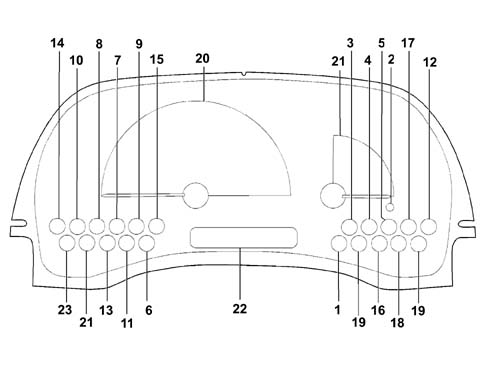
1 Coolant temperature overheating
2 Fuel reserve
3 Recharging
4 Engine oil pressure
5. OBD failure
6. Handbrake - insufficient brake fluid EBD
7. Side lights
8 Main beam headlamps
9 Direction indicators
10 Rear fog lamp
11. Heated rear windscreen
12. Immobilizer
13. Heater plugs
14. Fog lights
15. Alarm LED
16. ABS failure
17. (Air Bag failure) if available
18. (Passenger Air Bag failure) if available
19. Seat belt (preparation)
20. Electronic speedometer
21. Fuel level gauge (E1)
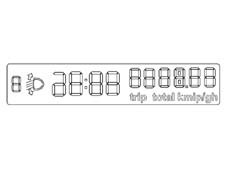
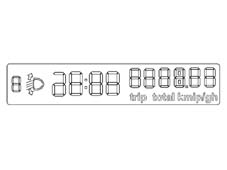
22. LCD with display of: headlamp position, clock, six figures with 7 segments for milometer; tot. 6 figures partial 4
23. Available
BASIC VERSION (STANDARD CARGO, STANDARD PANORAMA)
SPEEDOMETER (C1)
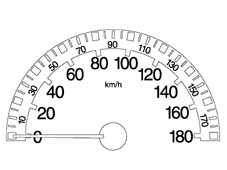
BASIC VERSION (STANDARD CARGO, STANDARD PANORAMA)
I.L.B. INDICATOR (E1)
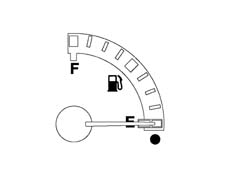
BASIC VERSION (STANDARD CARGO, STANDARD PANORAMA)
LCD (G1)
SUPER VERSION (ELEGANT VAN, ELEGANT PANORAMA)
like the basic version with the addition of:
- engine rpm (rev counter);
- coolant temperature (gauge and overheating warning light);
- warning lights
- trip computer with LCD display of trip mileage, range, average speed, journey time and average consumption.
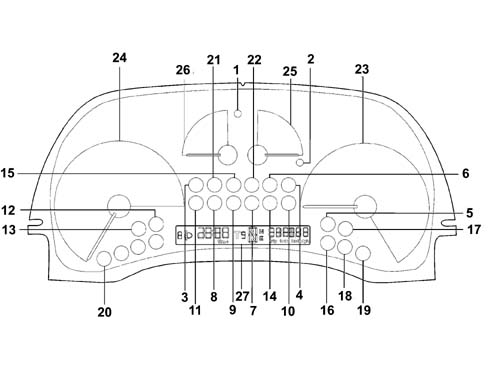
1 Coolant temperature overheating
2 Fuel reserve
3 Recharging
4 Engine oil pressure
5. OBD failure
6. Handbrake - insufficient brake fluid EBD
7. Side lights
8 Main beam headlamps
9 Direction indicator
10 Rear fog lamp
11. Heated rear windscreen
12. Immobilizer
13. Heater plugs
14. Fog lights
15. Alarm LED
16. ABS failure
17. Air Bag failure (if fitted)
18. Passenger Air Bag deactivted (if fitted)
19. Seat belt (preparation)
20. Available
21. Doors open
22. Available
23. Electronic speedometer
24. Rev counter
25. Fuel level gauge (E1)
26. Coolant temperature gauge
27. LCD with display of headlamp position, clock
SUPER VERSION (ELEGANT VAN, ELEGANT PANORAMA)
SPEEDOMETER (C3)
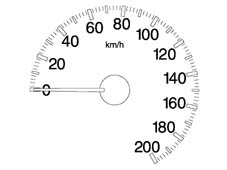
SUPER VERSION (ELEGANT VAN, ELEGANT PANORAMA)
REV COUNTER (D1)
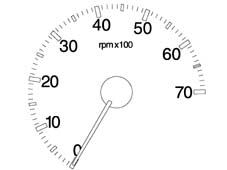
SUPER VERSION (ELEGANT VAN, ELEGANT PANORAMA)
I.L.B. INDICATOR (E2)
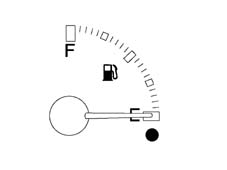
SUPER VERSION (ELEGANT VAN, ELEGANT PANORAMA)
COOLANT TEMPERATURE GAUGE (F1)
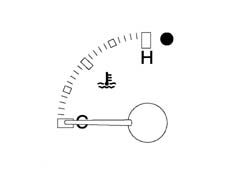
SUPER VERSION (ELEGANT VAN, ELEGANT PANORAMA)
LCD (G1)
COMPONENTS AND OPERATION
The main components of the instrument panel feature:
- External scale in white and internal scale in red and sector in grey (excluding de-luxe versions);
- Serigraphy lighting and indexes in orange.
- Rev counter (petrol and diesel) without danger zone.
- Coolant temperature gauge with danger area in red.
- LCD always lit up in orange.
- Warning lights.
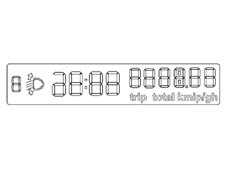
LCD:
The following are displayed on the LCD DISPLAY:
- clock
- headlamp position
- six figures with seven segments for the milometer
- four figures for the trip meter.
LCD:
All the information from and for the instrument panel is transferred, through the CAN interface at low speed, with the exception of data expressly indicated in the pin out. The fault diagnosis is also carried out through the CAN line.
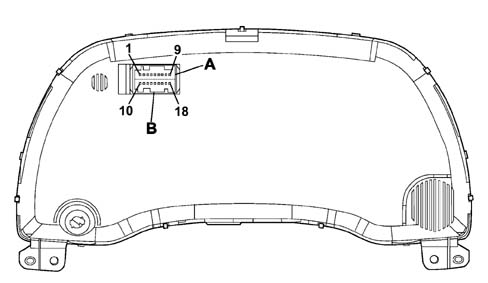
A = Connector E03PA (pins 1 to 9)
B = Connector E03PB (pins 10 to 18)
LCD:
A single AMO MQS 18-way vertical connector is used.
PIN OUT
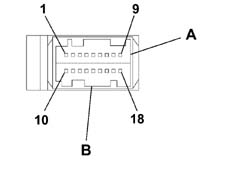
1 +15 panel supply
2 + battery instrument panel and clock
3 CAN A
4 CAN B
5. Headlamp aglinment signal
6. + Dipped headlamps
7. Instrument panel earth
8 Oil pressure (preparation)
9 Coolant temperature (preparation)
10 + Dimmer lights input (preparation)
11. Engine rpm signal (preparation)
12. Input for available warning light
13. Air Bag fialure warning light
14. Passenger Air Bag disabled warning light
15. Preparation for seat belts not fastened warning light
16. Free
17. Free
18. Engine oil level earth
Direct inputs
List of direct input signals:
- + 15 key;
- + battery;
- + lights from dimmer;
- Air Bag failure warning light (only for versions with Air Bag);
- Passenger Air Bag disabled warning light (only for versions with Air Bag);
- Seat belt warning light for Japanese version only;
- CAN line;
- Dipped headlamps signal for headlamp alignment;
Network direct inputs
List of direct input signals:
- Vehicle speed;
- RPM
- Fuel level;
- Fuel consumption
- Coolant temperature
- Mileometer;
- Warning lights
- Network management messages.
Direct outputs
List of direct output signals:
- Headlamp alignment signal;
- Oil level sensor operation;
Network output
- Network management messages and NQS operaton.
GENERAL DESCRIPTION
The programming (in the production plant) is carried out with a special instrument, on the vehicle assembly line, using the CAN serial line.
The Instrument Panel Connector (NQS) receives all the configuration parameters with a single Fiat EOL (end of line) command. The Instrument Panel therefore memorizes the data.
EOL PROGRAMMING
The Instrument Panel Connector (NQS) described so far uses four basic electronic fittings common to all versions, the difference being in the reception of the configuration parameters. If the NQS is replaced in the service network it is configured using the diagnostic equipment (SDC Examiner).
If any one of the connectors is not correctly configured or if the various connectors have been configured using incompatible data, then the Instrument Panel display segments used will flash at a frequency of 1 Hz, duty cycle 50%.
This procedure is necessary to signal the failed or incomplete personalization of one of more connectors for the CAN network on the vehicle following replacement operations in the service network.
NQS PROGRAMMING
The following Instrument Panel Connector (NQS) parameters are personalized, according to the version:
- Tank capacity according to the version (Diesel / Petrol);
- Tank percentage which activates the reserve warning light;
- Oversize percentage in the vehicle speed reading;
- ABS;
- Diesel/Petrol version;
- Right/left hand drive.
The information necessary for identifying the product, such as the Fiat design code, the HW code, the SW code, the production date, etc., should be added to these parameters.
Only once the EOL (end of line) programming has taken place in the plant or in the service network should the panel move over from the default parameters (which should remain intact until that moment) to the new parameters.
If the instrument panel does not accept the configuration in the service network, it is necessary to make sure that the product code is correct.
MILOMETER
View of milometer
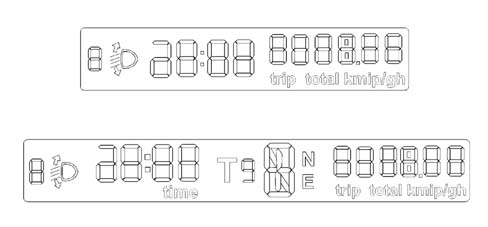
MILOMETER
The NQS receives information on the journey distance, via the CAN line, from the Body Computer. This information corresponds to a counter value which is increased by one unit each time 10m is travelled.
For every 10 counter values the trip meter is increased and therefore every 1000 metres, the total mileage is increased by 1 km.
The internal microprocessor converts the value received at the CAN network from km to miles using a suitable algorhythm.
The NQS memorizes the journey data in kilometres and only converts them into miles during the display. The limit for the trip meter remains 999.9 for both the km and miles, whilst the total limit is in kilometres only (399999) equal to around 248,547 miles.
When the limit (399999 km) is exceeded, the display shows 5 dashes at the centre and in place of the figures.
There is no planned synchronization between the NQS and the NBC when the trip meter figure is zeroed in the instrument panel, the maximum possible error is (10 m).
When the trip meter reaches 999.9 km or miles, it returns to 0.0.
The switching between the total and trip mileage is carried out using a special button (top right) which, if pressed for more than 3 seconds, zeros the trip value.
If the battery is disconnected, the instrument panel memorizes the total mileage so that not more than 1 km is lost. In this case the trip mileage is lost from the memory.
The instrument is supplied by the factory, with the possibility of resetting the total mileage counter only once during the first 200 km. It is possible if the display shows the letter H as the second digit on the left (7 segements).
The operation is carried out by keeping the zeroing button / trip selector (top right) pressed for at least four seconds.
The zeroing should be carried out before 200 km are reached, the total mileage counter is zerored and the letter H disappears. This operation cannot be carried out once 200 km are exceeded because the letter H disappears and the mileage reading displayed is maintained.
The NQS accepts the programming of the total number of Km (if it is replaced in the service network). This programming is NOT, however, possible if a certain mileage, greater than the value to be entered has already been memorized (e.g. taking the instrument panel from another vehicle to reduce the mileage).
CLOCK
The clock is shown in the same display as the milometer and is located between the headlamp alignment reading and the milometer figures; the reading is in hours and minutes and goes from 00.00 to 23.59. Each time the battery is connected the clock shows 00:00.
The two dots between the hours and the minutes flash every second.
The clock adjustment button is in the instrument panel. When it is pressed, the clock adjustment takes place as follows:
- Pressing the button for 0.1 seconds produces an increase of one minute;
- Pressing the button for between 1 and 3 seconds increases the minutes at an increasing speed which varies in a linear manner starting from an increase of 1 minute every 0.5 seconds, up to an increase of 1 minute every 0.2 seconds.
- Continuing to keep the button pressed for longer than 3 seconds causes an increase in 10 minute steps (rounded off to the next ten);
The second counter starts again after the minutes have been set.
The display shows the hours / minutes and the adjustment button also works with the ignition switched off.
SPEEDOMETER
The instrument panel receives speed information via the CAN line. The value received in this way is increased for the EOF value programmed and is then displayed on the graduated scale
The calculation error for values expressed in miles (milometer and speedometer) is less than 0.1 %. The panel configuration is for operation in miles. This parameter is only modified at the Magneti Marelli EOL (end of line).
The Instrument Panel Connector receives the engine rpm informtion, directly from the engine management control unit and without corrections the panel processes the engine rpm data with a constant time so that the response at zero RPM - end of scale RPM is less than 2 seconds.
INDICATOR RECOVERY LOGICS (STEPPING MOTOR)
The recovery of any steps which may be lost by the instrument is guaranteed for each individual indicator. The ''return to zero'' logic for the indicators occurs for every battery disconnecting / reconnecting operation. An (automatic) ''return to zero'' logic is used for the indicators each time the ignition is switched on and off.
SPEEDOMETER AND REV COUNTER PRECISION
The indicator precision is around 1 km for the tachograph and 50 rpm for the rev counter.
ENGINE COOLANT TEMPERATURE GAUGE
Every 200 ms the panel receives information concerning the engine coolant temperature, via the AN line, correspondding to a scale of - 40 to + 215 degrees C.
The movement of the pointer in the red sector corresponds to a dangerous temperature equal to 120 degrees C. With the ignition switched on, the pointer should reach the temperature value according to the following logic:
- if T < 50 ° C the pointer should be in line with the first reference/graduation on the scale
- if T > 50 ° C the pointer should be positioned on the reference corresponding to the temperature value measured.
If, with the ignition switched on, there is a burst of heat, then the temperature reading corresponds to the position of the pointer when the ignition was switched off, then the pointer should reach the position corresponding to the actual temperature in a time of 2 mins.
ENGINE COOLANT TEMPERATURE GAUGE OPERATING LOGIC
For temperatures equal to T = 50 ° C, the pointer is positioned on the first reference on the scale (start of the scale).
For temperatures between 50 and 80 ° C the pointer should move in a linear manner (between the zero and the centre of the scale).
For temperatures between 80 and 100 ° C (normal operation), the pointer should remain stable in the centre of the scale.
For temperatures between 100 and 120 ° C (uphill) and between 115 and 100 ° C (downhill) the pointer should move in a linear manner (betwen the centre of the scale and the start of the red sector).
For temperatures equal to T = 120 ° C, the pointer should be positioned at the start of the red sector of the scale.
For temperatures equal to T = 122 degrees C, the pointer should reach the position corresponding to the start of the red sector and as soon as the Engine Mangement Control Unit sends the warning light on signal, it should be positioned at the end of the scale and the coolant overheating warning light should come on with a delay of 5 seconds after receiving the information at the CAN network.
If the Engine Management Control Unit sends the signal to switch off the warning light (when the temperature goes below the level T = 115 degrees C), the instrument panel immediately switches off the engine coolant overheating warning light and the pointer returns to the position corresponding to the (actual) temperature value measured.
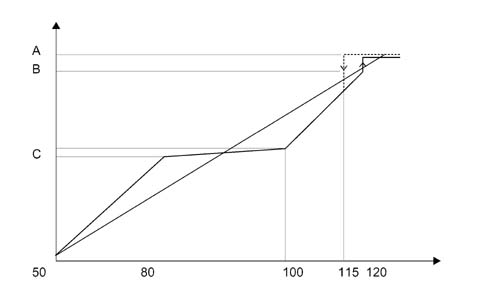
A. End of scale
B. Start of red sector
C. Centre of temperature scale between 80 ° C and 100 ° C
ENGINE COOLANT TEMPERATURE OVERHEATING WARNING LIGHT
The panel receives information concerning the switching on / off of the warning light via the CAN line.
Each time the ignition is turned on the engine management control unit sends the instrument panel the command to switch on the warning light in order to check the communication line or the warning light signal.
If the ignition is switched on and the conditions for switching on the warning light exist (engine coolant overheating and warning light already on when the ignition was switched off previously), then the CCM keeps the command to switch on the warning light activated and the instrument panel continues to keep the warning light on and position the pointer at the end of the scale.
FUEL GAUGE
The gauge signals the fuel level. The NBC contains damping software to prevent incorrect readings due to the fuel splashing around in the tank. The instrument panel is restricted to displaying the data received at the CAN line.
The precision / calibration guaranteed is 2 angular degrees throughout the scale.
Reserve warning light
The NQS lights up the reserve warning light when the NBC signals a fuel level equal to the value programmed at the EOL for the tank capacity. In order to prevent the reserve warning light from flashing, it comes on with a delay (timed hysteresis) of 50 seconds after the reserve condition occurs; the warning light goes out with a delay of 30 seconds from the moment this condition no longer exists.
WARNING LIGHTS FAILURE SIGNAL
The NQS checks the operation of the following warning light signals: ABS, EBD. When the warning light is on to signal a fault. At the end of the initial check on the warning lights, the panel signals any failure for one or more of the warning lights displaying the words ''LED Error'' flashing for 10 secs at 1 Hz, duty cycle 50%.
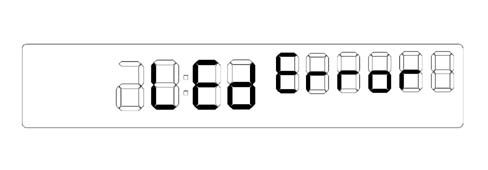
INSTRUMENT PANEL WARNING LIGHTS ON/OFF LOGIC
The behaviour of the warning lights in the NQS instrument panel can be simplified as follows:
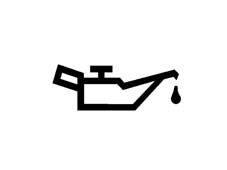
Engine oil pressure warning light
The ENGINE OIL PRESSURE warning light comes on for four seconds when the ignition is switched on and its operation is determined the receipt of a message from the CCM.
The warning light remains off if the NQS is disconnected from the CAN line or if there is no message from the CCM.
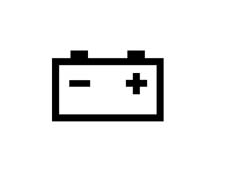
Recharging warning light
The RECHARING warning light comes on for four seconds when the ignition is switched on and its operation is determined by the receipt of the message from the NBC. The warning light remains off if the NQS is disconnected from the CAN line or if the message from the NBC is missing.
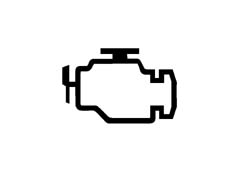
Engine control failure warning light
The ENGNIE CONTROL FAILURE warning light comes on for four seconds when the ignition is switched on and its operation is determined by the receipt of the message from the CCM. The warning light goes out if the NQS is disconnected from the CAN line, if there is a break in communication at the CAN after four seconds the check maintains the state of the warning light
Heater plugs warning light
The HEATER PLUGS warning light (diesel versions only) comes on for four seconds when the ignition is switched on and its operation is determined by the receipt of the message from the CCM with the light on constantly with the ignition switched on and flashing (1 Hz d.c. 50%) when the heater plugs failure signal is received.
The warning light remains on when the message from the CCM is received even during the CHECK stage and even if the NQS is disconnected from the CAN line after the four seconds following the switching on of the ignition.

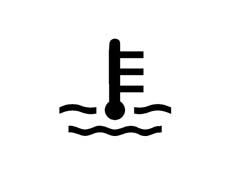
Engine coolant overheating warning light
The ENGINE COOLANT OVERHEATING warning light comes on for four seconds when the ignition is switched on and its operation is determined by the receipt of the message from the CCM.
If the NQS is disconnected from the CAN line, if there is no messager from the CCM or if the message from the CCM is a sensor/wiring failure, then the previous state of the warning light is maintained.
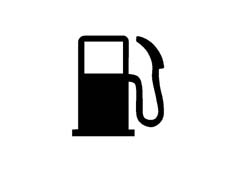
Fuel reserve warning light
The FUEL RESERVE warning light comes on for four seconds when the ignition is switched on and its operation is determined by the receipt of the message from the NBC corresponding to the reserve value (on CONSTANTLY)
The warning light goes out when the message received from the NBC corresponds to a suitable fuel level. If either the NQS or the NBC is disconnected from the CAN line or the message received from the NBC indicates a sensor / wiring failure, then the warning light starts flashing
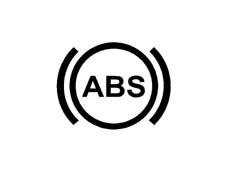
ABS failure warning light
The ABS FAILURE warning light comes on when the message from the NBC is received and the fault diagnosis is carried out when the warning light is on to signal a failure
The warning light comes on if the NQS and the NBC are disconnected from the CAN line (the operation is controlled by the NQS electronics)
Handbrake warning light
The HANDBRAKE warning light comes on CONSTANTLY when the message is received from the NBC that the handbrake is applied.
The BRAKE FLUID LEVEL warning light comes on CONSTANTLY (handbrake released) when the message received from the NBC indicates that the fluid level is too low
The EBD FAILURE warning light comes on CONSTANTLY when the EBD failure message is received from the NBC or if the NQS and the NBC are disconnected from the CAN line.

Side lights warning light
The operation of the SIDE LIGHTS warning light is determined by the receipt of the message from the NBC that the side lights are on / off
It comes on with the key in the parking position.
The warning light goes out if the NQS and the NBC are disconnected from the CAN line.

Main beam headlamps warning light
The operation of the MAIN BEAM HEADLAMPS warning light is determined by the receipt of the message from the NBC that the main beam headlamps are on / off.
The warning light goes out if the NQS and the NBC are disconnected from the CAN line.

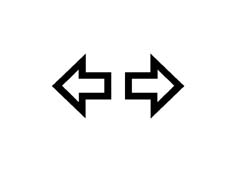
Direction indicators warning light
The operation of the DIRECTION INDICATORS warning light is determined by the receipt of the message from the NBC that the direction indicators are on or that the hazard warning light are on (the warning light for the latter can also come on with the ignition switched off) where the flashing frequency is given by the NBC
The warning light goes out if the NQS and the NBC are disconnected from the CAN line.
The warning light signals that the function has taken place by switching on the warning lights for the same family in a synchronous manner
Rear fog lamps warning light
The operation of the REAR FOG LAMPS warning light is determined by the receipt of the message from the NBC that the rear fog lamps are on / off
The warning light goes out if the NQS and the NBC are disconnected from the CAN line.

Fog light warning light
The operation of the FOG LIGHTS warning light is determined by the receipt of the message from the NBC that the fog lights are on / off
The warning light goes out if the NQS and the NBC are disconnected from the CAN line.

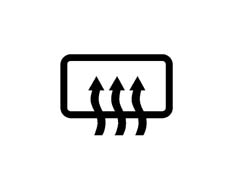
Heated rear windscreen warning light
The operation of the HEATED REAR WINDSCREEN warning light is determined by the receipt of the message from the NBC that the heated rear windscreen is on / off
The warning light goes out if the NQS and the NBC are disconnected from the CAN line.
Door open warning light
The operation of the DOOR OPEN warning light is determined by the receipt of the message from the NBC that one or more of the doors or the boot is open or that al the doors are closed
The warning light goes out if the NQS and the NBC are disconnected from the CAN line.

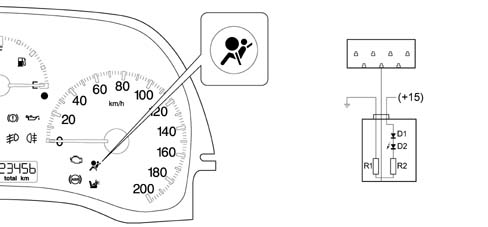
Air Bag system failure warning light (interface circuit shown in the diagram)
The AIR BAG SYSTEM FAILURE warning light (only for versions with AIR BAG) is operated directly by the AIR BAG control unit. The warning light is not connected to the CAN line, if the cable is disconnected then it comes on
Air Bag system failure warning light (interface circuit shown in the diagram)
The Air Bag warning light is an intelligent warning light because it is capable of signalling a failed connection with the actual control unit. The diagram shows the Air Bag warning light in the instrument panel. It consits of an LED (D2) connected to earth by two resistances in series (R1-R2). The LED anode is supplied through a diode (D1) by +15 controlled by the ignition, whilst the the Air Bag control unit warning light pin is connected between the two resistances (R1-R2). When the key is turned, the Air Bag control unit earths pin 13 and checks the warning light. The same happens if the system is faulty. If the Air Bag control unit is not connected to the system or there is a break in the warning light control line, when the key is turned to the ON position, the warning light comes on through the connection to earth and the resistances (R1-R2).
Passenger air bag deactivated warning light (interface circuit shown in the diagram)
The PASSENGER AIR BAG DEACTIVATED warning light (only on versions with AIR BAG) is operated directly by the AIR BAG control unit. The warning light is not connected to the CAN line

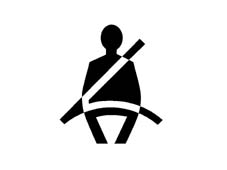
Seat belt warning light n.b. versions for Japan, Cyprus and Malta only (interface circuit shown in the diagram)
The SEAT BELT warning light is operated directly by the system, the warning light is available. The warning light is not connected to the CAN line
Code warning light
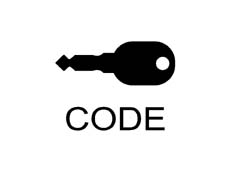
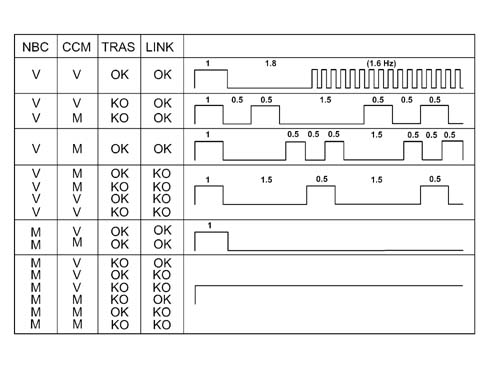
The CODE immobilizer warning light comes on for four seconds when the ignition is switched on and its operation is determined by the receipt of the message from the NBC in accordance with the code described in the table
The warning light remains off if the NQS is disconnected from the CAN line.
CODE WARNING LIGHT BLINK CODE TABLE
The NBC column indicates whether the Body Computer needs to be initialized (virgin V) or whether it is already programmed (M).
The CCM column indicates whether the Body Computer needs to be initialized (virgin V) or whether it is already programmed (M).
The column TRAS indicates the state of the transponder with OK - everything alright and KO not working
The LINK column indicates the state of the dialogue between the NBC and the CCM with OK standing for everything alright and KO meaning not working
PANEL LIGHT
The orange coloured ''backlight'' LEDs for the LCD (Liquid Crystal Display) are always on (even when the side lights are switched off, but the ignition is on)
The backlight LEDs for the scales and gauges are activated when the side lights on message is received by the
The actual panel activates the backlight LEDs if the NQS is disconnected from the CAN line.
HEADLAMP ALIGNMENT ADJUSTMENT
The panel has two dedicated inputs for the Headlamp Alignment Adjustment (CAF); one carries the dipped headlamps on signal, which is used to supply the operating circuit, the second is the signal which goes to the adjustment device on the headlamps.
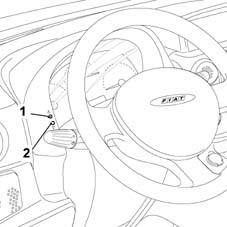
HEADLAMP ALIGNMENT ADJUSTMENT
The headlamp alignment can be adjusted using two switches which can assume four positions:
- the upper switch (1) (increases the voltage) decreases the value of the position (the light beam is raised),
- the lower switch (2) (decreases the voltage) increases the value of the position (the light beam is lowered).
The switch should be pressed for about 200 ms (to receive the signal); the switches should be released and pressed again to change position.
With a nominal supply of 13.5 Volt from the battery, the operating circuit, inside the panel, provides the following voltages:
| POSITION 0 | 11.42 Volt |
| POSITION 1 | 8.89 Volt |
| POSITION 2 | 7.59 Volt |
| POSITION 3 | 6.25 Volt |
With a tolerance of one Volt
The instrument panel display shows the reading for the adjustment device position with an ideogram of the number corresponding to the position selected.
The switches are only activted if the dipped headlamps are on and the ignition is switched on.
TRIP COMPUTER
The TRIP COMPUTER is a function of the instrument panel (NQS) which makes it possible to display the following:
- TOTAL MILOMETER;
- TRIP METER;
- VEHICLE RANGE;
- AVERAGE SPEED;
- JOURNEY TIME;
- AVERAGE CONSUMPTION.
All these readings, connected to the trip, are shown by the milometer display, using the most suitable figures and letters in the display. The TRIP function is only available on versions with a rev counter and coolant temperature gauge.
The following information is sent to the Body Computer Connector (NBC): mileage; fuel level in the tank (as a percentage of a full tank) and speed.
The information sent by the Engine Management Control Unit (CCM) includes the ''instant consumption'' (in litres/hour) and the journey time counted by a clock inside the Instrument Panel Connector (NQS) making it possible to calculate the values displayed
When the vehicle is stopped with the engine switched off, the counting of the various values stored in the memory (average speed, journey time...) are halted but not reset and resume as soon as the vehicle sets off again.
Therefore the countign only takes place when the ignition is switched on and the consumption signal is received from the CCM.
The figures stored in the memory can be zeroed through a manual reset (using the top right button) or when the maximum value which the milometer can display is reached. Therefore when the user resets the value, a new calculation is started, referring to the interval between one reset and the next.
AVERAGE SPEED
The ''average speed'' is calculated using the instant speed starting from when the driver reset the function.
Every second the instant speed value is added in an accumulator and is then divided by the number of seconds which have elapsed since the start of the calculation, the value obtained in this way is updated on the display. The value calculated is in tens of km/h or tens of mph.
RANGE
The range of the vehicle is the estimated distance in km or miles, assuming that the journey will continue in the same consumption conditions, which the vehicle can travel with the fuel in the tank. The value is calculated using the information received via the CAN (mileage; tank capacity and level; instant consumption; journey time).
If the fuel reserve warning light is on, the vehicle range is calculated and dashes appear on the display.
The range is calculated by multiplying the average consumption by the number of litres of fuel in the tank from when the battery was disconnected / connected or, better, from when the function was reset.
When the battery is connected, an average consumption of 15 km/litre is used for the calculation. To prevent the range from varying in an uncontrolled fashion, the average consumption settles down with the use of the vehicle.
When a new calculation is begun, the average consumption figure for the values measured previously when the function was reset is used as an initial value for counting the range for the new measurement and calculating the figures.
Whilst proceeding with detecting the information, the weight of the initial value loses importance and the average consumption data for the new measurement prevail. The average consumption depends a great deal on the driving style. In the moments following the start of a new measurement. The panel assumes that the tank has been refilled if there is an increase in the fuel level equal to at least 7% of the tank capacity.
If the tank is refilled, the panel displays a new range figure straight away, whilst during the use of the vehicle, the variation in the range data displayed takes place with increases proportional to the difference between the value displayed and the value calculated. In any case, the data is updated once every 30 seconds.
AVERAGE CONSUMPTION
Average consumption refers to the ratio between the distance travelled since the reset and the number of litres consumed since the figures have started to be measured.
The constant 1 gallon = 4.546 litres is used for the conversion from litres to gallons
The average consumption figure is updated every 10 seconds.
The average consumption figure tends to be 0 if the vehicle is stopped for a long period with the engine switched off.
DISPLAY MODES
All the information linked to the trip (trip mileage, range, average speed, journey time, average consumption) are displayed by the milometer, from time to time using the most suitable figures and letters from the display.
After the battery has been connected the TOTAL MILEAGE is diplayed
Repeatedly pressing the TRIP button (if it is for less than 3 seconds) makes it possible to move cyclically, in the display, from one set of information to another, in the following order:
- total mileage;
- trip mileage;
- average consumption;
- range;
- average speed;
- journey time;
- total mileage;
- etc.
The various pieces of information remain on the display until the Trip button is pressed
If the vehicle speed sensor is faulty, all the trip information display shows 5 dashes together with the description of the function (A and km for the range, km/h foar the average speed, etc.). If the fuel sensor is faulty, then dashes are displayed for the range and the average consumption.
If the sensor situation returns to normal, the counting continues according to the appropriate modes for each piece of information and none of the figures are reset and no new calculation is begun.
NQS OPERATION
The instrument panel is the component which makes it possible to display the main functional parameters of the vehicle for the driver also signalling possible on board electrical and electronic system failures. This instrument panel includes a CAN interface at low speeds to allow dialogue with other system connectors (e.g. engine management control unit, dashboard connector, ...).
The instrument panels SHOULD NOT be dismantled in the service network because their assembly requires precision instruments; otherwise serious, irreparable damage can be caused.
The panel has several functions with the ignition switched OFF, such as the adjustment and display of the clock, the switching on of the alarm warning light abd the switching on of the arrow warning lights etc.
Instrument panel graphic representation
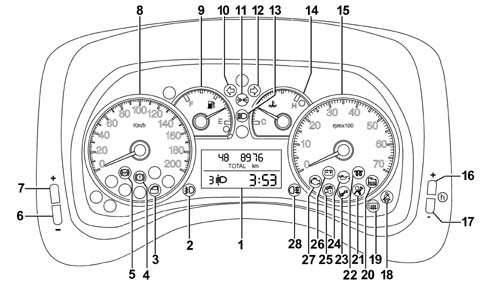
1, Multifunciton digital display
2, Fog lights (green)
3, Doors not properly shut warning light (red)
4, Insufficient brake fluid level warning light (red) - Handbrake applied (red)
5, ABS failure warning light (amber yellow) - EBD failure (together with the insufficient brake fluid warning light)
6, Headlamp alignment corrector (CAF - ) (the light beam lowers)
7, Headlamp alignment corrector (CAF + ) (the light beam rises)
8, Electronic speedometer
9, Fuel level gauge with reserve warning light
10, Left direction indicator (green) (intermittent)
11, Side lights and dipped headlamps - Follow me home function
12, Right direction indicator (green) (intermittent)
13, Main beam headlamps (blue)
14, Engine coolant temperature gauge with overheating warning light
15, Electronic rev counter
16, Clock adjustment key (+)
17, Clock adjustment button (-)
18, Seat belts not fastened warning light (red)
19, Heated rear windscreen warning light (amber yellow)
20, Water in diesel filter warning light (amber yellow)
21, Air Bag failure warning light (red)
22, Heater plugs warning light (amber yellow)
23, Passenger Air Bag disabled warning light (amber yellow)
24, Insufficient engine oil pressure warning light (red)
25, Fiat CODE - vehicle protection system failure warning light (amber yellow)
26, Battery recharging warning light
27, Injection system failure warning light (red - versions no EOBD)
27, Engine management system failure warning light/EOBD (amber yellow)
28, Rear fog lamps (amber yellow)
* Only valid for countries where fitted
** Only valid for 1.3 JTD / 1.9 JTD versions.
Rear view
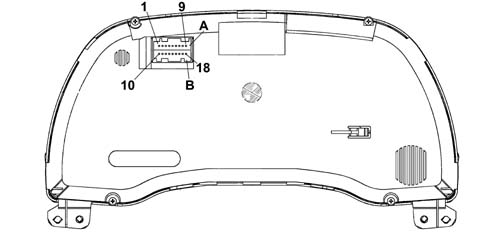
A: Connector at dashboard wiring (from pin 1 to 9)
B: Connector at dashboard wiring (from pin 10 to pin 18)
Rear view
A single AMO MQS 18-way connector is used.
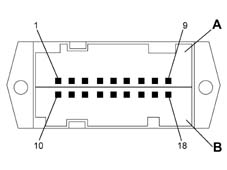
Connector A
| Pin N° | Function | Input / Output |
|---|---|---|
| 1 | + 15 (INT) panel supply | 1 |
| 2 | Signal earth | 1 |
| 3 | +30 battery | 1 |
| 4 | Trip button from steering column switch unit | 1 |
| 5 | N.C. | |
| 6 | C.A.F. signal | U |
| 7 | + Dipped headlamps | 1 |
| 8 | CAN B | I/U |
| 9 | CAN A | I/U |
Connector B
| Pin N° | Function | Input / Output |
|---|---|---|
| 10 | N.C. | |
| 11. | N.C. | |
| 12. | N.C. | |
| 13 | Air Bag fialure warning light | 1 |
| 14 | Passenger Air Bag disabled warning light | 1 |
| 15 | Seat belt not fastened warning light * | 1 |
| 16 | N.C. | |
| 17 | N.C. | |
| 18 | N.C. |
* Only valid for countries where fitted
Direct inputs
List of direct input signals:
- + 15 key;
- +30 battery;
- earth;
- CAN line;
- Air Bag failure;
- passenger Air Bag disablement;
- seat belts not fastened (only valid for countries where fitted);
- signal from trip button on steering column switch unit;
- dipped headlamps on signal for C.A.F. (headlamp alignment corrector)
Network input (some examples)
List of direct input signals:
- speedometer signal;
- engine rpm;
- fuel level;
- recharging (D+ alternator);
- network key status signal;
- engine oil pressure;
- + lights for dimmed lighting;
- heater plugs;
- EBD/ABS failure;
- brake fluid level;
- water in diesel filter;
- Vehicle Protection System;
- door/boot opening;
- windscreen/mirror defrosting;
- brake lights, direction indicators/hazard warning lights, side lights, main beam headlamps, flasher/Follow me home, rear fog lamps, fog lights;
Direct outputs
List of direct output signals:
- headlamp alignment signal.
Network output
Network management messages and NQS operaton.
ENGINE MANAGEMENT SYSTEM FAILURE WARNING LIGHT (EOBD)
On versions equipped with the EOBD system (Europen On Board Diagnosis) the warning light is amber yellow; it is activated by the engine control unit (check) when the ignition key is turned to the ON position.
The EOBD system carries out continuous diagnosis of the components related to the vehicle emissions system, signalling any deterioration of these components by the warning light in the panel coming on together with the message shown on the reconfigurable multifunction display (where fitted).
The aim of the system is:
- keeping the efficiency of the system under control;
- signalling an increase in emissions due to a vehicle malfunction;
- signalling the need to replace deteriorated components.
Prompt repair of the problem which has caused the warning light to come on is vital in accordance with the legal requirements of the traffic regulations of the country in question.
Rev counter anti-oscillation logic
The operating logic for the rev counter pointer should be disabled (in other words the indicator shows the actual engine rotation speed) when the vehicle speed is > 4 km/h.
The following graph is helpful in understanding this logic better:
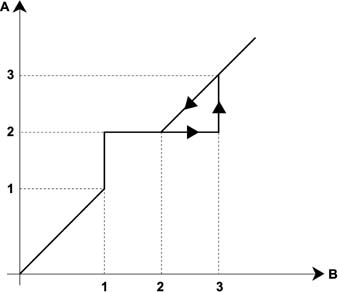
A, Value shown (rpm)
B, Engine speed (rpm)
1, First anti-oscillation logic threshold (608 rpm)
2, Second anti-oscillation logic threshold (800 rpm)
3, Third anti-oscillation logic threshold (1056 rpm)
Rev counter anti-oscillation logic
For rotation speeds between 0 and the first threshold, the values shown by the rev counter should be extended to the 0 - 608 range with linear features.
When the engine speed is between the first and third thresholds, the rev counter should indicate the value of the second threshold thereby determining an insensitivity band for the rev counter. As the number of revs decreases, the insensitivity band indicator input takes place for values below the second threshold.
To prevent sudden movements of the rev counter indicator, when the first and third thresholds are exceeded, there is a special movement of the actual indicator.
All the threshold values should be calibrated by the supplier at the end of the line.
ENGINE COOLANT TEMPERATURE GAUGE
With the ignition switched ON, the pointer should reach the temperature value according to the following logic:
- if T < 50° C, the pointer should be in line with the first reference / graduation on the scale
- if T > 50 ° C the pointer should be positioned on the reference corresponding to the temperature value measured.
If, with the ignition switched on, there is a burst of heat, then the temperature reading corresponds to the position of the pointer when the ignition was switched off, then the pointer should reach the position corresponding to the actual temperature in a time of 2 mins.
All movements of the indicator should take place gradually without sticking, oscillations or sudden movements.
ENGINE COOLANT TEMPERATURE GAUGE OPERATING LOGIC
For temperatures equal to T = 50 ° C, the pointer is positioned on the first reference on the scale (start of the scale).
For temperature of between 50 - 80° C the pointer should move in a linear manner (between zero and the centre of the scale).
For temperatures between 80 - 100° C (normal operation), the pointer should remain stable in the centre of the scale.
For temperatures between 100 - 120 ° C (uphill) and between 115 - 100 ° C (downhill) the pointer should move in a linear manner (between the centre of the scale and the start of the red sector).
For temperatures equal to T = 120 ± 1 ° C, the pointer should be positioned at the start of the red sector of the scale.
For temperatures equal to T ( 122 C the pointer should reach the position corresponding to the start of the red sector and as soon as the Engine Mangement Control Unit sends the warning light on signal, it should be positioned at the end of the scale and the coolant overheating warning light should come on.
If the warning light on signal coming from the NCM persists, the pointer remains at the end of the scale and the warning light remains on constantly.
If the Engine Management Control Unit sends the signal to switch off the warning light (when the temperature goes below the level T = 115± 1° C), the instrument panel immediately switches off the engine coolant overheating warning light and the pointer returns to the position corresponding to the (actual) temperature value measured.
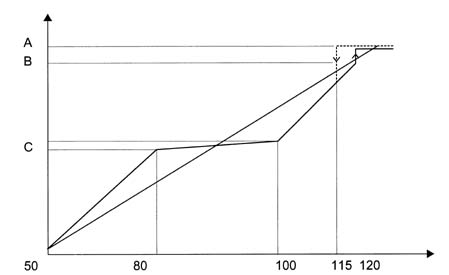
A. End of scale
B. Start of red sector
C. Centre of temperature scale between 80° C and 100° C
ENGINE COOLANT TEMPERATURE OVERHEATING WARNING LIGHT
The panel receives information concerning the switching on / off of the warning light via the CAN line.
Each time the ignition is turned on the engine management control unit sends the instrument panel the command to switch on the warning light in order to check the communication line or the warning light signal.
If the ignition is switched on and the conditions for switching on the warning light exist (engine coolant overheating and warning light already on when the ignition was switched off previously), then the NCM keeps the command to switch on the warning light activated and the instrument panel continues to keep the warning light on and position the pointer at the end of the scale.
FUEL GAUGE
The gauge signals the fuel level.
The damping logics to avoid incorrect readings due to the fuel splashing around in the tank are located in the NBC. The instrument panel is restricted to displaying the data received at the CAN line.
The precision / calibration guaranteed is ± 2 angular degrees throughout the scale.
Reserve warning light
The NQS lights up the reserve warning light when the NBC signals a fuel level equal to the value programmed at the EOL for the tank capacity.
In order to prevent the reserve warning light from flashing, it comes on with a delay (timed hysteresis) of 5 seconds after the reserve condition occurs; the warning light goes out with a delay of 20 seconds from the moment this condition no longer exists.
DIGITAL DISPLAY FEATURES
The following information is shown on the two line digital display + Trip Computer icon:
- total mileage counter (the trip meter is a function of the trip computer);
- clock;
- headlamp alignment corrector reading;
- Trip Computer data (processed by the control panel).
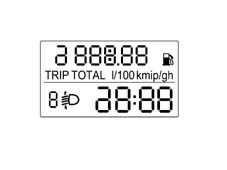
Standard displays (ignition OFF0
With the ignition OFF, the instrument panel display remains off (with both front doors closed).
When at least one of the front doors is opened/closed, the digital display should show the following:
- clock;
- total mileage.
Display of the clock function
The ''hh:mm'' (hours: minutes) display should remain on at the key on in ''24 hour'' mode, in other words from 0 to 23 h. The clock should not be displayed with the ignition OFF.
The '':'' symbol between the hours and minutes should flash at a frequency of 1 Hz, D.C. 50%.
Pressing the ''h+'' and ''h-'' buttons to the right of the control panel increases/decreases the reading in steps of 1 minute.
The length of each step depends on the time the button is pressed.
- if t < 2 s = 1 step every 400 ms
- if 2 s < t < 4 s = 1 step every 200 ms (5 steps per second)
- if t > 4 s = 1 step every 100 ms (10 steps per second)
FOLLOW ME HOME function display
The control panel in place of the milometer should show ''F XXX'' where:
- ''F'' is the Follow me home fuction activated message;
- ''XXX'' are the seconds set using the steering column switch unit which should not decrease during the display. After pressing the steering column switch unit 7 times, the time displayed (210 seconds) should not increase any more.
The display remains for 20 seconds starting from the last time the steering column switch unit is pressed unless the function is deactivated during the display through an abort command from the steering column switch unit. This also takes place after the steering column switch unit is pressed for the seventh time.
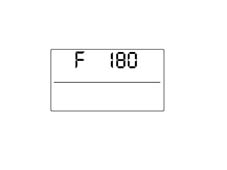
FOLLOW ME HOME function display
If one of the front doors is opened/closed, the segment display shows the milometer and the clock again.
Memory management and warning light status signal
The control panels memorize and transmit the status (ON/OFF) of the following warning lights (where present) via the CAN and whether or not there is a fault:
- Handbrake applied/insufficient brake fluid level/EBD failure;
- ABS failure;
If there is a fault for the warning light(s) the word LED in place of the milometer and the word ''Err'' in place the clock will flash in the display (at a frequency of 1 Hz, D.C. 50%) for 10 seconds
Diagnostic warning lights failure signalling
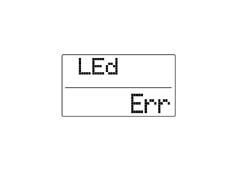
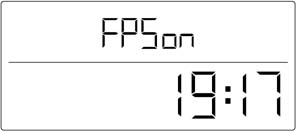
Display of intervention of inertia switch (FPS on)
If the inertia switch is triggered, an ''FPS on'' message is shown on the display instead of the mileometer. This remains fixed as long as the operations lasts.
Inertia switch operation:
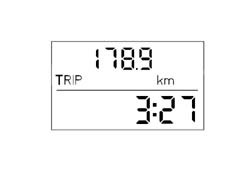
Display of information relating to the TRIP COMPUTER function
The Trip Computer is a specific function that makes it possible to show certain information relating the operational state of the vehicle on the instrument panel display: This information is:
- Distance travelled (km);
- Instant consumption and Average consumptin (l/100 km or km/l);
- Range (km);
- Average speed (km/h);
- Journey time (hh:mm)
The instrument panel receives the following information to calculate these parameters (input)::
| Input for instrument panel | Received from |
|---|---|
| Instant journey, with % oversize included | NBC (Body Computer) |
| Fuel level (% in relation to a full tank) | NBC (Body Computer) |
| Fuel tank capacity, in litres (memorized in the NQS) | Memorized in the NQS |
| Actual instantaneous speed (without increase) | NBC (Body Computer) |
| Instant consumption (in litres/hour); | NCM (Engine Management) |
| Journey time counted | Clock inside the NQS |
Each piece of information appears individually on the screen.
Mission start procedure
The term mission refers to the interval between zeroing the Trip Computer once and the next time.
This zeroing can take place as follows:
- Using the button: using the special button on the steering column switch unit (described in chapter 5550 ''WARNING AND MANOUEVRE SIGNALS'' it is possible to reset all the Trip parameters (except for the Range) after which each parameter works independently of the others.
This manual reset operation takes place by keeping the designated button pressed for 2 secs.
Automatic:
- when the journey distance information reaches the maximum limit equal to 9999.9 km;
- when the journey time reaches the maximum limit of 99.59 (hours: minutes);
- whenever the battery is reconnected
To move from displaying one Trip Computer parameter to the next, press the steering column switch unit button for < 1 sec.
Recovery conditions
If the data is not available (no CAN signals and/or sensor failure) or the range is below 50 km, ''---'' will appear on the display.
The word ''TRIP'' should not appear for the Range and Instant Consumption.
Journey distance
The journey time indicates the time elapsed since the start of the mission, i.e. from when the user reset the function by pressing the designated button.
The reading should be consistent with the total mileage display.
Each time the battery is reconnected or at the start of each mission, the display shows ''0:0'', after which the value calculated is displayed.
The value memorized at the previous key off should be displayed at each key on.
When the maximum possible journey value is reached, the display is automatically reset and the total TRIP is reset, apart from the Range item.
The calculation of the Distance Travelled should be activated at the key on.
The journey reading should be displayed with:
- range of between 0 and 9999.9 km;
- resolution equal to 0.1 km;
- display update every 0.1 km.
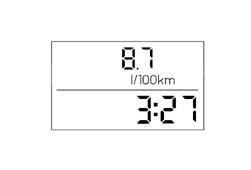
Instant consumptioin
The instantaneous fuel consumption refers to the value of litres of fuel consumed by the vehicle and measured during the last 10 seconds of the mission, calculated on the basis of a fuel consumption signal sent by the engine management control unit (NCM).
The control panel should acquire the consumption signal via the CAN.
The calculation is only carried out with the engine running (with a minimum level of 300 rpm.).
At the start of a new mission, the average consumption value is initialized at the ''pre-defined average consumption standard'' personalized for the vehicle / engine type. The ''weighting'' to be attributed to the above initial value is designed to prevent excessive changes in the data displayed during the mission. After this the data displayed tends to present the actual mission consumption conditions (steady state value) within 10 seconds.
For each journey, at the key on the value displayed should be equal to ''----'' for the distance travelled by the vehicle, starting from when the engine is running (500 m) after which the value calculated is displayed.
During the journey, for the calculation of the instant consumption, in order to prevent the value displayed from varying too much, the consumption figure initialized with reference to the last 10 seconds of the journey prior to switching the ignition OFF should be used. within 10 seconds, as the journey proceeds, this the data displayed tends to present the actual journey consumption conditions (steady-state value).
When at a standstill with the engine running (traffic lights, queues etc.), if the vehicle speed is < 4 km/h the displayed value is equal to ''---''. The display resumes normally when the vehicle speed is above the previous parameter.
The value should be calculated and displayed with a:
- resolution equal to 0.1 km/l;
- calculation accuracy: = 0.1 km/l;
- display updated every 1 s ± 0.1s;
- max. value indicated equal to 50 km/litre or 2 l/100 km;
- min. value indicated equal to 4 km/litre or 25 l/100km;
Average consumption
Average consumption refers to the ratio between the distance travelled since the start of the mission and the number of litres consumed since the start of the mission.
Cm = distance travelled / litres consumed
The control panel acquires the consumption signal via the CAN and should include it and compare it with the distance travelled from the start of the mission.
The calculation is only carried out with the engine running (with a minimum level of 300 rpm.).
At the start of a new mission due to TRIP reset (by pressing the dedicated key or reseting one of the Trip Computer parameters), the average consumption value is considered as equal to the ''average fuel consumption calculated during the previous mission''.
After this the data displayed tends to present the actual mission consumption conditions (steady state value) within 3 minutes (the influence of the standard data should be void).
The value displayed should be equal to ''----'' for a distance travelled by the vehicle from the start of the mission equal to 500 m, after which the value calculated should be displayed.
The value memorized at the previous key off should be displayed at each key on.
The average consumption data displayed should be equal to ''----'' if the following conditions prevail:
- resetting by pressing the dedicated button on the steering column switch unit;
- resetting one of the Trip parameters.
The value should be displayed through the same method as the Instant Consumption.
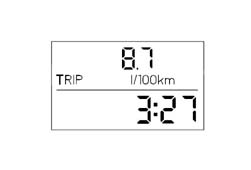
Range
The range indicates the estimated distance (in km) that can be covered with the fuel currently contained in the tank and assuming that the mission will continue in the same driving style (same consumption conditions). The range is calculated using the following information:
received from the NBC (Body Computer):
- instant distance,
- fuel level (as a percentage of a full tank);
received from the NCM (Engine Management Control Unit):
- instant consumption (in litres/hour);
fuel tank capacity, in litres (parameter entered during EOL programming by supplier).
The range is calculated considernig reference average fuel consumption and litres of fuel present in the tank.
Reference average fuel consumption value for calculating range is given by the average fuel consumption over the last 5 minutes of the mission.
The value memorized at the previous key off should be displayed at each key on.
If the range is below 50 km, the data should no longer be transmitted (but the counting of the range should continue). After which the reading ''----'' is displayed.
If the vehicle is stopped with the engine running (traffic lights, queque, etc.) if the vehicle speed is < 4 km/h, the value displayed should be equal to the last reading before the stop for a period of 5 mins; after which the reading ''----'' is displayed. The range calcluation remains active in any case.
The display resumes normally when the vehicle speed is above the previous parameter. The range figure is updated taking into account the fuel consumed during the stop and taking into consideration the driving style prior to the stop (last 5 minutes).
The range reading should be displayed with:
- calculation accuracy: = 1 km;
- resolution: 1 km;
- display updated every 30 s ± 0.1 s;
- max. value indicated equal to 3000 km;
- min. value equal to 50 km after which ''----'' is displayed
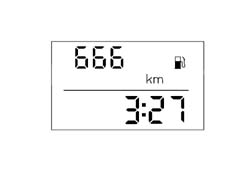
Average speed
The average speed is calculated at the start of the mission, as a ratio between the journey distance and the journey time.
Vm = journey distance / journey time
The calculation is only carried out with the engine running (with a minimum level of 300 rpm.).
Each time the battery is reconnected or at the start of each mission (reset), the display should show ''----'' for a distance of 500 m, after which the value calculated is displayed.
The value memorized at the previous key off should be displayed at each key on.
The average speed data displayed should be equal to ''----'' if the following conditions prevail:
- resetting by pressing the dedicated button on the steering column switch unit;
- resetting one of the Trip parameters;
The value should be displayed with:
- resolution equal to 0.1 km/h;
- calculation accuracy: = 0.1 km/h;
- display updated every 10 s ± 0.1s
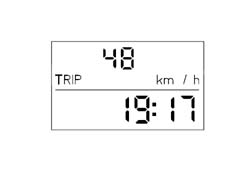
Journey time
The journey time indicates the time elapsed since the start of the mission, i.e. from when the user reset the function (by pressing the TRIP button or the automatic reset).
Each time the battery is reconnected or at the start of each journey, the display shows ''00:00'', after which the value calculated is displayed.
The value memorized at the previous key off should be displayed at each key on.
When the vehicle is stopped with the engine off (key-off) the counting of the journey time is halted but not reset and it resumes as soon as the vehicle sets off again (next key-on - engine running).
The journey time count is activated by the key on with the engine running (with a minimum level of 300 rpm.).
The journey time, starting from the key on, should be indicated in hh:mm with:
- range of between 0:00 and 99:59;
- resolution equal to 1 min;
- display updated every minute;
- data updated every second;
- the two dots '':'' between the ''hh'' and ''mm'' should be flashing during normal operation (frequency 1 Hz, D.C. 50%).
When the maximum possible value (99.59) is reached, the display of the journey time should be automatically zeroed and the Trip Computer should be completely reset at the same time apart from the Range item.
The actual panel activates the backlight LEDs if the NQS is disconnected from the CAN line.
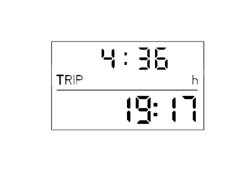
HEADLAMP ALIGNMENT ADJUSTMENT
The panel has two dedicated inputs for the Headlamp Alignment Adjustment (CAF); one carries the dipped headlamps on signal, which is used to supply the operating circuit, the second is the signal which goes to the adjustment device on the headlamps.
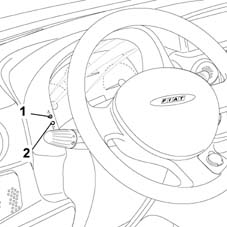
HEADLAMP ALIGNMENT ADJUSTMENT
The headlamp alignment can be adjusted using two switches which can assume four positions:
- the upper switch (1) (increases the voltage) decreases the value of the position (the light beam is raised),
- the lower switch (2) (decreases the voltage) increases the value of the position (the light beam is lowered).
The switch should be pressed for about 200 ms (to receive the signal); the switches should be released and pressed again to change position.
With a nominal supply of 13.5 Volt from the battery, the operating circuit, inside the panel, provides the following voltages:
| POSITION 0 | 11.42 Volt |
|---|---|
| POSITION 1 | 8.89 Volt |
| POSITION 2 | 7.59 Volt |
| POSITION 3 | 6.25 Volt |
With a tolerance of one Volt
The instrument panel display shows the reading for the adjustment device position with an ideogram of the number corresponding to the position selected.
The switches are only activted if the dipped headlamps are on and the ignition is switched on.
Button logic
There are 2 buttons on the left side of the instrument panel:
- Headlamp alignment corrector (CAF -) (the light beam lowers)
- Headlamp alignment corrector (CAF +) (the light beam rises)
There are 2 buttons on the right side of the instrument panel:
- clock button (+)
- clock button (-)
The button for selecting Trip Computer functions is on the right steering wheel lever.
Parts & tools for this job For 2000 Fiat Doblò
- TOOLDigital multimeterSearch: automotive digital multimeter
- PARTAssorted fuse kitSearch: car fuse assortment kit
- TOOLWire crimper and connector kitSearch: wire crimper connector kit
Links open Amazon search results in a new tab. As an Amazon Associate I earn from qualifying purchases.