
Procedure b)
- Make
- Fiat
- Model
- Punto (176) Factory Service Manual
- Year
- 1993–1999
- Section
- Alarm ('97-'98 range) › Procedure b)
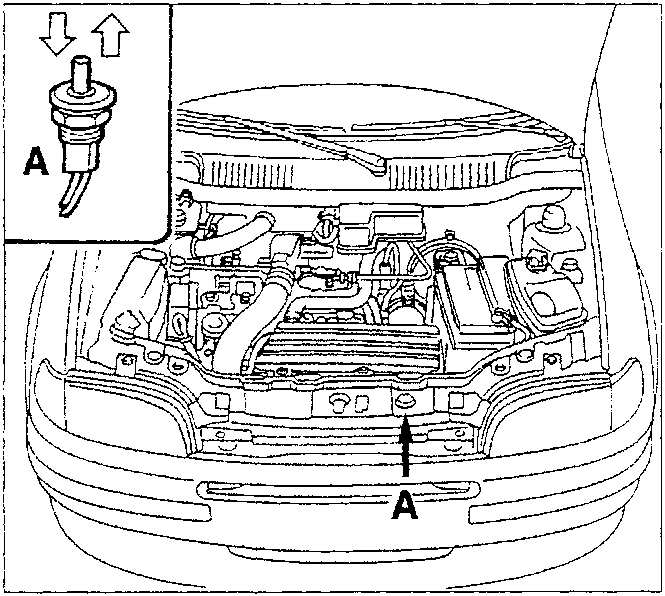
Procedure b)
Alternatively, it is possible to programme the "country code" via the following procedure:
- open the front lid;
- turn the ignition key from ON to OFF then, within 15 seconds it is necessary to press switch (A) (front lid opening sensor) 7 times in quick succession; 5 beeps will signal entry into MANUAL DIAGNOSIS (see paragraph). During this stage (5 beeps) press switch (A) and keep it pressed. A further long beep will signal acceptance of this manoeuvre;
- keep the switch pressed for the entire duration of the long beep. The latter confirms entry into "country code programming" and the possibility of later entering the "country code";
- release the switch (A) and, within 10 seconds, press the switch n. times (see table on previous page) to select the operating mode for the desired country (each time it is pressed a confirmation beep will be emitted).
The simplified programming procedure definitively cancels the universal code, used before the vehicle is handed over to the customer.
CLOSING THE MEMORY
To prevent entering unauthorized remote controls, the memory must be protected (closed); this operation takes place automatically after the alarm system has been switched on/off 128 times. It is also possible to close the memory manually by entering the password (4 figure code on the plate on the remote control illustrated on page 2): for example on a new vehicle before delivery after all the codes for the remote controls have been programmed.
The method for entering the password is as follows:
- Take one of the plates for the remote controls programmed in the receiver, then press the button on the receiver for 1 second: the LED will flash as long as the button is pressed.
- Release the button: after around 3 seconds the LED will flash briefly to indicate the possibility of introducing the first figure of the password.
- Press the button on the receiver as many times as indicated by the first digit of the password (if for example the password is 5.2.0.3.: press it 5 times). It should be noted that each time the button is pressed the LED comes on briefly to give a visual confirmation.
- Around 3 seconds after the last time the button is pressed (the fifth in the example) the LED will emit another flash to request the input of the next figure.
- Proceed from point 3 to enter all the subsequent figures.
NOTE When there is a "0" in the password (see example), the button on the receiver should not be pressed, but you should wait for the request to enter a new figure, signalled by the flashing.
After having entered the 4 figures of the Password, the LED in the receiver:
- will no longer come on; this indicates that the Password has been entered correctly;
- will come on constantly for around 10 seconds; this indicates that the password has not been correctly entered. If this is the case, after the LED goes out, the password should be correctly reintroduced starting from point 1.
Entering the password correctly "closes" (protects) the memory to prevent the programming of unauthorized remote controls. In effect, with the memory "closed" it is not possiblet o programme a new remote control because, after having transmitted the new code, the LED in the receiver will stop flashing to indicating the failure of the operation. In order to programme a new remote control, it is necessary to "open the memory", following the instructions given overleaf.
Parts & tools for this job For 1993 Fiat Punto
- TOOLDigital multimeterSearch: automotive digital multimeter
- PARTAssorted fuse kitSearch: car fuse assortment kit
- TOOLWire crimper and connector kitSearch: wire crimper connector kit
Links open Amazon search results in a new tab. As an Amazon Associate I earn from qualifying purchases.