
Engine management (MEMS 3), fuel and emission systems (Throttle cable): Adjustments
- Make
- MG
- Model
- TF Factory Workshop Manual
- Year
- 2002–2005
- Section
- Adjustments › Throttle cable
Engine management (MEMS 3), fuel and emission systemsThrottle cable
THROTTLE CABLE
Service repair no - 19.20.05
NOTE: Before adjustment, ensure the cable is correctly routed and located. Do not attempt to adjust the throttle cable or engine idle speed by means of the throttle stop screw.
Adjust
- Remove the engine compartment access panel. See BODY, Exterior fittings.
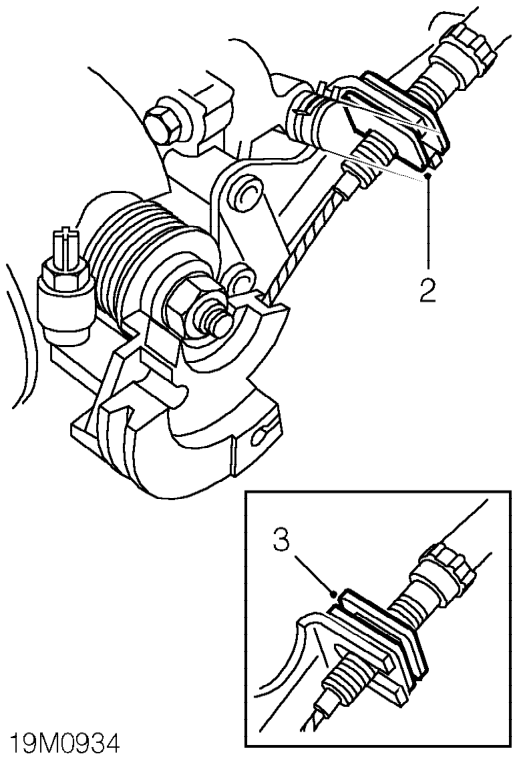
- Release cable adjusting nut from abutment bracket.
- Position outer cable to abutment bracket so that adjusting nut is in contact with top of abutment bracket.
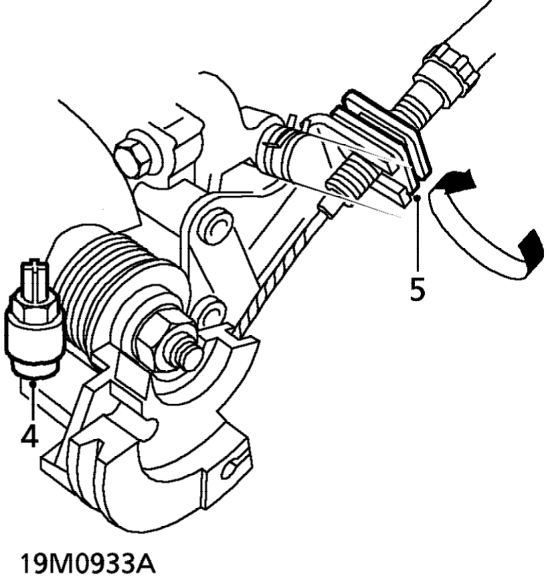
- Hold throttle cam in fully closed position, ensure throttle cam contacts throttle stop screw.
- Rotate cable adjusting nut until all slack is taken out of inner cable. Ensure throttle does not open.
- Locate throttle cable adjusting nut in abutment bracket.
- Operate throttle pedal and ensure that full throttle pedal movement is available.
- Fit engine compartment access panel. See BODY, Exterior fittings.
Parts & tools for this job For 2002 MG TF
- PARTEngine gasket setSearch: MG TF 2002 engine gasket set
- TOOLTorque wrenchSearch: 3/8 inch torque wrench
- TOOLFeeler gauge setSearch: feeler gauge set
Links open Amazon search results in a new tab. As an Amazon Associate I earn from qualifying purchases.