
Throttle and kickdown cable (Automatic gearbox)
- Make
- Rover
- Model
- 200 Workshop Manual
- Year
- 1995–1999
- Section
- Adjustments › Throttle and kickdown cable
Automatic gearboxThrottle and kickdown cable
Refill
- Clean drain plug and sealing face of gearbox.
- Fit new sealing washer to drain plug, fit drain plug and tighten to 30 Nm.
- Remove stand(s) and lower vehicle.
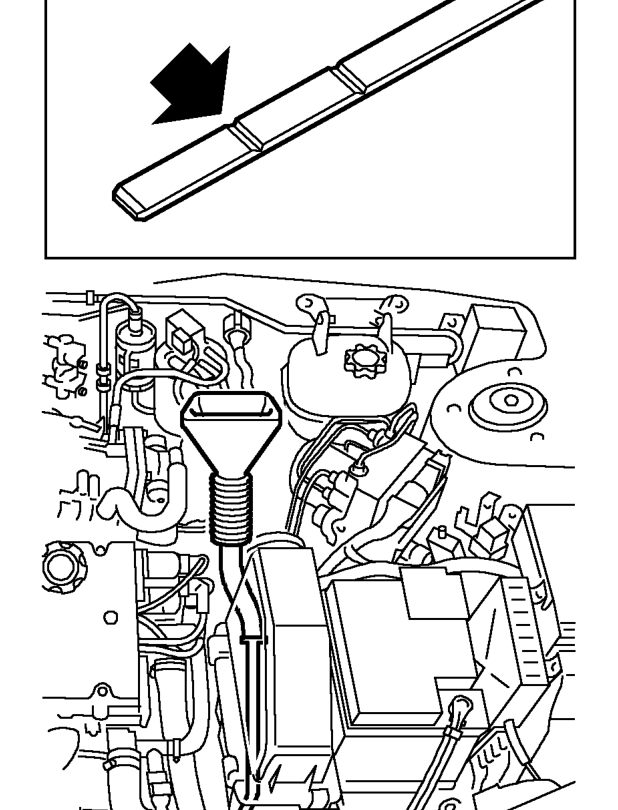
- Using a funnel on the end of the dipstick tube, carefully fill gearbox to the minimum mark with new CVT fluid. See INFORMATION, Capacities, fluids and lubricants.
- Replace dipstick tube.
- Start engine and run until normal operating temperature is achieved.
- Operate gearbox through full range of selector positions 3 times to ensure fluid is in all parts of the system.
- With the vehicle on horizontal ground, the selector lever in the ’N’ position and the engine running at idle speed, check the oil level and add oil until the level lies between the minimum and maximum marks on the dipstick.
- Fit hose between air cleaner and throttle body and secure with clips.
THROTTLE AND KICKDOWN CABLE
Service repair no - 44.30.02
Adjust
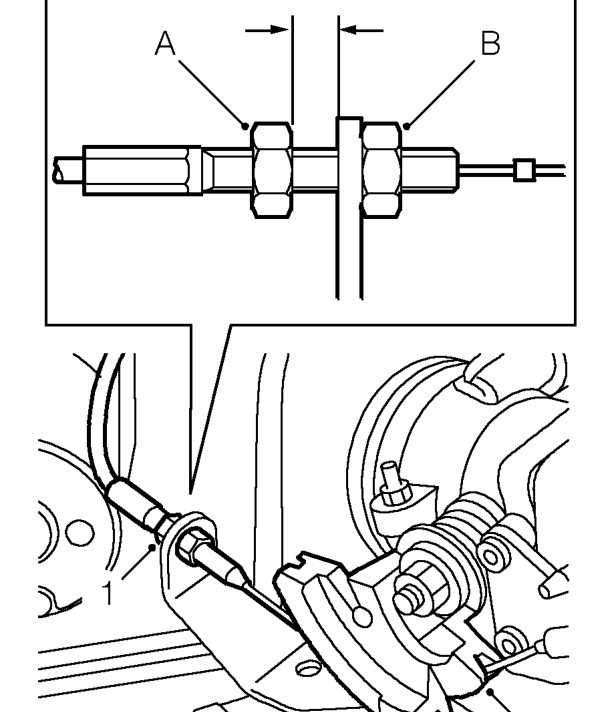
- Loosen kickdown cable adjusting nut and locknut.
- Adjust throttle cable. See ENGINE MANAGEMENT SYSTEM - MEMS, Adjustments.
- Rotate and hold throttle cam in its fully open position.
- With assistance, insert a 1 mm thick feeler gauge between the kickdown cable adjusting nut (A) and abutment bracket.
- Tighten adjusting nut (A) to remove all free play from kickdown cable. Ensure throttle cam is still in its fully open position.
- Remove feeler gauge and tighten kickdown cable locknut (B).
- Release throttle cam and check that full movement of throttle cam is achievable.
Parts & tools for this job For 1995 Rover 200
- PARTTransmission filter kitSearch: Rover 200 1995 transmission filter kit
- FLUIDAutomatic transmission fluidSearch: Rover automatic transmission fluid
- TOOLFluid transfer pumpSearch: fluid transfer pump
Links open Amazon search results in a new tab. As an Amazon Associate I earn from qualifying purchases.