
Removing:
- Make
- SEAT
- Model
- Alhambra
- Year
- 1996–2010
- Section
- Communication › Removing:
Removing:
Before beginning dismantling work, perform the following steps:
Switch off ignition and all electrical consumers and pull out ignition key.
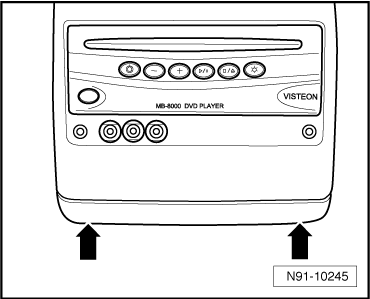
Remove bolts (arrows).
Unscrew bolt (arrow).
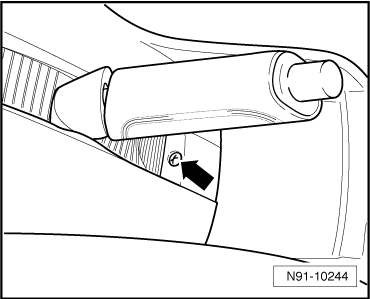
Pull the handle off of the parking brake lever.
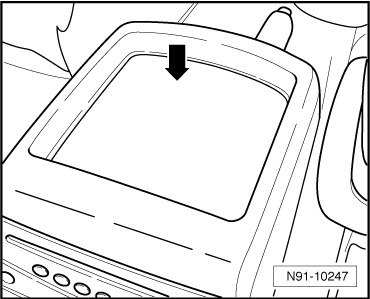
Remove the cover mat from the centre console (arrow)
Remove bolts (arrows).
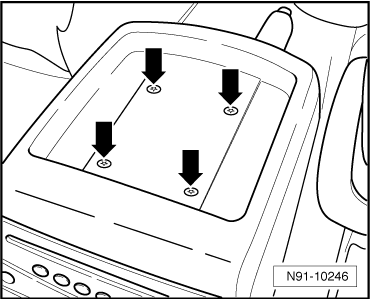
Note!
- The bolts are of different lengths. Mark the respective locations of the individual bolts in order to avoid confusion when reinserting.
Remove the centre console from above; the DVD player remains below.
Carefully unscrew the bolts (arrows) from the circuit board and place the board to the side.
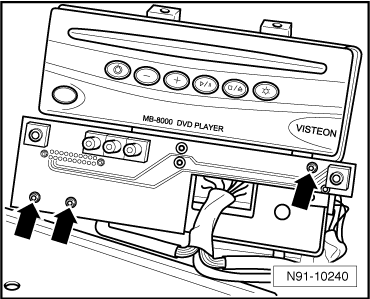
Note!
- Exercise caution when detaching the connectors, as the lines attached to the connectors are very sensitive to mechanical damage.
- In order to avoid confusion, mark the connectors in accordance with their connection jacks. This will ensure that the connectors are properly connected later on.
Unclip the connector (arrow) and detach it.
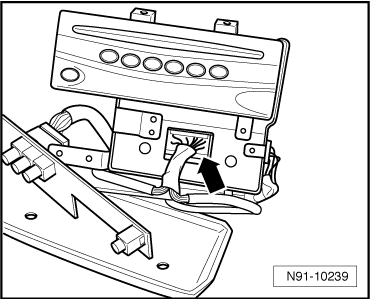
Now unclip the connectors (arrows) and detach them.
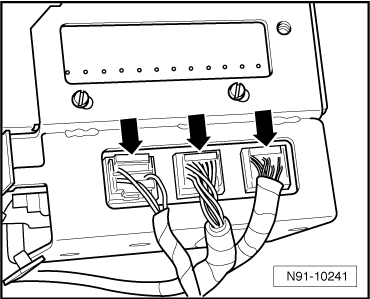
Unclip connector (A) at the points indicated by the (arrows) and detach.
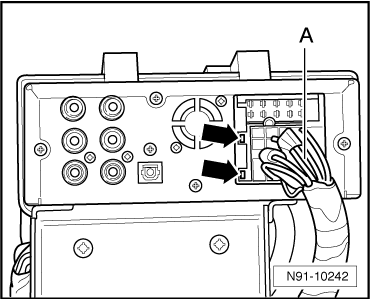
Remove the DVD player/multi-media control unit assembly.
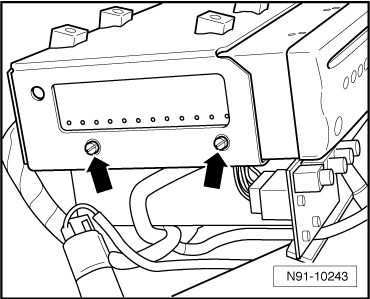
Unscrew the bolts (arrows) on the left and right of the bracket to disconnect the DVD player from the multi-media control unit.
Parts & tools for this job For 1996 SEAT Alhambra
- TOOLTorque wrenchSearch: 3/8 inch torque wrench
- TOOLSocket setSearch: socket set metric
- BOOKHaynes manualSearch: Haynes manual SEAT Alhambra
As an Amazon Associate we earn from qualifying purchases.