
Removing telephone mounting
- Make
- SEAT
- Model
- Alhambra
- Year
- 1996–2010
- Section
- Communication › Removing telephone mounting
InfotainmentRemoving telephone mounting
Removing telephone mounting
Before beginning dismantling work, perform the following steps:
Switch off ignition and all electrical consumers and pull out ignition key.
Remove the mobile telephone from the mounting.
Unclip the mobile telephone mounting from the mobile telephone bracket.
Detach connector, if necessary. The cable connector is located in the mobile telephone mounting.
Remove bolt in retaining plate (arrow).
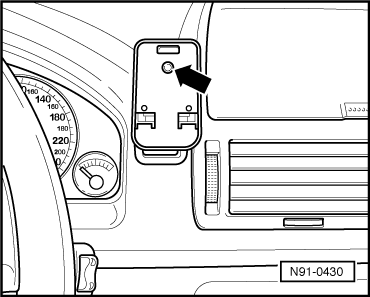
Unscrew the securing screw from the base mounting using a screwdriver as shown.
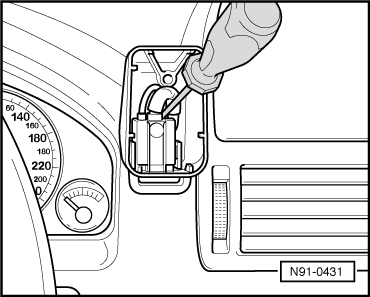
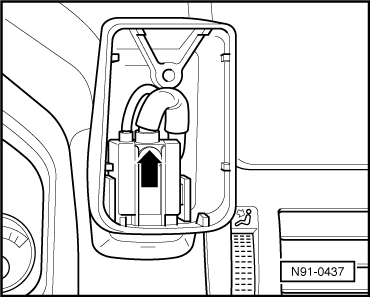
Remove the base mounting from the dash panel. In the process, detach the connector in the base mounting, then push up and remove.
Parts & tools for this job For 1996 SEAT Alhambra
- TOOLTorque wrenchSearch: 3/8 inch torque wrench
- TOOLSocket setSearch: socket set metric
- BOOKHaynes manualSearch: Haynes manual SEAT Alhambra
As an Amazon Associate we earn from qualifying purchases.