
Removing
- Make
- SEAT
- Model
- Alhambra
- Year
- 1996–2010
- Section
- Running gear, axles, steering › Removing
Removing
Remove the airbag unit (only in vehicles with airbag Chapter “Airbag unit, driver's side: removing and fitting”).
Remove the steering wheel (steering wheel with airbag Chapter “Removing and installing steering wheel, vehicles ¸% 05.00”).
Remove the lower covering for the steering column combination switch.
Remove the upper covering for the steering column combination switch (arrows).
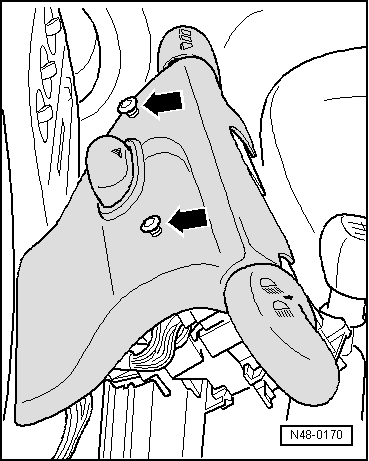
Remove the left-hand side lining situated below the instrument panel.
Unplug the connector of the steering lock body.
Loosen the bolt of the body of the steering lock (arrow).
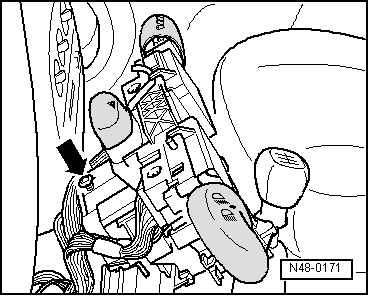
Remove the steering column combination switch.
Loosen the bolt of the steering driveshaft (arrow).
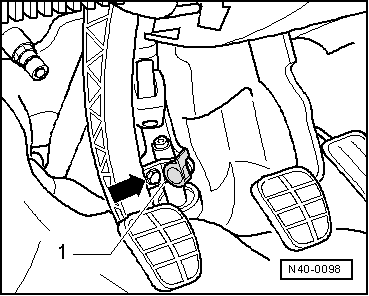
Lift the hinge (1).
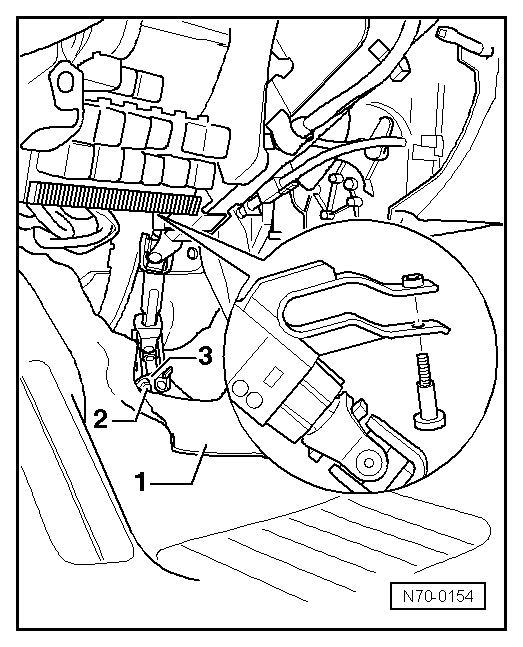
Loosen the lower bolt of the steering column/pedal support block.
Warning
Use safety goggles.
Drill out the rupture bolts (1) or use a chisel, if necessary.
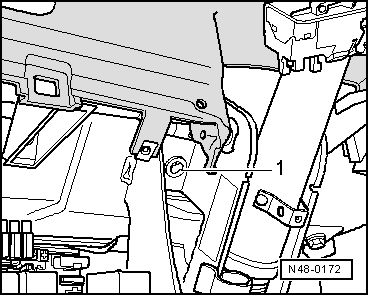
Pull the steering column upwards and remove it.
If necessary, remove the drilled bolts from their support (the second bolt is not shown for clarity).
Parts & tools for this job For 1996 SEAT Alhambra
- TOOLTie rod end toolSearch: tie rod end puller
- TOOLBall joint separatorSearch: ball joint separator
- FLUIDPower steering fluidSearch: SEAT power steering fluid
As an Amazon Associate we earn from qualifying purchases.