
Steering mount and steering column: removing
- Make
- SEAT
- Model
- Alhambra
- Year
- 1996–2010
- Section
- Running gear, axles, steering › Steering mount and steering column: removing
Steering mount and steering column: removing
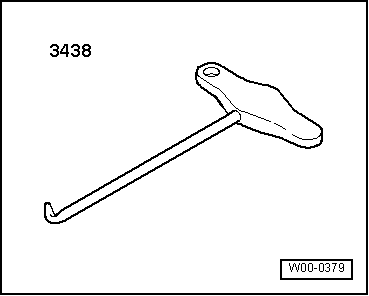
- Hook 3438
The steering mount and the steering column can only be disassembled once removed from the vehicle. Removing and fitting the steering mount and the steering column Chapter “Steering mount and steering column: removing and fitting”.
Separate the upper element from the lower element of the steering mount by pulling both elements in opposite directions.
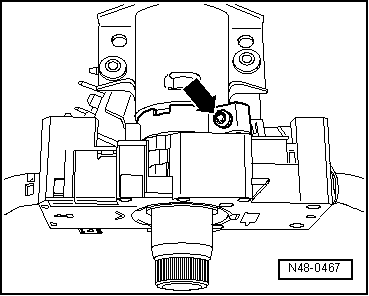
Loosen the bolt of the steering column combination switch (arrow), and remove the combination switch.
Loosen the springs (arrows) with the hook 3438.
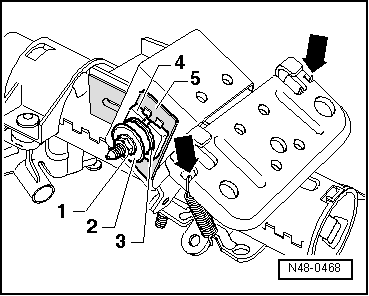
Release the column height and depth adjustment lever.
Loosen the nut (1) and remove the washers (2) and (3).
Remove the spring element (4) and the track (5) from the support block.
Remove the height and depth adjustment lever from the support block and steering mount.
Remove the tracks (1) from the steering mount.
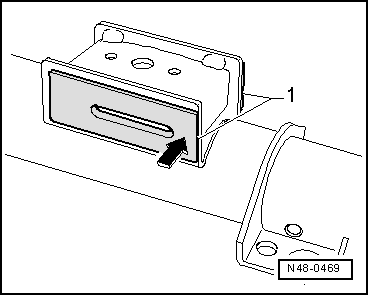
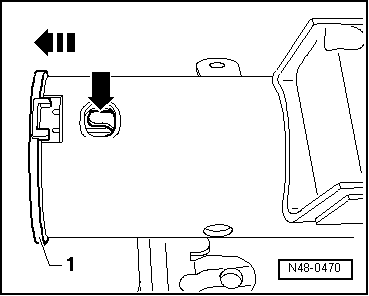
Press the tab (arrow) down, and pull the guide tube (1) out of the steering mount in the direction of the arrow.
Parts & tools for this job For 1996 SEAT Alhambra
- TOOLTie rod end toolSearch: tie rod end puller
- TOOLBall joint separatorSearch: ball joint separator
- FLUIDPower steering fluidSearch: SEAT power steering fluid
As an Amazon Associate we earn from qualifying purchases.