
Navigation system, removing and installing
- Make
- SEAT
- Model
- Toledo
- Year
- KG, 2012–2019
- Section
- Communication › Navigation system, removing and installing
‹ Prev Radio navigation system “SEAT Media System 2.2”Next › Plug connections on the navigation system
InfotainmentNavigation system, removing and installing
Navigation system, removing and installing
Note
- The part number for the complete navigation system is indicated on a sticker on the housing of the navigation system.
Radio: turn off all electrical devices and remove ignition key.
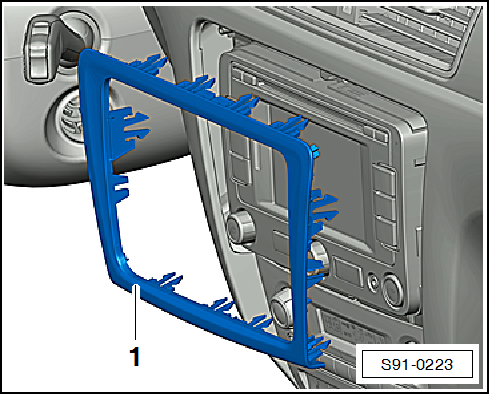
Carefully release the cover frame of the navigation system using the disassembly wedge 3409.
Remove bolts (arrows) (1.5 Nm).
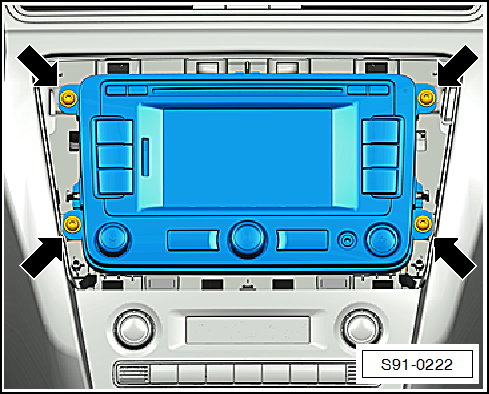
Pull the navigation system out of the dash panel.
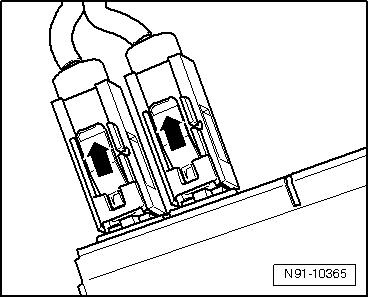
Compress plug catch (arrows).
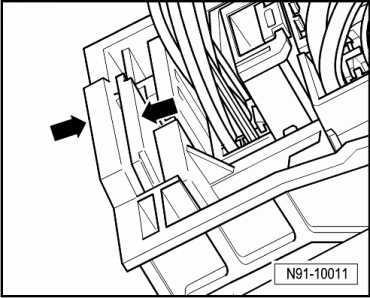
Open catch clamp (arrow) and disconnect plug.
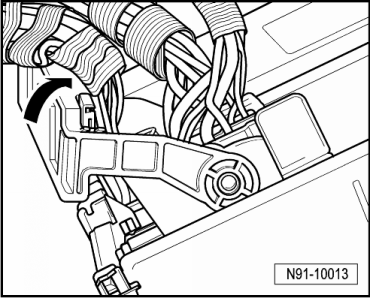
Release plug of antenna socket (arrows) and disconnect.
Installation is carried out in reverse order, noting the following:
Note
- When inserting into the dash panel on no account press on the display or on the operating buttons otherwise the navigation system may be damaged.
If the navigation system was replaced:
Enter the safety code Chapter “Electronic anti-theft coding” and code the navigation Vehicle diagnostic tester
‹ Prev Radio navigation system “SEAT Media System 2.2”Next › Plug connections on the navigation system
Parts & tools for this job For 2012 SEAT Toledo
- TOOLTorque wrenchSearch: 3/8 inch torque wrench
- TOOLSocket setSearch: socket set metric
- BOOKHaynes manualSearch: Haynes manual SEAT Toledo
As an Amazon Associate we earn from qualifying purchases.