
Removing and installing MDI power socket (USB and AUX-IN)
- Make
- SEAT
- Model
- Toledo
- Year
- KG, 2012–2019
- Section
- Communication › Removing and installing MDI power socket (USB and AUX-IN)
InfotainmentRemoving and installing MDI power socket (USB and AUX-IN)
Removing and installing MDI power socket (USB and AUX-IN)
Turn off the ignition and all electricity consumers.
Remove the storage compartment in the dash panel on the front passenger side Body Work Rep. gr. 70.
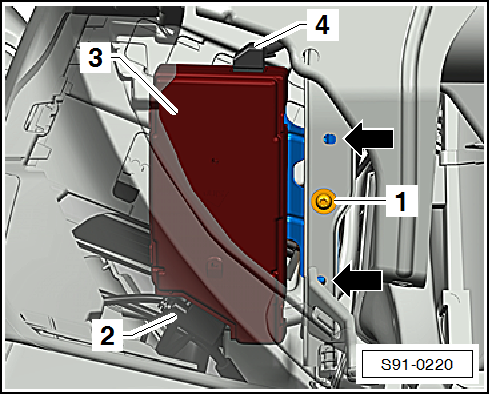
Disconnect plug (2) from control unit for multimedia system J650.
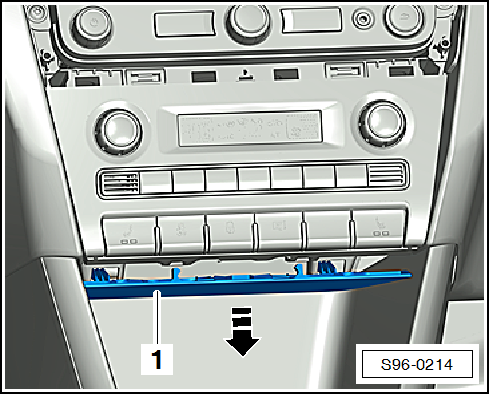
Lever off the cover (1) using the disassembly wedge 3409 (arrow).
Release the MDI power socket (USB and AUX-IN) (2) from the catch pegs and push it out (arrow).
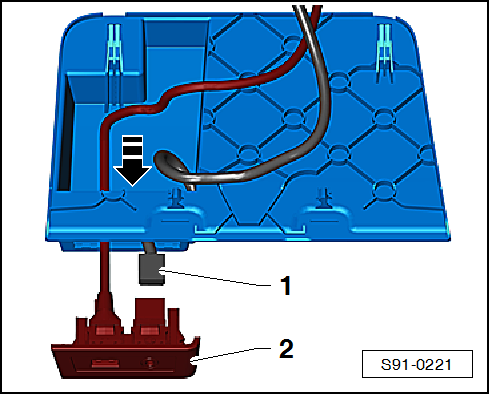
Remove the plug (1).
Parts & tools for this job For 2012 SEAT Toledo
- TOOLTorque wrenchSearch: 3/8 inch torque wrench
- TOOLSocket setSearch: socket set metric
- BOOKHaynes manualSearch: Haynes manual SEAT Toledo
As an Amazon Associate we earn from qualifying purchases.