
Removing and installing brake pads
- Make
- Skoda
- Model
- Citigo
- Year
- NF, 2012 on
- Section
- Brake systems › Removing and installing brake pads
Removing and installing brake pads
- Piston jig T10145
Remove wheels.
Remove cover caps.
Unscrew and remove both guide pins (arrows) from brake caliper.
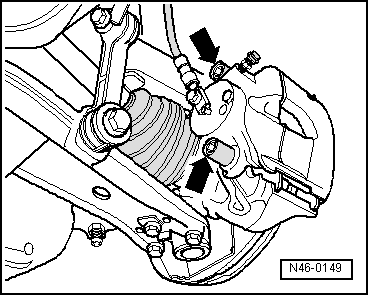
Remove brake caliper and secure with wire so that weight of brake caliper does not strain or damage brake hose.
Take the brake pads out of the brake caliper.
Warning
Do not blow out brake system with compressed air; the resulting dust constitutes a health hazard!
Thoroughly clean guiding surface for brake pads on brake carrier and remove corrosion.
Clean the brake caliper.
Lightly grease guiding surface for brake pads on brake carrier with lithium grease G 052150 A2.
Push back piston.
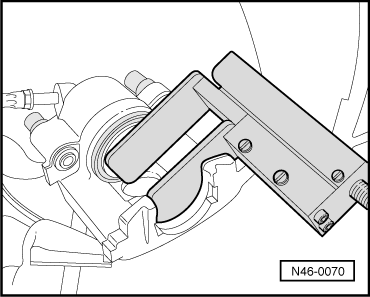
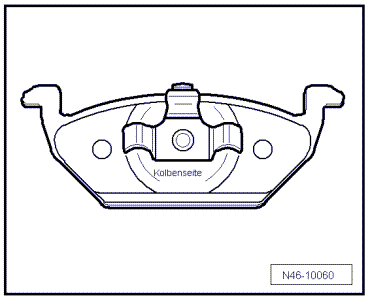
Insert brake pads into brake caliper and piston.
Insert brake pad with „piston side“ written on supporting plate into brake piston.
Install brake caliper with brake pads on wheel bearing housing.
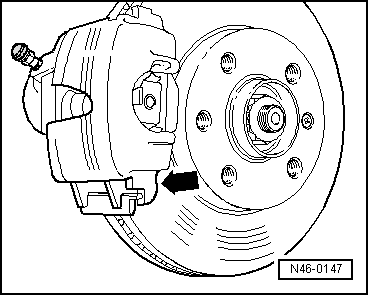
First position brake caliper at bottom (arrow) of brake carrier.
- The brake caliper pin must be located behind the guide of the brake carrier!
Bolt brake caliper to brake carrier with both guide pins.
Insert both caps.
Fit wheels.
Tightening torque of wheel bolts Axles, steering Rep. gr. 44.
Note
- After every brake pad change, depress brake pedal firmly several times with vehicle stationary, so that brake pads are properly seated in their normal operating position.
- Check brake fluid level after replacing the brake pads.
| Tightening torque: | |
|---|---|
| Guide bolts to brake carrier | 30 Nm |
Parts & tools for this job For 2012 Skoda Citigo
- PARTBrake padsSearch: Skoda Citigo 2012 brake pads
- TOOLCaliper piston rewind toolSearch: brake caliper piston rewind tool
- FLUIDBrake fluidSearch: brake fluid
As an Amazon Associate we earn from qualifying purchases.