skoda Workshop Repair Guides

Skoda Workshop Service and Repair Manuals

Repairing the propshaft > < Removing and installing the front flexible disk
Removing and installing flexible disk with oscillation damper (rear flexible disk)
Special tools and workshop equipment required
t  Screw M8 x 80 mm with nut
  Note
Before the removal, mark the position of all parts to each other. Carry out the installation again in the same position, otherwise the imbalance is too great, damages to the bearing and droning noises could occur.
Removing
   
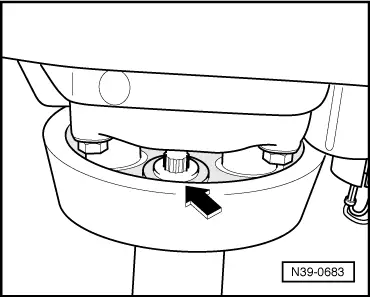
–  Unscrew the flexible disk with oscillation damper from the rear propshaft pipe (only one of the three screws is visible in the illustration -arrow-).
  N39-0683
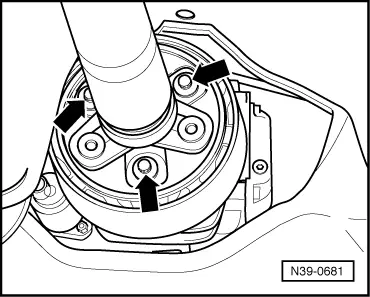
–  Afterwards unscrew the flexible disk from the rear final drive -arrow-.
  N39-0681
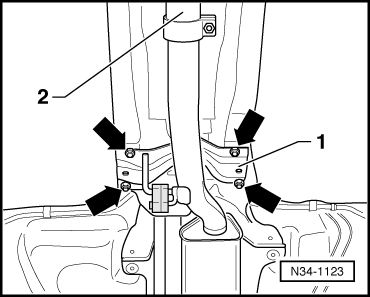
–  Detach bracket -1- above the exhaust system -arrows-.
–  Separate exhaust system at the double clamp → Engine → Rep. Gr.26.
–  Remove front and middle heat shield.
  N34-1123
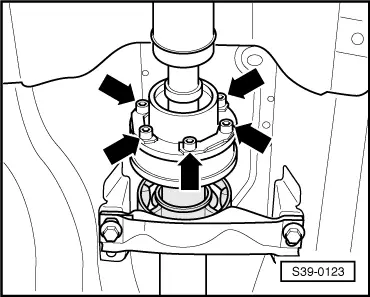
–  Remove the front propshaft pipe from the rear propshaft pipe -arrows-.
  S39-0123
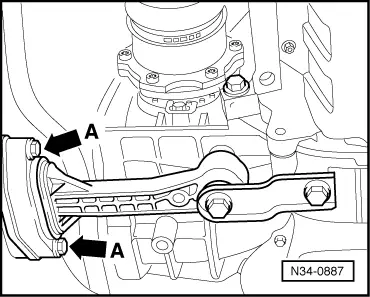
–  Remove pendulum support from assembly carrier -arrows°A-.
  N34-0887
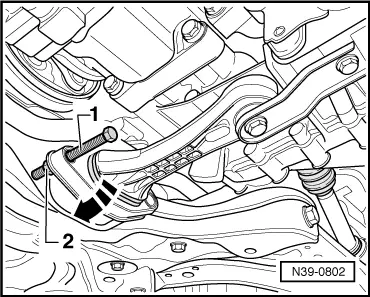
–  Carefully press the engine/gearbox forwards and while doing so align the pendulum support in front of the assembly carrier -arrow-.
–  Secure pendulum support with screw -1- (M8 x 80 mm) and nut -2- at assembly carrier.
  Note
t  If necessary eliminate paint damage as follows:
t  Remove grease residues with Nitro-diluent -L 001 600 -.
t  Apply 2-component acrylic paint -ALN 769 041- with hardener -ALZ 009 001-.
  N39-0802
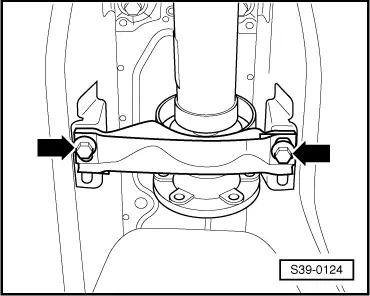
–  Unscrew intermediate bearing of propshaft from the vehicle -arrows-.
–  Afterwards, push the rear propshaft pipe over the front propshaft pipe until the flexible disk with oscillation damper can be removed.
Install
Installation is performed in the reverse order, pay attention to the following points:
  Note
  S39-0124
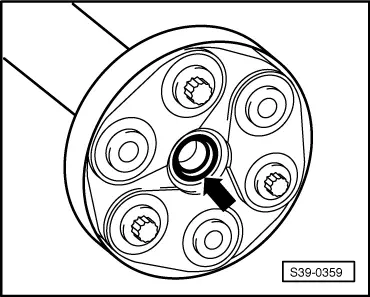
t  The gasket rings -arrow- in the flanges of the propshaft must not be damaged when removing and installing.
t  In case of damaged gasket rings the propshaft must be replaced.
t  Push propshaft horizontally onto the centering stud.
Fitting position of the flexible disk with oscillation damper
t  Three protruding bushings at the Haldex coupling flange and the propshaft flange grip into the location holes of the flexible disk with oscillation damper.
  S39-0359
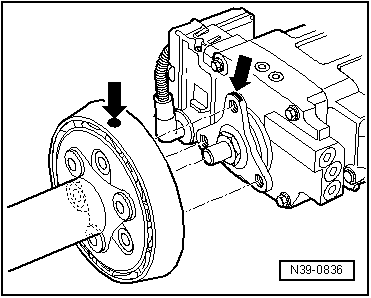
–  Install the propshaft on the flange of the Haldex coupling in such a way that the markings -arrows- are on the same line.
  N39-0836
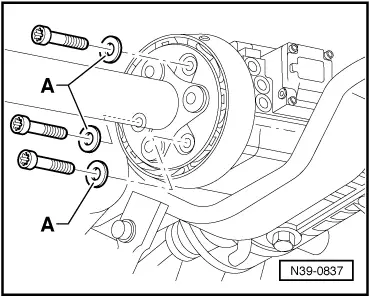
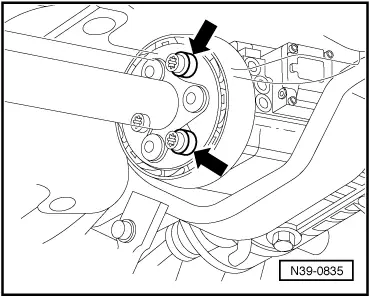
As of 04.00, balancing washers and new screws for the propshaft are inserted on the flange of the Haldex coupling -arrows-.
Two new screws can be fitted with one balancing washer each.
  N39-0835
In order to avoid droning noises, if necessary the balancing washers must be repaced with the washers after releasing the screw connections -A-.
Assignment of the washers → Electronic Catalogue of Original Parts.
Fit intermediate bearing stress-free
–  Only screw down intermediate bearing after tightening the propshaft.
–  Align the intermediate bearing in its elongated holes in such a way that the propshaft is not under tension.
–  Align the exhaust system, without tightening → Engine → Rep. Gr.26.
–  Attach the pendulum support to the assembly carrier → Chassis → Rep. Gr.40.
  Note
t  If droning noises occur while driving, the following must be observed:
t  Unscrew the propshaft with the flexible disk from the flange of the Haldex coupling and screw on again offset to a hole.
t  If the droning noises can still be heard, the propshaft must be screwed on once again offset to a hole.
  N39-0837
Tightening torques
ComponentNm
Intermediate bearing to body25
Front to rear propshaft pipe40
Flexible disk to propshaft60
Flexible disk to rear final drive60


Repairing the propshaft > < Removing and installing the front flexible disk