skoda Workshop Repair Guides

Skoda Workshop Service and Repair Manuals

Removing and installing the clutch pedal > < Summary of components - Foot controls
Removing and installing over-centre helper spring (Octavia II)
Special tools and workshop equipment required
t  Release tool -T10178-
Removing
–  Push the driver seat as far as possible towards the rear and position the steering wheel in the highest position.
–  Remove lower part of the dash panel insert on the driver's side → Body Work; Rep. gr.70.
   
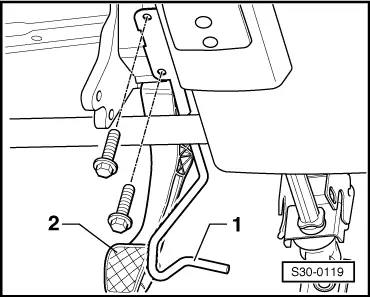
–  Unscrew crash strut -1- in front of the clutch pedal -2-.
  S30-0119
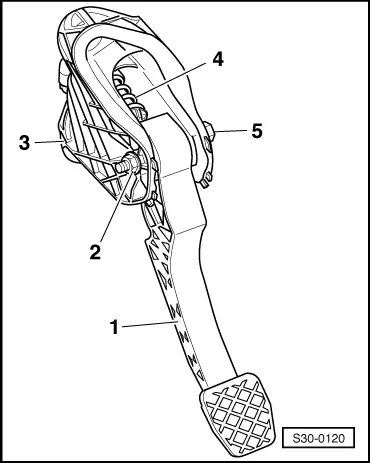
–  Unscrew clutch pedal -1- from bracket -3-, to this end release nut -2- and pull out screw -5-.
  Note
The clutch pedal remains hanging on the actuating rod of the master cylinder.
–  Swivel clutch pedal slightly downwards and remove over-centre helper spring -4- from the bracket.
Install
Installation is performed in the reverse order, pay attention to the following points:
  Note
Replace self-locking nut.
  S30-0120
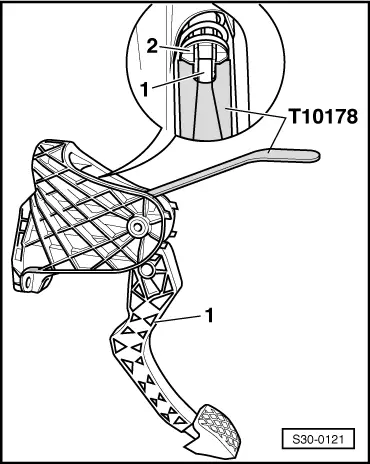
–  Insert over-centre helper spring -2- from above into the bracket and while doing so hold the spring end in the fitting position using the release tool -T10178-.
–  Insert bearing bolt of clutch pedal into the step bearing of the over-centre helper spring.
–  Press on clutch pedal -1- slightly, slide through screw and tighten self-locking nut.
  S30-0121
–  Screw on crash strut -1- in front of the clutch pedal -2-.
–  Install lower part of the dash panel insert on the driver's side → Body Work; Rep. gr.70.
  S30-0119
Tightening torques
ComponentNm
Clutch pedal to bearing bracket → Chapter Pos. 16
Crash strut to bracket/steering column9


Removing and installing the clutch pedal > < Summary of components - Foot controls