
Removing and installing
- Make
- Skoda
- Model
- Rapid
- Year
- NA, 2011 on
- Section
- Body Work › Removing and installing
Bonnet, flaps, cab, central lockingRemoving and installing
Removing and installing
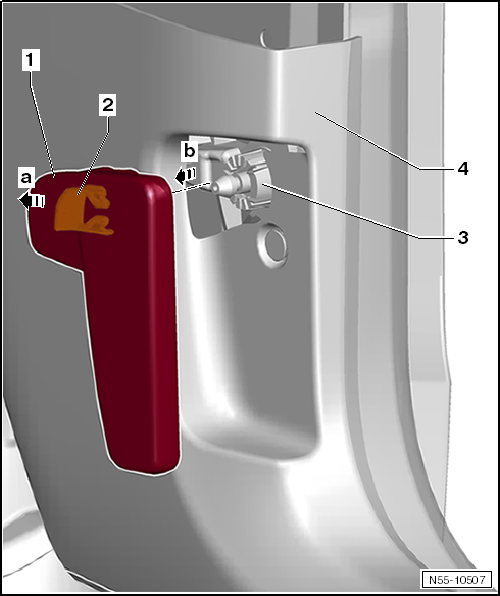
Tighten the operating lever (1) and unlock the front flap.
Fit a small screwdriver into the gap between the operating lever (1) and the retaining clip (2).
Lever the retaining clip (2) out of the operating lever (Pos.1) (arrow) and detach the operating lever from the bearing bracket (3).
When carrying out further work on the bearing bracket (3), remove the bottom A pillar trim panel (4).
- (4) is installed.
Push the retaining clip (2) into the operating lever.
Press the operating lever (1) onto the bearing bracket (3).
Parts & tools for this job For 2011 Skoda Rapid
- TOOLTrim removal tool kitSearch: trim removal tool kit
- PARTTouch-up paintSearch: Skoda touch up paint
- PARTPanel clip assortmentSearch: Skoda panel clips assortment
As an Amazon Associate we earn from qualifying purchases.