Workshop Manuals Factory service & repair Vauxhall
01 General Vehicle Information02 Maintenance, Body and Chassis Sheet Metal Parts, Frame03 Paint04 Body Equipment05 Heating, Ventilation, Air Conditioning (HVAC)06 Front Wheel Suspension, Wheels and Tyres07 Rear Axle and Rear Wheel Suspension08 Brakes09 Engine and Engine Aggregates10 Clutch and Transmission11 Fuel and Exhaust System12 Steering13 Electrical Equipment and Instruments14 Accessories
Vauxhall Astra G13 · Electrical Equipment and Instruments
13 · Electrical

Fuse Box, Replace

Make
Vauxhall
Model
Astra G
Section
Fuse Box › Repair Instructions › Fuse Box, Replace
Electrical Equipment and InstrumentsFuse Box, Replace

Fuse Box, Replace

  Remove

Multitimer – see operation "Multitimer, Remove and Install".

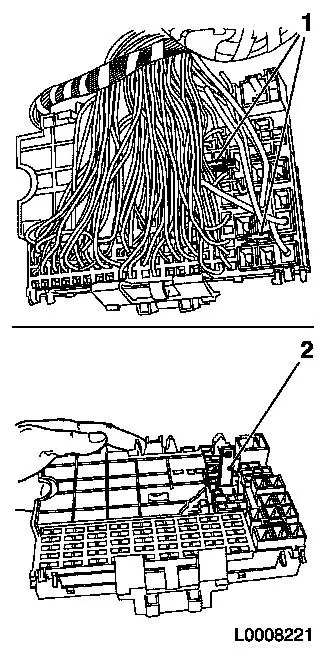
Unclip rear fuse box cover. Expose wiring harness (remove cable ties and insulating tape). Pull out retaining pins (1). Pull out all fuses and relays.

Note:   After releasing from the old fuse box, insert cable immediately into the new fuse box in order to prevent positioning errors.

Release cables one after the other from the old fuse box: MKM-923-1, for narrow lock opening, MKM-923-3, for contacts with double lock and MKM-923-5, for contacts with wide lock. Use Locking Tool KM-6128 to install the contacts in the new fuse box.

Note:   Before installing the plug contacts, slightly bend open locking tabs to ensure secure seating in the fuse box.

Insert KM-6128 (2) in new fuse box to enable the plugs to be inserted!

Object Number: 2412038  Size: DEFAULT

  Install

Locking pins, remove KM-6128, secure wiring harness, insert fuses, rear fuse box cover, multitimer, function check.


Related Literature Units
-
-
-

Parts & tools for this job For Vauxhall Astra

Links open Amazon search results in a new tab. As an Amazon Associate I earn from qualifying purchases.