BrakesRear Wheel Brake, Adjust
|
Rear Wheel Brake, Adjust
Note: Due to the
automatic readjustment, adjustment of the drum brake is only
necessary after disassembly of the brake, replacement of the drum
hub or replacement of the brake shoe. Ensure that parking brake
lever is released prior to adjustment. If the braking effect on the
wheels is not equal, the components of the drum brake and the
parking brake cables must be checked and replaced if necessary.
 Remove Remove
| 1. |
Detach rear wheel
| • |
Mark position in respect of drum hub
|
| • |
Detach drum hub/brake drum
- For Model F 08 F 08 & W5L, F 68

- For model F 06, F 25
|
|
| 2. |
Adjusting unit (arrow) must be turned so that it is completely
closed
Note: Star wheel must
not stick at the end of the adjustment unit
|
|
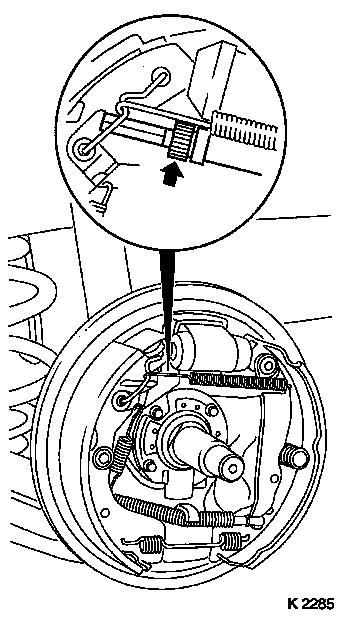
|
 Install
| 3. |
Install drum hub/brake drum
- For Model F 08 F 08 & W5L, F 68
- For model F 06, F 25
|
| 4. |
Fit rear wheel - tightening torque 110
Nm
|
| 5. |
Adjusting the Drum Brake
Note: Actuate foot
brake at least 20 times until adjustment lever cannot be heard to
skip, since the brake shoes will then be resting against the brake
drum.
|
| 7. |
Perform short run-in drive of approx. 300 m at low speed
against lightly applied parking brake.
|
|
|
08 Brakes