
Removing and installing front handbrake cable
- Make
- Volkswagen
- Model
- Amarok 2H
- Year
- 2010–2020
- Section
- Handbrake › Removing and installing front handbrake cable
Brake systemsRemoving and installing front handbrake cable
Removing and installing front handbrake cable
Remove handbrake lever → Chapter.
Raise vehicle MaintenanceBookletDescriptions of work; Raising vehicle.
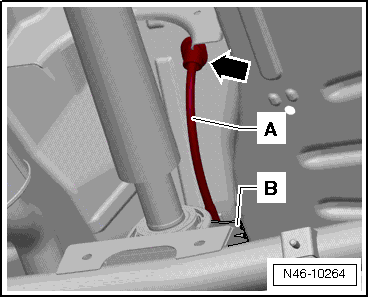
Unhook front handbrake cable (A) from bracket (B) and pull out downwards with grommet (arrow).
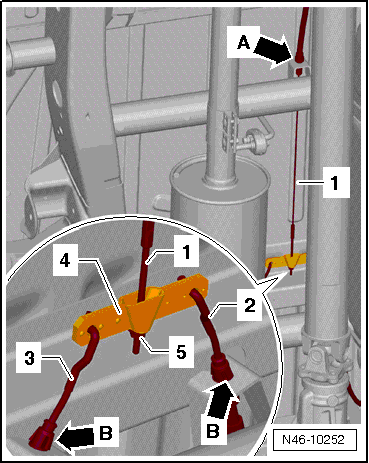
Unscrew adjustment nut (5) from front handbrake cable (1).
Note
- Handbrake cables at rear left (2) and right (3) remain in compensator (4).
Using pliers, press together both locking projections on cable support bracket (arrow A) of front handbrake cable, and remove handbrake cable (1) from cable support bracket.
Installation is performed in reverse sequence; note the following:
Locking projections on cable support bracket (arrow A) of front handbrake cable must be horizontal after installation.Install handbrake lever → Chapter.
Adjust handbrake → Chapter.
- Chapter“Assembly overview - parking brake”
- Installing centre console General body repairs, interiorRep. gr.68Compartments, covers and trims; Installing centre console.
Parts & tools for this job For 2010 Volkswagen Amarok
- PARTBrake padsSearch: Volkswagen Amarok 2010 brake pads
- TOOLBrake bleeder kitSearch: one man brake bleeder kit
- FLUIDBrake fluidSearch: brake fluid
As an Amazon Associate we earn from qualifying purchases.