
Removing and installing rear handbrake cable
- Make
- Volkswagen
- Model
- Amarok 2H
- Year
- 2010–2020
- Section
- Handbrake › Removing and installing rear handbrake cable
Removing and installing rear handbrake cable
Raise vehicle MaintenanceBookletDescriptions of work; Raising vehicle.
Remove rear wheels.
Unscrew adjustment nut (5) from front handbrake cable (1).
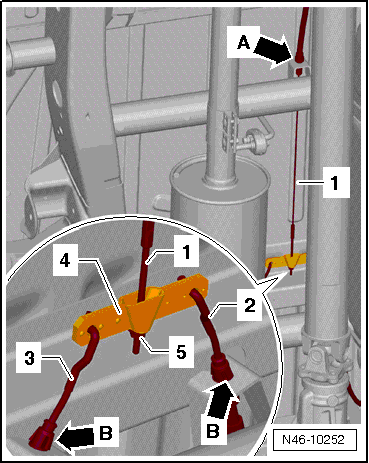
Unhook corresponding handbrake cable at rear left (2) or right (3) from compensator (4).
Using pliers, press together both locking projections on cable support bracket (arrow B) of corresponding rear handbrake cable, and remove handbrake cable from cable support bracket.
Resetting brake and removing brake drum → Chapter.
Push spring (1) of handbrake cable back in (direction of arrow) and hold it with pliers.
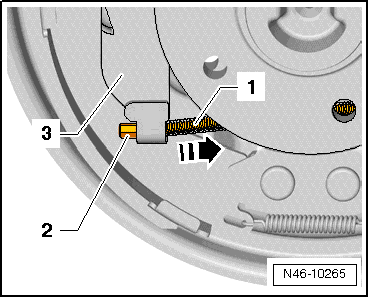
Unhook handbrake cable (2) from lever (3).
Remove cable ties (arrows) for speed sensor wire from handbrake cable.
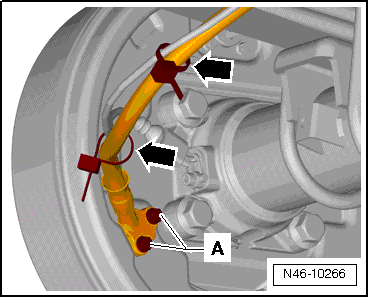
Remove bolts (A) and take handbrake cable off brake carrier.
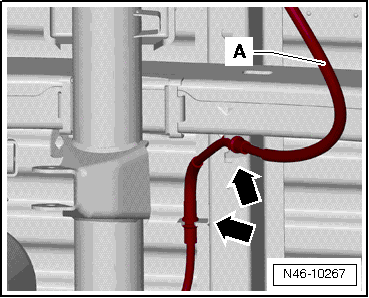
Then pull handbrake cable (A) out of brackets on frame, pull out and remove body (arrows).
Installation is performed in reverse sequence; note the following:
Handbrake cable (A) must be within support plate bracket (B).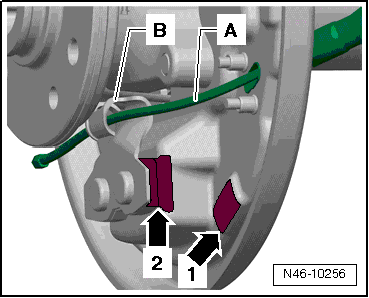
Note
- For reasons of clarity, brake shoes are removed in illustration.
- (Arrow 1) and (arrow 2) are not relevant.
Tighten bolts (A) to specified torque.
Fit new cable ties (arrows) for speed sensor wire on handbrake cable.
Take handbrake cable that is to be installed at rear left (2) or right (3) and hook it into compensator (4).
Connect compensator (4) to front handbrake cable (1).
Adjust handbrake → Chapter.
- Chapter“Assembly overview - parking brake”
- Wheels, tyres; Specified torque for wheel bolts Rep. gr.44Specified torque for wheel bolts.
Parts & tools for this job For 2010 Volkswagen Amarok
- PARTBrake padsSearch: Volkswagen Amarok 2010 brake pads
- TOOLBrake bleeder kitSearch: one man brake bleeder kit
- FLUIDBrake fluidSearch: brake fluid
As an Amazon Associate we earn from qualifying purchases.