
Removing and installing hazard warning light button E229
- Make
- Volkswagen
- Model
- Caddy Mk4
- Year
- 2015–2020
- Section
- Controls › Removing and installing hazard warning light button E229
‹ Prev Removing and installing buttons in centre of dash panelNext › Removing and installing glove compartment light switch E26
Electrical systemRemoving and installing hazard warning light button E229
Removing and installing hazard warning light button E229
Switch off ignition and all electrical loads, and pull out ignition key.
Remove centre vents General body repairs, interiorRep. gr.70Dash panel; Removing and installing dash panel vents.
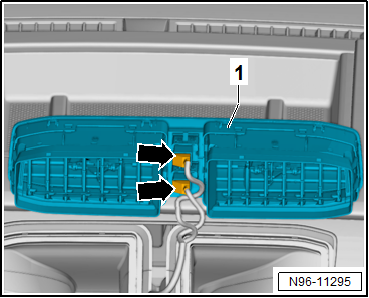
Release and separate electrical connectors (arrows) and remove dash panel vent (1).
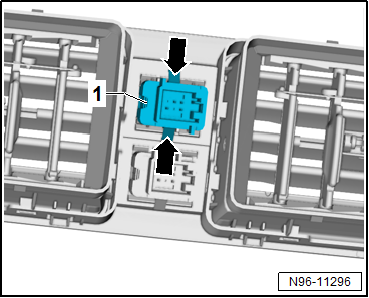
Release locking lugs (arrows) and remove button (1) from mounting frame.
Installation is carried out in the reverse sequence.
Test functionality.
‹ Prev Removing and installing buttons in centre of dash panelNext › Removing and installing glove compartment light switch E26
Parts & tools for this job For 2015 Volkswagen Caddy
- TOOLDigital multimeterSearch: automotive digital multimeter
- PARTAssorted fuse kitSearch: car fuse assortment kit
- TOOLWire crimper and connector kitSearch: wire crimper connector kit
As an Amazon Associate we earn from qualifying purchases.