
Removing and installing driver side switch module
- Make
- Volkswagen
- Model
- CC Passat CC and CC
- Year
- 2008–2016
- Section
- Controls › Removing and installing driver side switch module
‹ Prev Removing and installing glove compartment light switch E26Next › Removing and installing front left window regulator switch E40
Electrical systemRemoving and installing driver side switch module
Removing and installing driver side switch module
The following components (depending on level of equipment) are integrated into the driver side switch module:
- Front left window regulator switch E40
- Rear left window regulator switch, in driver door E53
- Rear right window regulator switch, in driver door E55
- Front right window regulator switch, in driver door E81
- Childproof lock button E318
- Button illumination bulb L76
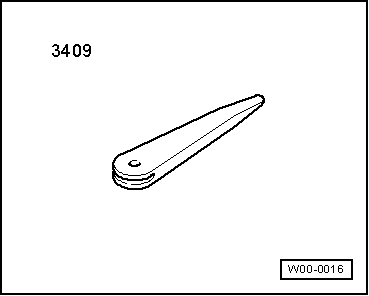
Note
- When removing and installing components that are in view (switches, covers, trim and so on), mask off areas in which tools (removal wedge 3409, screwdriver) are used to lever out those components using commercially available tape.
Switch off ignition and all electrical consumers and disengage ignition key or ignition and starter button by moving to position 0 (pre-detent).
Carefully lever out handle trim (1) on locking lug in direction of (arrow) using removal wedge 3409 or a screwdriver.
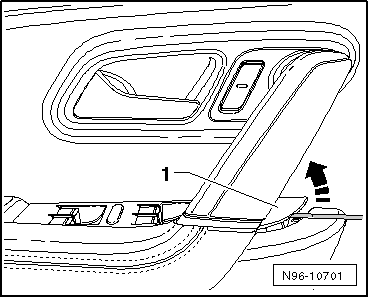
Pull handle trim forwards and remove it from door trim, taking connected wiring length into consideration.
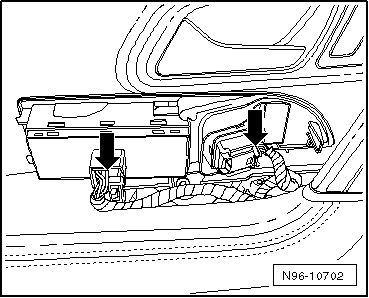
Release and disconnect connectors (arrows) and remove handle trim.
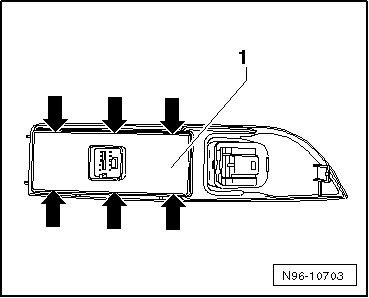
Release locking lugs (arrows) and remove switch module (1) from handle trim.
Install in reverse order of removal.
‹ Prev Removing and installing glove compartment light switch E26Next › Removing and installing front left window regulator switch E40
Parts & tools for this job For 2008 Volkswagen CC
- TOOLOBD2 scannerSearch: OBD2 scanner
- TOOLDigital multimeterSearch: automotive digital multimeter
- TOOLBack-probe test leadsSearch: back probe test leads
As an Amazon Associate we earn from qualifying purchases.