
Removing and installing electromechanical parking brake button E538 » 01/2012
- Make
- Volkswagen
- Model
- CC Passat CC and CC
- Year
- 2008–2016
- Section
- Controls › Removing and installing electromechanical parking brake button E538 » 01/2012
‹ Prev Removing and installing electromechanical parking brake button E538Next › Removing and installing electromechanical parking brake button E538 » 01/2012
Electrical systemRemoving and installing electromechanical parking brake button E538 » 01/2012
Removing and installing electromechanical parking brake button E538 ▶ 01/2012
The following components are integrated into the electromechanical parking brake button E538:
- Electromechanical parking brake warning lamp K213
- Auto-hold warning lamp 2 K238
Note
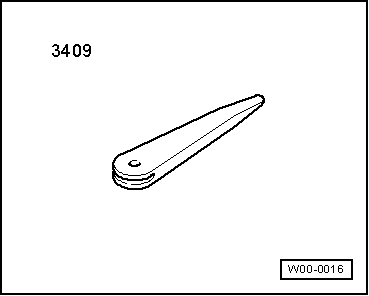
- When removing and installing components that are in view (switches, covers, trim and so on), mask off areas in which tools (removal wedge 3409, screwdriver) are used to lever out those components using commercially available tape.
Switch off ignition and all electrical consumers and disengage ignition key or ignition and starter button by moving to position 0 (pre-detent).
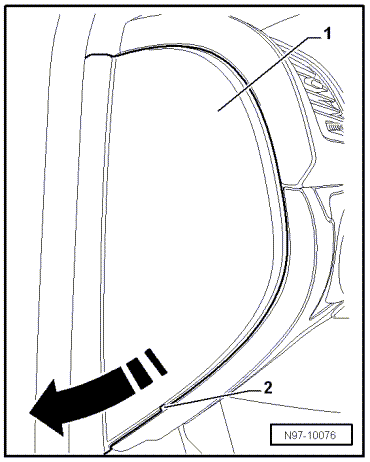
Remove side cover (1) of dash panel by inserting removal wedge 3409 or a suitable screwdriver in recess (2) and levering off side cover (1) in direction of (arrow).
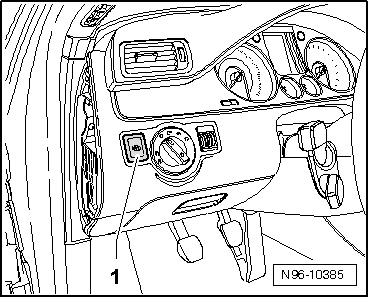
Push on back of electromechanical parking brake button E538(1) to remove it from dash panel.
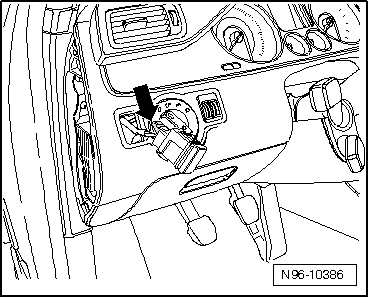
Unclip connector (arrow) and disconnect.
Install in reverse order of removal.
‹ Prev Removing and installing electromechanical parking brake button E538Next › Removing and installing electromechanical parking brake button E538 » 01/2012
Parts & tools for this job For 2008 Volkswagen CC
- PARTBrake padsSearch: Volkswagen CC 2008 brake pads
- TOOLBrake bleeder kitSearch: one man brake bleeder kit
- FLUIDBrake fluidSearch: brake fluid
As an Amazon Associate we earn from qualifying purchases.