
Removing and installing brake pads
- Make
- Volkswagen
- Model
- Citi Golf South Africa
- Year
- 1984–2009
- Section
- Final drive, Differential › Removing and installing brake pads
Removing and installing brake pads
Remove wheels.
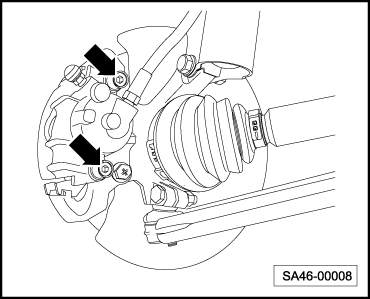
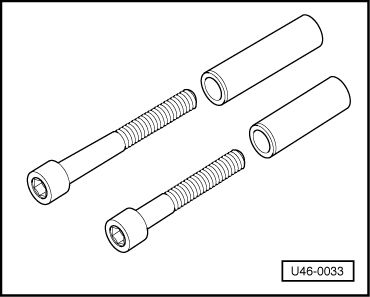
Unscrew upper and lower guide bolts (arrows).
Note
- The top bolt is longer than the bottom bolt.
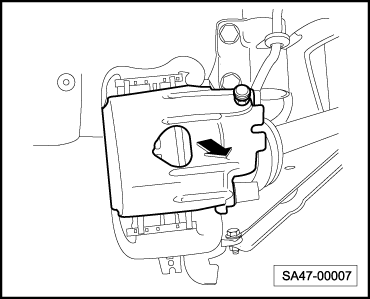
Remove brake piston housing (arrow).
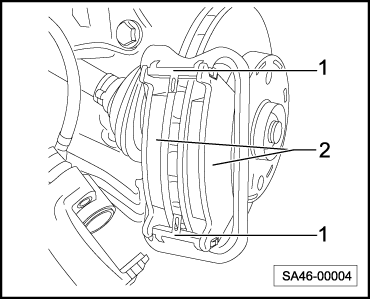
Remove brake pads (1) and anti-rattle clips (2) from pad carrier.
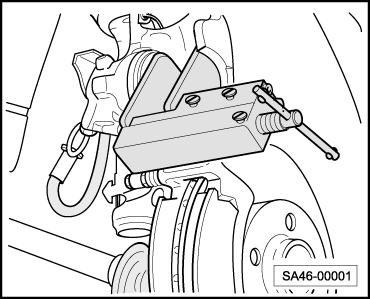
Press the piston back into the piston housing.
Warning Before pressing the piston back, draw off the brake fluid from the master cylinder. Otherwise fluid may leak out causing damage, especially if additional fluid has been added in the meantime.
To draw off the fluid, only use a brake bleeder bottle or a plastic bottle which has only contained brake fluid. Brake fluid is poisonous and must on no account be sucked out with a hose.
Warning With vehicle standing still, fully depress brake pedal a number of times so that the brake pads move into appropriate operating positions.
Fit anti-rattle clips on carrier before installing the pads.
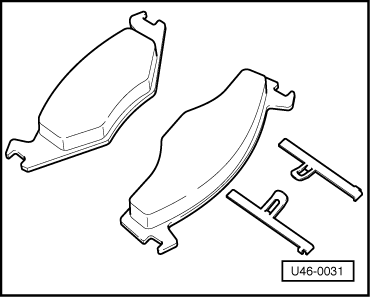
Install brake pads.
Insert caliper only so far that the socket head screws can be started. If the caliper is pressed past this point the retaining springs can be distorted. This will then cause noises when braking.
Install socket head screws with guide sleeves. Tightening torque 40 Nm.
Parts & tools for this job For 1984 Volkswagen Citi Golf
- PARTBrake padsSearch: Volkswagen Citi Golf 1984 brake pads
- TOOLCaliper piston rewind toolSearch: brake caliper piston rewind tool
- FLUIDBrake fluidSearch: brake fluid
As an Amazon Associate we earn from qualifying purchases.