
Command keys (version 1) - remove and install
- Make
- Volkswagen
- Model
- Fox Brazil: Fox, SpaceFox, CrossFox
- Year
- 2010–2015
- Section
- Multifunction steering wheel › Command keys (version 1) - remove and install
Command keys (version 1) - remove and install
Turn off the ignition and all electrical devices, then remove the ignition key.
Disconnect the Battery AElectrical devicesRep. gr.27 Starter motor, alternator, battery.
Remove the Driver side airbag igniter N95Body - Internal assembly workRep. gr.69Protection of occupants or remove the Horn plate HChassis, axels, steeringRep. gr.48 Steering.
Remove the fastening screw (arrow) from the Multifunction buttons on left in steering wheel E440.
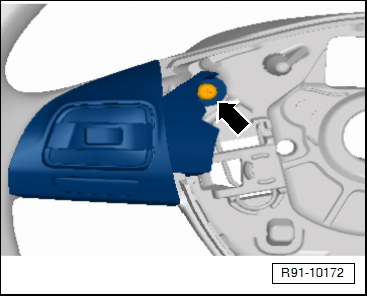
Remove the fastening screw (arrow) from the Multifunction buttons on right in steering wheel E441.
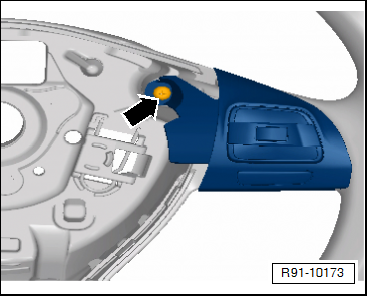
Disconnect the connectors (arrows) of the Multifunction buttons on right in steering wheel E441(1)and Multifunction buttons on left in steering wheel E440(2) and remove them from the steering wheel (3).
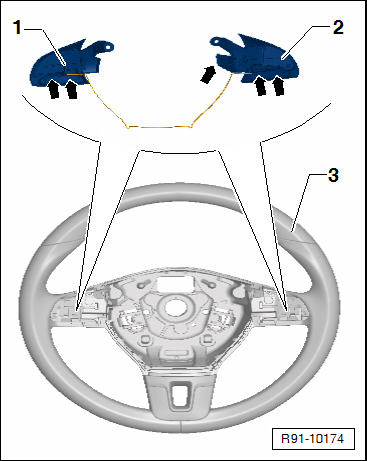
Installation is performed in reverse sequence to the removal, considering the following:
Note
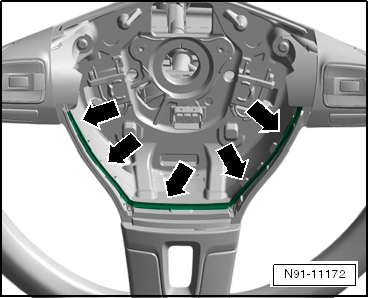
- Make sure that the cable is installed in the steering wheel, between the two Multi-function controls , as illustrated in the figure (arrows).
Parts & tools for this job For 2010 Volkswagen Fox
- TOOLTie rod end toolSearch: tie rod end puller
- TOOLBall joint separatorSearch: ball joint separator
- FLUIDPower steering fluidSearch: Volkswagen power steering fluid
As an Amazon Associate we earn from qualifying purchases.