
Removing and installing headlight range control regulator E102
- Make
- Volkswagen
- Model
- Golf Mk7 Estate
- Year
- 2013–2020
- Section
- Controls › Removing and installing headlight range control regulator E102
‹ Prev Removing and installing rotary light switch EX1Next › Removing and installing button for Charisma E735
Electrical systemRemoving and installing headlight range control regulator E102
Removing and installing headlight range control regulator E102
Switch off ignition and all electrical consumers.
Remove ignition key, if inserted.
Remove rotary light switch EX1Chapter.
Remove bolt (1).
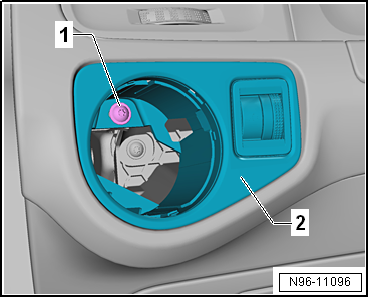
Remove trim (2) together with headlight range control regulator E102 from dash panel.
Release and detach connectors.
Press fasteners on headlight range control regulator E102(1) in direction of arrow (A).
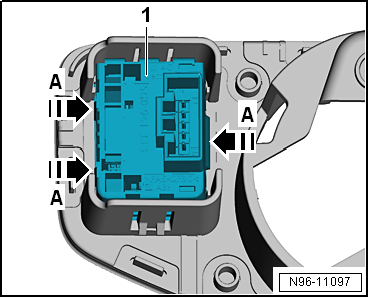
Push headlight range control regulator E102(1) out of trim.
Installation is carried out in the reverse sequence.
Test functionality.
‹ Prev Removing and installing rotary light switch EX1Next › Removing and installing button for Charisma E735
Parts & tools for this job For 2013 Volkswagen Golf
- PARTReplacement bulbsSearch: Volkswagen Golf 2013 bulbs
- TOOLDigital multimeterSearch: automotive digital multimeter
As an Amazon Associate we earn from qualifying purchases.