
Removing and installing switch module in centre console EX23/ EX30
- Make
- Volkswagen
- Model
- Golf Mk7 Estate
- Year
- 2013–2020
- Section
- Controls › Removing and installing switch module in centre console EX23/ EX30
Removing and installing switch module in centre console EX23/ EX30
Special tools and workshop equipment requiredRemoval wedge 3409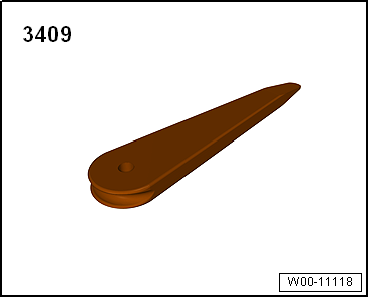
On the left and right next to the gear lever, there can be the following buttons in two button modules, depending on the equipment level. The procedure for removal and installation of the button modules is identical for both modules and is therefore described for one of them only. A removed button module cannot be dismantled further.
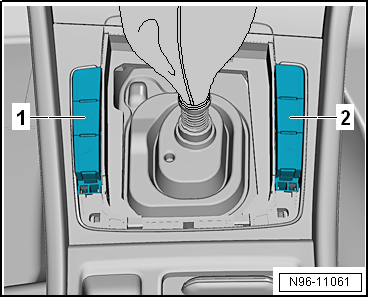
Switch module 1 in centre console EX23
- Button for driver profile selection E735
- Start/stop operation button E693
- TCS and ESP button E256
Switch module 2 in centre console EX30
- Parking aid button E266
- Park assist steering button E581
Warning Danger of damage to component surfaces.
- When using leverage tools, mask visible areas of the component with commercially available adhesive tape.
Switch off ignition and all electrical consumers.
Remove ignition key, if inserted.
Removing selector level gaiter Rep. gr.34Selector mechanism; Removing and installing selector lever handle.
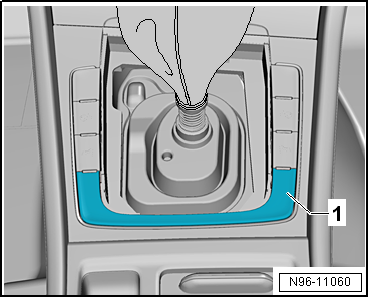
Carefully lever off trim (1) upwards using removal wedge 3409.
Lift driver side button module (1) or front passenger side button module (2) out of centre console.
Release connector (1) and disconnect.
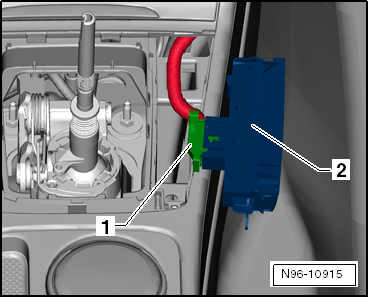
Remove button module (2).
Installation is carried out in reverse order of removal.
Test functionality.
Parts & tools for this job For 2013 Volkswagen Golf
- TOOLOBD2 scannerSearch: OBD2 scanner
- TOOLDigital multimeterSearch: automotive digital multimeter
- TOOLBack-probe test leadsSearch: back probe test leads
As an Amazon Associate we earn from qualifying purchases.