
Service interval display: Resetting
- Make
- Volkswagen
- Model
- Golf Mk6
- Section
- Differential › Service interval display: Resetting
Service interval display: Resetting
Resetting service interval display using vehicle diagnostic testerChapter
Resetting service interval display without vehicle diagnostic testerChapter
Note
- It is also possible to reset the service interval display manually. If the service interval display is reset manually, it must be taken into account that the vehicle is coded to non-flexible intervals, i.e. every 1,000 km or 30 days. This also modifies the adjusting canal for oil quality.
Resetting service interval display using vehicle diagnostic tester
Connect diagnostic testerChapter.
Switch on ignition.
Select »Guided functions«.
If the display is not as shown in the procedure: Operating instructions for vehicle diagnostic tester
Select one after another:
- Brand
- Type
- Model year
- Engine code
Confirm vehicle identification.
Select one after another:
- “Dash panel insert.”
- “Resetting the service interval display”
Perform adaptation according to the information of “Guided functions”.
Select »GoTo« and press »End«.
Switch off ignition and separate diagnosis connections.
Switch on ignition.
After the ignition is switched on, the type of service is no longer displayed in the distance display in the dash panel insert.
Resetting service interval display without vehicle diagnostic tester
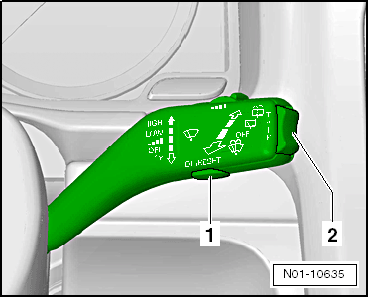
Select “Settings” menu using rocker on windscreen wiper lever, or
Select menu “Settings” using buttons in the multifunction steering wheel.
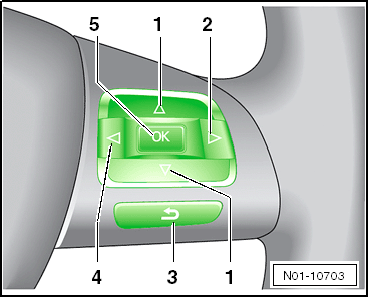
Mark menu option “Reset” in sub-menu “Service” and reset service interval display by pressing OK button (1) in windscreen wiper lever or in multi-function steering wheel (5).
Confirm resulting security question again with OK button.
With ignition switched off, press and hold button (3).
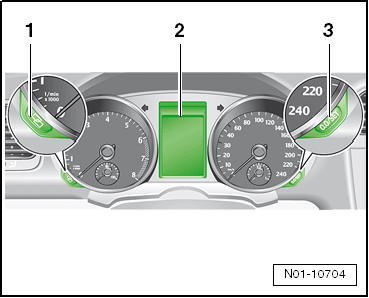
Switch on ignition.
Release button (3) and press clock setting button (1) once briefly.
The service interval display is now in the resetting mode.
After a short time the display switches back to the original display.
Parts & tools for this job For Volkswagen Golf
- PARTOil filterSearch: Volkswagen Golf oil filter
- TOOLOil filter wrenchSearch: oil filter wrench
- FLUIDEngine oilSearch: Volkswagen Golf engine oil
As an Amazon Associate we earn from qualifying purchases.