
Clock and date: setting
- Make
- Volkswagen
- Model
- Golf Mk7
- Year
- 2013–2020
- Section
- Other controlling and regulating components › Clock and date: setting
Clock and date: setting
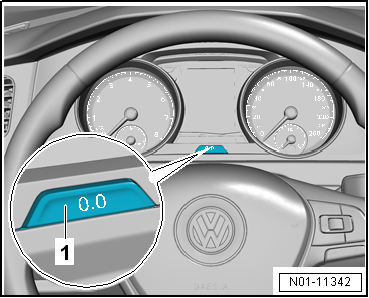
The time is set using button (1) in the dash panel insert.
Press button (1) and hold it until the text “Time” is shown on the display.
Release button (1).
The time is displayed on the display and the hour value is highlighted.
Press button (1) until the desired hour value is displayed.
Keep the button pressed for "fast run".
After the hour value has been set, wait until the minute value is highlighted on the display.
Press button (1) until the desired minute value is displayed.
Keep the button pressed for "fast run".
Switch on ignition.
Switch on Infotainment system.
Press CAR button.
Press Setup function button.
In the menu, scroll to the Service function button.
Press Time and date function button.
Press Time function button and set current time.
Press Date function button and set current date.
Parts & tools for this job For 2013 Volkswagen Golf
- TOOLA/C manifold gauge setSearch: AC manifold gauge set
- TOOLUV leak detection kitSearch: AC UV leak detection kit
- PARTCabin filterSearch: Volkswagen Golf 2013 cabin filter
As an Amazon Associate we earn from qualifying purchases.